Ubiquiti UniFi U6+
Buy Ubiquiti UniFi U6+ in Kenya from Orbitlink Solutions. Dual-band WiFi 6 AP with 4 spatial streams, 300+ clients, 140m² coverage, Gigabit uplink and PoE.
Ubiquiti UniFi U6+ Access Point in Kenya

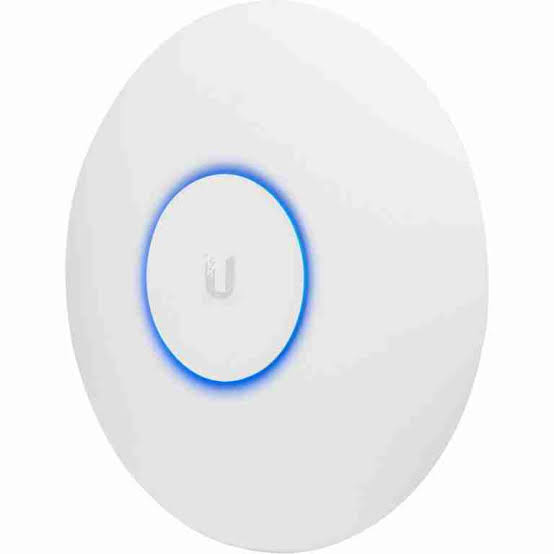
The Ubiquiti UniFi U6+ is a compact dual-band WiFi 6 access point designed for small and medium-sized businesses, offices, shops, clinics, restaurants, apartments and homes that need centrally managed UniFi wireless networking at a relatively affordable level. Ubiquiti positions the U6+ as a four-spatial-stream WiFi 6 AP that improves on the U6 Lite with higher performance and dual-band WiFi 6 support.
The U6+ uses 2×2 MU-MIMO on both 5GHz and 2.4GHz, delivering theoretical PHY rates of up to 2.4Gbps on 5GHz and 573.5Mbps on 2.4GHz. Ubiquiti also lists a Gigabit Ethernet uplink, 140m² manufacturer coverage rating, 300+ maximum associated clients, PoE power and 9W maximum consumption.
One of the most important distinctions between the U6+ and the older U6 Lite is that the U6+ supports WiFi 6 on both 2.4GHz and 5GHz, while maintaining the same compact 160mm-class form factor. Ubiquiti continues to list the U6+ in its current UniFi WiFi portfolio as a value-oriented WiFi 6 model.
Ubiquiti U6+ Key Features
| Feature | Specification |
|---|---|
| Product Name | UniFi U6+ |
| Model | U6+ |
| Wi-Fi Generation | WiFi 6 |
| Bands | 2.4GHz + 5GHz |
| Spatial Streams | 4 |
| 5GHz MIMO | 2×2 DL/UL MU-MIMO |
| 2.4GHz MIMO | 2×2 DL/UL MU-MIMO |
| 5GHz Max PHY Rate | 2.4Gbps |
| 2.4GHz Max PHY Rate | 573.5Mbps |
| 5GHz Channel Width | Up to 160MHz |
| Ethernet Uplink | 1 × Gigabit RJ45 |
| Coverage Rating | 140m² / 1,500ft² |
| Maximum Client Rating | 300+ |
| 5GHz Antenna Gain | 5.4dBi |
| 2.4GHz Antenna Gain | 3dBi |
| Max TX Power | 23dBm on both bands |
| Power Method | PoE |
| Voltage Range | 44–57V DC |
| Maximum Consumption | 9W |
| Mounting | Ceiling / Wall |
| Dimensions | Ø160 × 33mm |
| Management | UniFi Network |
| Best For | Small/medium offices, homes and commercial Wi-Fi |
Dual-Band WiFi 6
The U6+ supports WiFi 6 / 802.11ax on both 2.4GHz and 5GHz. Its supported wireless standards also include WiFi 5 and WiFi 4 for backward compatibility with older devices.
This allows one U6+ to serve a mixed network containing:
-
Modern WiFi 6 smartphones
-
Laptops
-
Tablets
-
Smart TVs
-
POS terminals
-
Printers
-
IoT devices
-
Older Wi-Fi clients
For performance-focused devices, 5GHz is normally preferable, while 2.4GHz remains useful for longer reach and legacy or IoT equipment.
5GHz WiFi 6 Performance
On 5GHz, the U6+ provides:
2×2 DL/UL MU-MIMO
WiFi 6
up to 160MHz channels
up to 2.4Gbps theoretical PHY rate
5.4dBi antenna gain
23dBm maximum transmit power
The 2.4Gbps figure is a radio-link rate, not a guaranteed internet speed.
Actual user throughput will normally be lower because of wireless overhead, interference, distance, client capability, channel width and the AP's Gigabit Ethernet uplink.
2.4GHz WiFi 6 Performance
The 2.4GHz radio also supports WiFi 6 and provides:
2×2 DL/UL MU-MIMO
up to 40MHz channel width
up to 573.5Mbps theoretical PHY rate
3dBi antenna gain
23dBm maximum TX power
This gives the U6+ an advantage over the U6 Lite, whose 2.4GHz implementation belongs to an older Wi-Fi generation.
2.4GHz remains useful for:
-
IoT equipment
-
Older clients
-
Devices farther from the AP
-
Printers
-
POS terminals
Four Spatial Streams
The U6+ has four total spatial streams:
2 streams on 5GHz
plus
2 streams on 2.4GHz.
This places the U6+ below the U6 Pro's six-stream radio architecture but makes it well suited to value-focused business and home deployments.
For moderate-density environments, four spatial streams can provide a strong balance between cost, capacity and power consumption.
Gigabit Ethernet Uplink
The U6+ includes one Gigabit RJ45 interface.
A typical installation looks like:
Internet
↓
Router / Gateway
↓
PoE Switch
↓
U6+
↓
Wireless Clients
The Ethernet cable carries both data and PoE power when connected to a suitable PoE source.
Can the U6+ Deliver 2.4Gbps Internet?
Not through its wired uplink.
The 5GHz radio supports a theoretical PHY rate of up to 2.4Gbps, but the AP itself connects to the wired network through 1GbE.
The 2.4Gbps radio figure mainly provides additional wireless capacity and protocol headroom.
For networks specifically targeting multi-gigabit wired throughput, newer UniFi models with 2.5GbE or 10GbE interfaces are more appropriate.
PoE Powered Access Point
The U6+ uses Power over Ethernet and supports an input range of 44–57V DC.
This allows one Ethernet cable to provide:
Data + Power
to the access point.
For ceiling installations, this is significantly cleaner than installing a separate mains socket next to each AP.
PoE Switch or PoE Adapter
A typical professional deployment is:
Router
↓
PoE Switch
↓
U6+
Ubiquiti currently lists its 15W PoE Adapter as an accessory for the U6+.
For multiple APs, a PoE switch is usually more convenient.
The switch's total PoE budget should be checked before installing several access points.
Low 9W Power Consumption
One of the U6+'s strengths is relatively low power usage.
Ubiquiti currently specifies a maximum consumption of only 9W.
For example, four U6+ access points would have a theoretical combined AP load of:
4 × 9W = 36W
before adding design margin and any other PoE devices.
This can make the U6+ attractive where multiple APs need to be deployed from a modest PoE switch.
140m² Coverage Rating
Ubiquiti currently lists a nominal coverage area of:
140m²
or
1,500ft².
This is a manufacturer planning specification rather than a guaranteed real-world result.
Actual coverage varies according to:
-
Concrete walls
-
Stone
-
Metal
-
Glass
-
Furniture
-
Neighbouring Wi-Fi
-
Mounting location
-
Client radios
-
Channel selection
A site survey or on-site signal testing is preferable for business installations.
300+ Maximum Client Rating
Ubiquiti lists the U6+ with a 300+ maximum associated-client specification.
This does not mean 300 users can simultaneously perform high-bandwidth tasks at maximum speed.
There is a major difference between:
Associated devices
and
simultaneously active high-throughput devices.
Usable capacity depends on:
-
Airtime
-
Traffic type
-
Signal quality
-
Interference
-
Channel width
-
Client capabilities
-
Internet bandwidth
For dense auditoriums or conference environments, a higher-capacity design may be preferable.
U6+ Antenna Gain

Ubiquiti specifies:
| Band | Antenna Gain |
|---|---|
| 2.4GHz | 3dBi |
| 5GHz | 5.4dBi |
The higher 5GHz antenna gain helps support the U6+'s 140m² manufacturer coverage positioning.
Maximum transmit power is specified at 23dBm on both bands, subject to regional regulations.
Compact Design
The U6+ measures approximately:
160mm diameter × 33mm depth.
The compact design is suitable for:
-
Offices
-
Homes
-
Clinics
-
Shops
-
Restaurants
-
Classrooms
-
Reception areas
The AP is relatively unobtrusive when ceiling mounted.
Ceiling and Wall Mounting
The U6+ supports both:
Ceiling mounting
and
Wall mounting
with mounting hardware included.
Ceiling mounting is generally preferable for broad room coverage because the radio pattern is designed around access-point-style placement.
Wall mounting can still work well where ceiling access is difficult or the room layout requires it.
UniFi Network Management
The U6+ is managed through UniFi Network.
Ubiquiti currently specifies UniFi Network version 7.3.76 or later.
Administrators can centrally manage:
-
SSIDs
-
VLANs
-
Connected clients
-
Radio settings
-
Guest networks
-
Captive portals
-
Schedules
-
Roaming features
-
Band steering
-
Meshing
-
Authentication
-
Client isolation
This centralized management becomes especially useful when several APs are deployed across one property.
Wireless Meshing
The U6+ supports wireless meshing.
This allows an AP to connect wirelessly to another compatible UniFi AP where wired backhaul is not available.
However, whenever possible, a wired Ethernet connection is preferable.
Recommended
PoE Switch → Ethernet → U6+
Alternative
Wired UniFi AP → Wireless Mesh → U6+
Wireless meshing consumes radio airtime for backhaul and may reduce usable client capacity.
Band Steering
Band steering is supported on the U6+.
This can help encourage compatible devices toward 5GHz where appropriate, reducing congestion on 2.4GHz.
The client device still participates in deciding which band to use.
Fast Roaming
The U6+ supports:
802.11k
802.11v
802.11r
These technologies help compatible client devices move more efficiently between multiple access points.
A typical office might have:
Reception U6+
↓
Open Office U6+
↓
Meeting Room U6+
Users can remain on the same SSID while roaming through the building.
Roaming is still partly controlled by the client device.
Passpoint / Hotspot 2.0
Ubiquiti lists Passpoint / Hotspot 2.0 among the U6+'s supported features.
This can be useful for enterprise, hospitality and public wireless deployments that use more sophisticated authentication and network-discovery methods.
Captive Portal
The U6+ supports UniFi captive portal functionality including:
-
Custom branded landing pages
-
Voucher authentication
-
Payment-based authentication
-
External portal servers
-
Password authentication
-
Guest isolation
This is useful for:
Hotels
Restaurants
Cafés
Clinics
Reception areas
Shared offices
Private Pre-Shared Keys

The U6+ supports Private Pre-Shared Key (PPSK) functionality.
This allows different users or groups to use different Wi-Fi passwords while connecting to the same SSID.
PPSK can help simplify network segmentation without creating a large number of separate visible network names.
Dynamic RADIUS VLAN Assignment
Ubiquiti also supports dynamic RADIUS-assigned VLANs on the U6+.
A user can therefore be placed into a network according to their authenticated identity rather than purely according to the SSID they joined.
For example:
Staff Login
↓
RADIUS Authentication
↓
Staff VLAN
This can be useful in enterprise environments.
VLAN Support
The official U6+ datasheet confirms 802.1Q VLAN support.
A business could build:
| VLAN | Purpose |
|---|---|
| 10 | Management |
| 20 | Staff |
| 30 | Guests |
| 40 | IoT |
| 50 | POS |
| 60 | CCTV |
The U6+ carries wireless traffic into these networks.
The router or firewall should control traffic between VLANs.
Client Isolation
The U6+ supports both:
Guest network isolation
and
client-device isolation.
This is valuable on public Wi-Fi where connected guests should not be able to communicate directly with other client devices.
Wi-Fi Speed Limiting
UniFi allows Wi-Fi speed limits to be applied to U6+ deployments.
For example:
Staff Network → Full bandwidth
Guest Network → Limited bandwidth
This can help ensure guest users do not consume all available internet capacity.
U6+ for Small Offices
Ubiquiti specifically positions the U6+ for small and medium-sized businesses.
A typical office network could be:
Fibre / Starlink
↓
Router / Gateway
↓
PoE Switch
↓
U6+ APs
↓
Staff + Guest Devices
The AP can provide separate staff, guest and IoT networks while being centrally managed through UniFi.
U6+ for Medium-Sized Offices
The U6+ can also work well across medium-sized offices when several units are deployed.
For example:
U6+ – Reception
U6+ – Open Office
U6+ – Meeting Area
U6+ – Management Area
Multiple lower-cost APs placed correctly can often provide better coverage and roaming than one excessively powerful AP trying to cover the entire building.
U6+ for Homes
For homes requiring dedicated access points, the U6+ provides a strong balance of:
-
Dual-band WiFi 6
-
Compact size
-
Low power consumption
-
UniFi management
-
Gigabit Ethernet
A larger home might use:
Ground Floor U6+
Upper Floor U6+
with Ethernet backhaul to both APs.
U6+ for Apartments
The U6+ can be deployed across apartment common areas, corridors, lounges and reception spaces.
For individual hotel-style rooms or apartment units, an in-wall UniFi model may sometimes provide better room-level coverage.
U6+ for Restaurants and Cafés
A U6+ network can support separate wireless services for:
POS
Management
Staff
Guests
Using VLANs can help keep business-critical systems separated from customer Wi-Fi.
The AP itself provides wireless connectivity, while the gateway or firewall controls the actual network-security policy.
U6+ for Clinics
A clinic can use separate SSIDs for:
Staff
Administration
Guests
IoT
The U6+'s support for VLANs, guest isolation and centralized management makes it practical for smaller professional environments.
U6+ for Schools
The U6+ can work well for smaller classrooms, administrative areas and moderate-density education environments.
For high-density lecture halls or large student populations, models with stronger radio architecture may be more appropriate.
U6+ for Hotels
The U6+ can be useful in:
-
Lobby areas
-
Corridors
-
Reception
-
Restaurants
-
Business centres
-
Small meeting spaces
For individual rooms, in-wall APs may provide better coverage architecture.
U6+ for Starlink
The U6+ can distribute a Starlink connection across a building or compound.
A typical topology is:
Starlink
↓
Router / Gateway
↓
PoE Switch
↓
U6+ APs
The APs improve wireless coverage and capacity.
They do not increase the bandwidth available from Starlink itself.
U6+ for Fibre Internet
The U6+ works well with Gigabit-class fibre.
A typical deployment is:
Fibre ONT
↓
Router
↓
Gigabit PoE Switch
↓
U6+
Because its wired interface is 1GbE, businesses building new multi-gigabit networks should also compare newer UniFi models with 2.5GbE uplinks.
U6+ vs U6 Lite
This is one of the most important comparisons.
| Feature | U6+ | U6 Lite |
|---|---|---|
| Wi-Fi | WiFi 6 on both bands | WiFi 6 mainly on 5GHz |
| Spatial Streams | 4 | 4 |
| 5GHz PHY | 2.4Gbps | 1.2Gbps |
| 2.4GHz PHY | 573.5Mbps | 300Mbps |
| Coverage | 140m² | 115m² |
| Clients | 300+ | 300+ |
| Ethernet | 1GbE | 1GbE |
| Max Power | 9W | Higher |
| Best Fit | Small/medium business | Entry-level/legacy U6 |
Ubiquiti explicitly states that the U6+ improves on the U6 Lite with higher performance and dual-band WiFi 6 support. (
For a new installation, the U6+ is generally the more capable of the two.
U6+ vs U6 Pro
| Feature | U6+ | U6 Pro |
|---|---|---|
| Spatial Streams | 4 | 6 |
| 5GHz MIMO | 2×2 | 4×4 |
| 5GHz PHY | 2.4Gbps | 4.8Gbps |
| 2.4GHz | 2×2 | 2×2 |
| Coverage | 140m² | 140m² |
| Clients | 300+ | 250+ |
| Uplink | 1GbE | 1GbE |
| Max Power | 9W | 13W |
| Best Fit | Value / SMB | Higher-density professional |
The U6+ has lower power consumption and strong value positioning, while the U6 Pro offers a significantly stronger 4×4 5GHz radio.
For busy offices with many actively transmitting 5GHz devices, the U6 Pro can still be the better technical choice.
U6+ vs U6 Long-Range
The U6 Long-Range is designed for broader coverage and higher radio capacity.
The U6+ focuses more on affordability, compact size and lower power consumption.
A larger property should not automatically choose the Long-Range model, however.
Several correctly placed U6+ APs can often provide better signal consistency and roaming than one AP attempting to cover multiple rooms through heavy walls.
U6+ vs U7 Lite
The U7 Lite belongs to Ubiquiti's newer WiFi 7 generation.
For a completely new deployment, buyers should compare:
U6+
against
U7 Lite
based on:
-
Current price
-
Client-device support
-
Expected network lifetime
-
Switch infrastructure
-
Required capacity
The U6+ remains relevant where WiFi 6 and Gigabit Ethernet are sufficient.
U6+ vs U7 Pro
The U7 Pro moves into a higher class with:
WiFi 7
6GHz support
2.5GbE uplink
and a more advanced radio architecture.
The U6+ is more appropriate where:
-
Budget matters
-
Gigabit infrastructure is already installed
-
WiFi 6 is sufficient
-
Client density is moderate
For a new multi-gigabit network, U7-class hardware offers more expansion headroom.
U6+ vs Wi-Fi Range Extender

The U6+ is designed as a proper network access point rather than a plug-in range extender.
Preferred:
Router
↓
PoE Switch
↓
Ethernet
↓
U6+
rather than:
Router → Wi-Fi → Range Extender
A wired access point normally provides more predictable backhaul capacity.
The U6+ can still use wireless meshing where Ethernet genuinely cannot be installed.
Advantages of Ubiquiti U6+
The U6+ provides:
-
Dual-band WiFi 6
-
Four spatial streams
-
2.4Gbps theoretical 5GHz PHY rate
-
573.5Mbps theoretical 2.4GHz PHY rate
-
Up to 160MHz channels
-
140m² manufacturer coverage
-
300+ manufacturer client rating
-
Gigabit Ethernet
-
PoE power
-
Low 9W maximum consumption
-
Ceiling and wall mounting
-
Wireless meshing
-
Band steering
-
802.11k/v/r roaming
-
Passpoint
-
Captive portal
-
PPSK
-
Dynamic VLAN assignment
-
VLAN support
-
Guest isolation
-
Centralized UniFi management
Limitations of Ubiquiti U6+
The main limitations are:
Gigabit Ethernet Only
The U6+ uses a 1GbE uplink.
No 6GHz
It does not provide 6GHz capability.
No WiFi 7
It is a WiFi 6 access point.
2×2 Radios
Both radios are 2×2, so it does not provide the 4×4 5GHz architecture found on the U6 Pro.
Indoor-Oriented Design
For exposed outdoor installations, a purpose-built UniFi outdoor AP should be selected.
Who Should Buy the Ubiquiti U6+?
The U6+ is particularly suitable for:
Small offices
Medium-sized offices
Homes
Retail shops
Restaurants
Clinics
Classrooms
Apartments
Reception areas
Small hotels
Existing Gigabit UniFi networks
It offers a strong balance of price, WiFi 6 performance, coverage and low power consumption.
Typical U6+ Network Architecture
A professional deployment could look like:
Fibre / Starlink
↓
Router / Gateway
↓
Managed PoE Switch
↓
U6+ Access Points
↓
Staff / Guest / IoT Devices
For multiple areas:
PoE Switch
├── U6+ – Reception
├── U6+ – Office
├── U6+ – Meeting Room
└── U6+ – Common Area
All access points can then be managed through UniFi Network.
Ubiquiti U6+ Price in Kenya
Ubiquiti's US store currently lists the U6+ at US$129 before the displayed regional surcharge, while the EU store lists a different regional price. These are manufacturer-store reference prices and not Orbitlink Solutions Kenya prices.
Kenya pricing can vary according to:
-
Exchange rates
-
Freight
-
Taxes
-
Distributor pricing
-
Stock availability
-
Warranty
-
Accessories
Contact Orbitlink Solutions for the current Ubiquiti U6+ price and stock availability in Kenya.
Why Buy Ubiquiti U6+ from Orbitlink Solutions?
The U6+ is especially attractive where a site requires a current-generation WiFi 6 access point but does not need the higher radio capacity of the U6 Pro or the multi-gigabit infrastructure associated with many WiFi 7 deployments.
Its combination of dual-band WiFi 6, 140m² manufacturer-rated coverage, 300+ client rating, 9W power consumption and centralized UniFi management makes it a strong candidate for many small and medium commercial environments.
Orbitlink Solutions can also help match the U6+ with compatible PoE switching, routers, structured cabling and additional access points so the entire network is designed as one system rather than treating the AP as an isolated device.
Watch the Ubiquiti U6+ Video
The U6+ sits in an important position within Ubiquiti's UniFi range because it improves on the older U6 Lite without moving into the higher-cost radio architecture of the U6 Pro. Its two 2×2 WiFi 6 radios provide up to 2.4Gbps on 5GHz and 573.5Mbps on 2.4GHz, while the AP remains compact and relatively power-efficient at a maximum of 9W.
Its specifications also show why published wireless speed figures need context. The 5GHz radio can negotiate up to 2.4Gbps under the right conditions, but the wired uplink is Gigabit Ethernet. The U6+ should therefore be viewed as a capable Gigabit-class managed AP with substantial wireless headroom rather than as a device that will deliver 2.4Gbps internet throughput to a single client.
For many small and medium offices, that balance is practical. A business already using Gigabit switching may gain little from paying for a multi-gigabit AP unless the entire wired infrastructure is also being upgraded. In those environments, the U6+ can provide dual-band WiFi 6, UniFi management and strong coverage without unnecessarily increasing switching and PoE requirements.
Frequently Asked Questions About Ubiquiti U6+
What is the Ubiquiti U6+?
The U6+ is a compact dual-band UniFi WiFi 6 access point with four spatial streams, Gigabit Ethernet and PoE.
Is U6+ WiFi 6?
Yes. It supports WiFi 6 / 802.11ax.
Does U6+ support WiFi 6 on 2.4GHz?
Yes. Both the 2.4GHz and 5GHz radios support WiFi 6.
Does U6+ support 5GHz?
Yes. It provides a 2×2 5GHz WiFi 6 radio.
Does U6+ support 6GHz?
No.
Is U6+ WiFi 7?
No. It is WiFi 6.
What is the maximum 5GHz rate?
Ubiquiti specifies up to 2.4Gbps at 160MHz.
What is the maximum 2.4GHz rate?
Ubiquiti specifies up to 573.5Mbps at 40MHz.
Is U6+ 2×2 or 4×4?
Each radio is 2×2, giving four total spatial streams.
Does U6+ have Gigabit Ethernet?
Yes. It has one GbE RJ45 port.
Does U6+ have 2.5GbE?
No.
How much area can U6+ cover?
Ubiquiti currently rates it at approximately 140m² / 1,500ft². Real coverage depends on the site.
How many users can U6+ support?
Ubiquiti lists 300+ maximum associated clients.
Does 300+ clients mean 300 heavy users?
No. The figure refers to associated clients, not guaranteed simultaneous high-bandwidth performance.
Does U6+ use PoE?
Yes.
What voltage does U6+ support?
Ubiquiti specifies 44–57V DC.
How much power does U6+ use?
Maximum consumption is 9W.
Does U6+ come with a PoE injector?
A PoE adapter should not automatically be assumed to be included. Ubiquiti lists a 15W PoE Adapter as an accessory.
Can U6+ be ceiling mounted?
Yes. Ceiling and wall mounts are included.
Can U6+ be wall mounted?
Yes.
Does U6+ support mesh?
Yes. Wireless meshing is supported.
Does U6+ support fast roaming?
Yes. It supports 802.11k, 802.11v and 802.11r.
Does U6+ support VLANs?
Yes. Ubiquiti documents 802.1Q VLAN support.
Does U6+ support WPA3?
Yes. Ubiquiti lists WPA/WPA2/WPA3 security support.
Can U6+ provide guest Wi-Fi?
Yes. It supports captive portal, guest isolation and several authentication options.
Can U6+ work with MikroTik routers?
Yes. It can operate behind MikroTik or other third-party gateways as long as DHCP, VLAN and firewall configuration is correct.
Can U6+ work with Starlink?
Yes. It can distribute connectivity from a network using Starlink.
Can multiple U6+ access points use the same SSID?
Yes. Multiple UniFi APs can be centrally managed and use common SSIDs.
Is U6+ better than U6 Lite?
For a new installation, the U6+ is generally more capable. Ubiquiti explicitly states that it improves on the U6 Lite with higher performance and dual-band WiFi 6.
Is U6+ better than U6 Pro?
Not in every respect. The U6 Pro has a more powerful 4×4 5GHz radio and six spatial streams. The U6+ offers lower power consumption and value-focused positioning.
Should I buy U6+ or U7 Lite?
The U6+ is suitable where WiFi 6 and Gigabit Ethernet meet the requirement. U7 Lite is worth considering for a new network where WiFi 7 support and longer-term upgrade headroom matter.
What is the Ubiquiti U6+ price in Kenya?
Contact Orbitlink Solutions for the current exact-model price and stock availability.
Buy Ubiquiti UniFi U6+ in Kenya
The Ubiquiti UniFi U6+ is a strong value-focused access point for organizations that need dual-band WiFi 6, 140m² manufacturer-rated coverage, 300+ client capacity, PoE and centralized UniFi management without moving to a more expensive enterprise or WiFi 7 platform. Ubiquiti continues to list the U6+ in its current flagship WiFi portfolio as an “outstanding value” option.
Its principal limitation is the Gigabit Ethernet uplink, which makes it best suited to Gigabit-class networks rather than new multi-gigabit infrastructure. For many offices, shops, homes, clinics and smaller hospitality environments, that balance can be entirely appropriate.
Official Ubiquiti Resources
Ubiquiti U6+ official technical specifications
Ubiquiti U6+ official product page
Contact Orbitlink Solutions
Orbitlink Solutions
Lyric House, 7th Floor, Room S9, Kimathi Street, Nairobi
Call / Text / WhatsApp: +254 743 720 551
Email: info@orbitlinksolutions.co.ke
Alternative Email: orbitlinksolutions@gmail.com
Opening Hours: Monday–Saturday, 9:00 AM–6:00 PM
Availability: Nairobi pickup and nationwide delivery
Contact Orbitlink Solutions for the current Ubiquiti U6+ price in Kenya, stock availability, compatible PoE switches, structured cabling, UniFi configuration and professional wireless network deployment.
Need Help Choosing? Ask a Technician
Get guidance on setup, compatibility, stock, and delivery before buying for your project.