MikroTik Point-to-Point Wireless in Kenya
Build reliable MikroTik point-to-point wireless links in Kenya for buildings, CCTV, offices, farms and remote sites using 5GHz or 60GHz MikroTik equipment.

Top picks in MikroTik Point-to-Point Wireless in Kenya
Compare price points, specs, and bundles tailored to Kenyan homes and businesses.

MikroTik Point-to-Point Wireless Solutions in Kenya
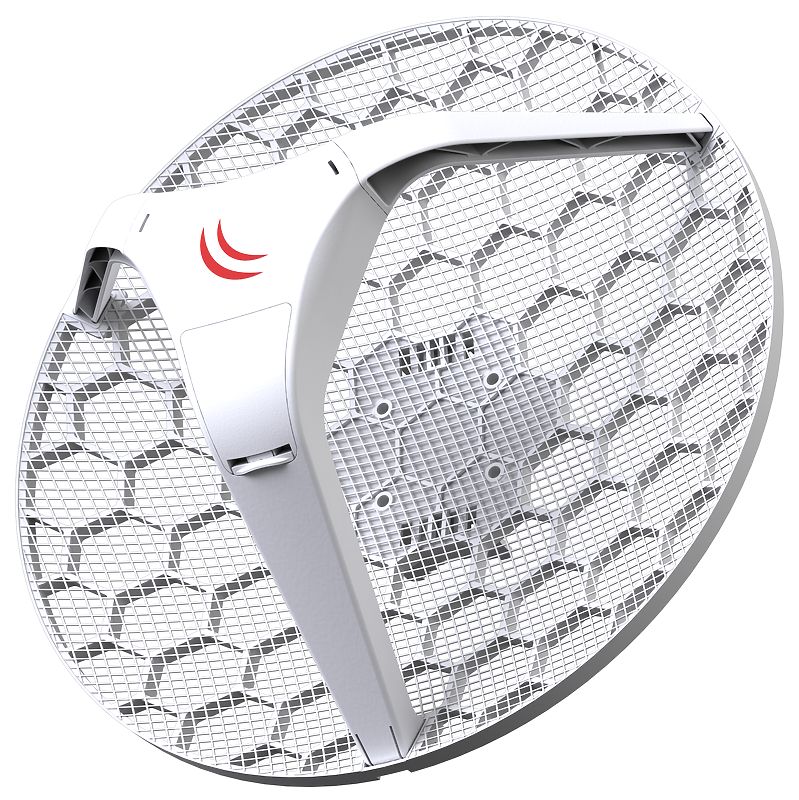
A MikroTik point-to-point wireless link connects two separate locations over the air so that they can communicate almost as if an Ethernet or fibre cable had been installed between them. One MikroTik radio is installed at the first location and another compatible radio is installed at the second location, with the two devices aligned toward each other to create a dedicated wireless bridge.
Point-to-point wireless is widely used for building-to-building networking, CCTV backhaul, office connectivity, internet extension, school campuses, hotels, farms, warehouses, factories and remote sites where trenching fibre or Ethernet cable would be difficult, expensive or impractical.
MikroTik currently offers several approaches for PtP links, including 5GHz Wi-Fi 6 CPEs such as the LHG 5 ax and LHG XL 5 ax, compact SXTsq 5 ax units, configurable NetBox 5 ax and NetMetal ax systems, and 60GHz equipment such as the Cube 60Pro ac. The correct equipment depends on distance, required throughput, interference, line of sight and installation environment.
What Is a MikroTik Point-to-Point Wireless Link?
A point-to-point, or PtP, connection consists of two wireless devices communicating directly with each other.
A simple topology is:
Main Network → MikroTik PtP Radio A )))))) Wireless Link (((((( MikroTik PtP Radio B → Remote Network
For example, a company may have fibre internet in its main office but require connectivity in another building 500 metres away.
Instead of ordering another internet connection or digging a trench for fibre, two directional MikroTik radios can create a transparent wireless bridge between the buildings.
RouterOS supports transparent PtP configurations in which the wireless and Ethernet interfaces are bridged. MikroTik's default PtP documentation uses bridge mode on one side and station-bridge mode on the other.
How MikroTik Point-to-Point Wireless Works
The first MikroTik radio is installed at the source location and connected to the existing router, switch or network.
The second radio is installed at the destination.
The two radios require:
-
Compatible wireless frequencies
-
Correct configuration
-
Accurate antenna alignment
-
Appropriate channel settings
-
Matching SSID/security
-
Adequate signal levels
-
Clear or near-clear line of sight
-
Suitable mounting height
For transparent Layer 2 bridging, MikroTik documentation shows the Ethernet and wireless interfaces being placed in the same bridge, with one device configured as the bridge/AP side and the second as station-bridge.
MikroTik Point-to-Point Wireless Applications
Building-to-Building Internet
A PtP wireless bridge can extend an existing internet connection between nearby buildings.
Example:
Building A Fibre Router → MikroTik Radio → Wireless → MikroTik Radio → Building B Switch
The second building can then operate computers, access points, phones and other network equipment through the main connection.
CCTV Wireless Backhaul
MikroTik PtP links are particularly useful for carrying IP camera traffic from:
-
Gates
-
Parking areas
-
Remote compounds
-
Warehouses
-
Farms
-
Construction sites
-
Perimeter locations
Typical topology:
Remote IP Cameras → PoE Switch → PtP Radio )))) PtP Radio → NVR
The wireless bridge transports the camera traffic without requiring a long physical cable between locations.
Office and Branch Connectivity
Two offices within visual range can be connected through a PtP wireless link.
Depending on network design, the link can carry:
-
Internet traffic
-
LAN traffic
-
VoIP
-
CCTV
-
ERP systems
-
NAS access
-
File sharing
-
VLANs
Hotels and Resorts
Wireless bridges can connect:
-
Main reception
-
Accommodation blocks
-
Restaurants
-
Conference facilities
-
Gatehouses
-
Staff areas
Farms and Remote Properties
Long-range MikroTik links can connect a farmhouse, gate, storage facility, security post or remote office where fibre installation is impractical.
5GHz vs 60GHz MikroTik Point-to-Point Links
One of the most important decisions is whether to use 5GHz or 60GHz.
| Feature | 5GHz PtP | 60GHz PtP |
|---|---|---|
| Range | Short to very long | Usually shorter |
| Throughput | High | Very high |
| Interference | Can be congested | Generally much lower |
| Rain Sensitivity | Lower | Higher |
| Alignment | Important | Very important |
| Obstruction Tolerance | Better | Very low |
| Line of Sight | Required for best results | Strongly required |
| Typical Use | Long-distance links | High-capacity short/medium links |
| Example | LHG 5 ax | Cube 60Pro ac |
The exact choice should be based on a link survey rather than distance alone.
MikroTik 5GHz Point-to-Point Wireless
5GHz remains one of the most flexible choices for outdoor PtP networking.
Modern MikroTik Wi-Fi 6 devices provide improved efficiency, higher modulation rates and better wireless performance compared with older generations.
MikroTik LHG 5 ax
The LHG 5 ax is a modern long-range outdoor Wi-Fi 6 CPE with an integrated 24.5dBi directional antenna.
MikroTik specifically positions it for long-distance point-to-point applications. It supports 5GHz 802.11a/n/ac/ax, WPA3, Gigabit Ethernet, passive PoE and RouterOS v7.
Key Features
| Specification | LHG 5 ax |
|---|---|
| Wi-Fi | Wi-Fi 6 |
| Frequency | 5GHz |
| Antenna | 24.5dBi |
| Wireless | 802.11a/n/ac/ax |
| Ethernet | Gigabit |
| PoE | Passive PoE |
| RouterOS | v7 |
| Security | WPA3 |
| Application | Long-range PtP/CPE |
MikroTik LHG XL 5 ax
For longer links, MikroTik offers the LHG XL 5 ax.
It has a larger integrated 27dBi antenna and MikroTik states that it can support point-to-point links of up to 30 km in ideal conditions. The actual achievable distance and throughput depend heavily on line of sight, interference, Fresnel-zone clearance, channel width, regulatory power limits and alignment.
Key Specifications
| Specification | LHG XL 5 ax |
|---|---|
| Product Code | LHG-5axD-XL |
| Frequency | 5GHz |
| Wi-Fi | Wi-Fi 6 |
| Maximum Wireless Data Rate | 1200Mbps theoretical |
| Antenna Gain | 27dBi |
| Ethernet | 1× Gigabit |
| PoE | Passive PoE 12–28V |
| RouterOS | v7 |
| Protection | IP54 |
| Long-Range Claim | Up to 30 km under ideal conditions |
MikroTik SXTsq 5 ax
The SXTsq 5 ax is useful where a smaller, lower-cost directional CPE is appropriate.
It includes:
-
5GHz Wi-Fi 6
-
16dBi directional antenna
-
Gigabit Ethernet
-
PoE input
-
RouterOS Level 4
-
AP functionality
-
Weatherproof enclosure
MikroTik reports field testing to around 3 km in high-interference urban environments and says the architecture is capable of 10+ km under suitable line-of-sight conditions.
This makes it attractive for links such as:
Office ↔ Warehouse
School Block ↔ Administration
Main House ↔ Gate
Hotel ↔ Accommodation Block
MikroTik LHG 5
The older LHG 5 remains another familiar MikroTik PtP device.
It uses an integrated 24.5dBi dual-polarization grid antenna, operates on 5GHz 802.11a/n and supports MikroTik's Nv2 TDMA protocol.
MikroTik describes it as suitable for point-to-point links and longer-distance CPE deployments.
For new high-performance deployments, however, modern Wi-Fi 6 LHG ax models are worth considering because of their newer hardware, RouterOS v7 platform and WPA3 support.
MikroTik SXTsq Lite5
The SXTsq Lite5 is a lower-cost 5GHz outdoor unit with an integrated 16dBi antenna.
MikroTik states that it is suitable for point-to-point links of up to 12 km, subject to proper installation and link conditions.
It can be useful for:
-
CCTV links
-
Small offices
-
Gate connectivity
-
Remote buildings
-
Basic ISP CPE
-
Lower-bandwidth backbone links
For bandwidth-intensive modern networks, the Fast Ethernet interface and older wireless platform should be considered before selecting it over newer Gigabit/Wi-Fi 6 products.
MikroTik 60GHz Point-to-Point Wireless
60GHz is particularly attractive for high-capacity links over shorter distances.
Because the band is less crowded than traditional 2.4GHz and 5GHz Wi-Fi, it can provide very high throughput with relatively little interference when there is strong line of sight.
MikroTik Cube 60Pro ac
The Cube 60Pro ac is one of MikroTik's current high-performance 60GHz PtP options.
MikroTik describes it as a 60GHz 802.11ay CPE intended for high-speed point-to-point bridging. It officially positions the product for connections of up to around 1 km normally, while MikroTik reports successful testing at approximately 2.4 km using appropriate channels and conditions.
It also includes:
-
60GHz 802.11ay
-
5GHz radio
-
Gigabit networking
-
Outdoor IP66 enclosure
-
PoE
-
GPS
-
RouterOS
The 5GHz radio can provide additional resilience depending on the deployment design.
Wireless Wire and Wireless Wire Cube
MikroTik has also offered pre-paired Wireless Wire solutions.
The Wireless Wire concept is designed to replace a physical Ethernet connection with a transparent high-speed 60GHz wireless bridge.
The older Wireless Wire Cube provided up to 2Gbps aggregate 60GHz link capacity together with 5GHz failover, although MikroTik now marks that specific model as discontinued.
This is an important reason to check current product status before purchasing older MikroTik equipment from existing stock.
MikroTik NetBox 5 ax for PtP Links
The NetBox 5 ax offers more flexibility than an integrated-antenna CPE.
It provides a 5GHz Wi-Fi 6 radio with RP-SMA connectors, allowing installers to choose an appropriate external antenna.
MikroTik states that pairing it with an antenna such as the mANT30 PA can create point-to-point links reaching up to approximately 30 km under suitable conditions.
This type of solution is useful when installers need more control over:
-
Antenna gain
-
Beamwidth
-
Mounting
-
Link budget
-
Polarization
-
Link distance
MikroTik NetMetal ax
The NetMetal ax is a more rugged and flexible outdoor wireless platform.
It provides:
-
Wi-Fi 6
-
Dual-band operation
-
RP-SMA connectors
-
Gigabit Ethernet
-
2.5Gbps SFP
-
IP66 protection
-
PoE
-
RouterOS v7
-
External antenna flexibility
MikroTik states that suitable directional antennas can enable links up to approximately 30 km, although it explicitly notes that longer-link reliability depends heavily on the antenna and deployment conditions.
It is therefore better suited to professional deployments where antenna selection and environmental durability matter.
Recommended MikroTik PtP Equipment by Distance

| Approximate Link Requirement | Potential MikroTik Option |
|---|---|
| Short building-to-building | SXTsq 5 ax |
| 1–5 km | SXTsq 5 ax / LHG 5 ax |
| 5–15 km | LHG 5 ax |
| 15–30 km | LHG XL 5 ax / NetBox 5 ax + suitable antenna |
| Very long 5GHz link | NetMetal ax + appropriate directional antenna |
| High-capacity short link | Cube 60Pro ac |
| Very high speed with clean LOS | 60GHz MikroTik solution |
These are planning guidelines rather than guaranteed ranges. Final equipment selection should follow a proper link budget and site survey.
Line of Sight for MikroTik Point-to-Point Wireless
A successful PtP link requires more than simply being able to see the other building.
The path should ideally have:
Clear visual line of sight
Adequate Fresnel-zone clearance
Correct mounting height
Minimal obstruction from trees and buildings
A common mistake is installing radios where the endpoints are technically visible but trees, rooftops or terrain intrude significantly into the Fresnel zone.
This can cause:
-
Low throughput
-
Poor modulation rates
-
Retransmissions
-
Unstable signal
-
Packet loss
-
Intermittent disconnections
Fresnel Zone Clearance
The Fresnel zone is the elliptical area surrounding the direct radio path.
For reliable long-distance wireless, installers should aim to keep much of this zone free from obstructions.
This becomes increasingly important as link distance increases.
A professional survey should therefore consider:
-
Elevation
-
Building heights
-
Trees
-
Terrain
-
Towers
-
Pole heights
-
Antenna positioning
Antenna Alignment
Directional MikroTik equipment requires accurate alignment.
High-gain antennas have relatively narrow beams.
A small angular error can significantly reduce signal level, particularly over long distances.
Installation should include:
-
Initial visual alignment.
-
RouterOS signal monitoring.
-
Horizontal adjustment.
-
Vertical adjustment.
-
Fine alignment for the highest practical modulation and lowest loss.
-
Tightening mounting hardware without changing alignment.
60GHz systems generally require even more precise alignment than ordinary 5GHz links.
MikroTik Point-to-Point Wireless Configuration
RouterOS can create a transparent point-to-point bridge.
MikroTik's documentation describes a basic arrangement where:
Radio A: bridge mode
Radio B: station-bridge mode
Both Ethernet and wireless interfaces are then placed into a Layer 2 bridge.
This allows Ethernet frames to pass transparently between locations.
Typical topology:
Switch A → ether1 → MikroTik Radio A → Wireless → MikroTik Radio B → ether1 → Switch B
Bridge vs Routed MikroTik PtP
Not every PtP connection needs to operate as a transparent bridge.
There are two major approaches:
| Design | Best Use |
|---|---|
| Layer 2 Bridge | Extending the same LAN/VLAN between buildings |
| Layer 3 Routed Link | Separating sites into different subnets |
MikroTik documentation notes that standard station mode does not provide transparent Layer 2 bridging, whereas station-bridge is specifically designed for transparent bridging between RouterOS devices.
For larger enterprise networks, routed links are often preferable because they can reduce broadcast-domain size and make network segmentation easier.
MikroTik PtP and VLANs
A properly configured transparent MikroTik bridge can carry VLAN-tagged traffic between sites.
This can allow the same PtP link to transport separate networks for:
-
Corporate users
-
CCTV
-
VoIP
-
Guest Wi-Fi
-
Management
-
Access control
-
IoT
Example:
VLAN 10 – Staff
VLAN 20 – CCTV
VLAN 30 – Voice
VLAN 40 – Guest
All of these can traverse one appropriately designed wireless bridge.
MikroTik Point-to-Point for CCTV
CCTV is one of the strongest use cases for wireless PtP.
For example:
Remote Cameras → PoE Switch → MikroTik LHG/SXTsq → Wireless Bridge → MikroTik Radio → NVR
The link should be sized according to:
-
Number of cameras
-
Camera bitrate
-
Resolution
-
Frame rate
-
Codec
-
Recording mode
-
Additional traffic
-
Required headroom
A PtP link carrying 30 cameras therefore needs much more capacity than one carrying only two or three cameras.
MikroTik Point-to-Point for Starlink
MikroTik PtP equipment can also extend a Starlink internet connection from one location to another.
Example:
Starlink → Router → MikroTik PtP Radio A )))) MikroTik PtP Radio B → Remote Building
The point-to-point link does not increase Starlink's internet speed. It simply transports the existing network connection between sites.
This can be useful for:
-
Farms
-
Resorts
-
Schools
-
Compounds
-
Construction sites
-
Offices
-
Remote accommodation blocks
MikroTik Point-to-Point for Fibre Internet
The same concept works with fibre.
Example:
Fibre ONT → Router → PtP Radio → Wireless Link → PtP Radio → Remote Switch
This can be considerably cheaper and faster to deploy than trenching new fibre between nearby properties.
For permanent mission-critical links, the advantages and disadvantages of wireless versus underground or aerial fibre should still be evaluated.
MikroTik Point-to-Point Wireless vs Fibre
| Factor | MikroTik Wireless PtP | Fibre |
|---|---|---|
| Installation Speed | Fast | Slower |
| Trenching | Usually unnecessary | Often required |
| Long-Term Capacity | High | Very high |
| Lightning Isolation | Air gap between sites | Fibre naturally isolated |
| Interference | Possible | None |
| Alignment | Required | No |
| Physical Cable Damage | Minimal between buildings | Possible |
| Deployment Cost | Often lower | Can be higher |
| Weather Effects | Possible | Minimal |
Wireless is particularly attractive when trenching is difficult or the link needs to be deployed quickly.
MikroTik Point-to-Point vs Ubiquiti
Both MikroTik and Ubiquiti provide strong outdoor PtP options.
MikroTik is particularly attractive for users who want deep control through RouterOS, including routing, VLANs, firewall rules, queues, monitoring, scripting and advanced network design.
Ubiquiti often emphasizes streamlined wireless management and installation workflows.
The better platform depends on:
-
Existing infrastructure
-
Installer experience
-
Distance
-
Required throughput
-
Management preferences
-
Network complexity
-
Budget
Factors That Determine MikroTik PtP Performance
| Factor | Why It Matters |
|---|---|
| Distance | Affects signal and link budget |
| Antenna Gain | Improves directional link budget |
| Frequency | Determines propagation characteristics |
| Channel Width | Affects throughput and interference |
| Noise Floor | Reduces usable signal-to-noise ratio |
| Line of Sight | Critical for stability |
| Fresnel Clearance | Important at distance |
| Mounting Height | Helps clear obstacles |
| Alignment | Essential for directional antennas |
| Weather | Especially relevant to 60GHz |
| Ethernet Port | Can limit total throughput |
| CPU | Can matter with routing/filtering |
| Local Regulations | Limit channels and transmit power |
Important Note About Wireless Range
Advertised distances such as 10 km, 20 km or 30 km should not be treated as automatic guarantees.
MikroTik itself qualifies long-range claims by referring to ideal conditions or noting that reliability depends on antenna choice and deployment conditions.
A properly engineered link should consider:
Link budget + terrain + interference + Fresnel zone + antenna gain + regulatory limits + required throughput.
Advantages of MikroTik Point-to-Point Wireless
MikroTik PtP wireless can provide several advantages:
-
Rapid deployment
-
No trenching between buildings
-
Long-distance connectivity
-
High throughput
-
Flexible RouterOS configuration
-
VLAN transport
-
CCTV backhaul
-
Starlink extension
-
Fibre extension
-
Remote office connectivity
-
PoE-powered outdoor radios
-
Multiple hardware choices
-
5GHz and 60GHz options
Limitations of Point-to-Point Wireless
Wireless is not always the right solution.
Possible limitations include:
-
Requires suitable line of sight
-
Trees can obstruct links
-
Buildings can obstruct links
-
Radio interference can affect 5GHz
-
Heavy rain can affect 60GHz more strongly
-
Accurate alignment is required
-
Regulatory frequency restrictions apply
-
Throughput varies with signal conditions
-
Towers or masts may be necessary
-
Lightning and surge protection should be considered
Who Should Use MikroTik Point-to-Point Wireless?
MikroTik PtP is particularly suitable for:
Businesses connecting separate buildings.
Schools and universities connecting blocks, laboratories, offices and hostels.
Hotels and resorts extending networks to accommodation areas.
Warehouses and factories connecting detached structures.
Farms linking homes, offices, gates and CCTV.
CCTV installers creating remote camera backhaul.
ISPs and WISPs creating infrastructure links.
Starlink users extending service to another building.
Construction projects requiring temporary high-speed connectivity.
MikroTik Point-to-Point Wireless Price in Kenya
The cost of a MikroTik point-to-point wireless link in Kenya depends on more than the price of the radios.
A complete project may include:
-
Two MikroTik radios
-
Mounting brackets
-
Poles or masts
-
Outdoor Ethernet cable
-
PoE injectors
-
Surge protection
-
Network switches
-
Labour
-
Alignment
-
Configuration
-
Site survey
-
Transport
-
Lightning protection
Different devices also serve very different applications, so a short 300-metre building link should not automatically use the same equipment as a 20-km backbone.
Contact Orbitlink Solutions for current MikroTik equipment prices, stock availability and a recommended PtP configuration.
Why Buy MikroTik Point-to-Point Equipment from Orbitlink Solutions?

Orbitlink Solutions can help customers choose point-to-point equipment according to distance, bandwidth requirements, environment, line of sight and network purpose, rather than selecting hardware based only on advertised range.
Solutions can be designed for home compounds, offices, schools, hotels, CCTV networks, farms, warehouses, fibre extension and Starlink connectivity.
Equipment options can include current MikroTik platforms such as the SXTsq 5 ax, LHG 5 ax, LHG XL 5 ax, NetBox 5 ax, NetMetal ax and Cube 60Pro ac, depending on availability and project requirements.
Watch the MikroTik Point-to-Point Wireless Video
A well-designed MikroTik point-to-point wireless link should be treated as network infrastructure rather than simply two outdoor radios facing each other. Equipment selection, mounting height, frequency planning, antenna alignment and link budgeting all have a direct impact on throughput and long-term reliability.
RouterOS adds considerable flexibility because the link can function as a simple transparent bridge or become part of a more sophisticated routed network. MikroTik specifically documents station-bridge for transparent Layer 2 operation between RouterOS devices, while ordinary station mode is more appropriate where Layer 2 bridging is unnecessary.
For modern deployments, it is also important to avoid automatically specifying older MikroTik AC products simply because they are familiar. MikroTik now offers Wi-Fi 6 products such as LHG 5 ax, LHG XL 5 ax and SXTsq 5 ax, while some older products including the LHG 5 ac and SXTsq 5 ac are officially marked discontinued.
Frequently Asked Questions About MikroTik Point-to-Point Wireless
What is a MikroTik point-to-point wireless link?
It is a direct wireless connection between two MikroTik devices used to carry network traffic between two separate locations.
Can MikroTik connect two buildings wirelessly?
Yes. Building-to-building bridging is one of the main applications for MikroTik outdoor directional wireless equipment.
How does MikroTik PtP work?
One wireless unit is installed at each location. The devices establish a directional wireless connection and can bridge or route traffic between their Ethernet networks.
What is the best MikroTik for point-to-point?
There is no single best model. The correct choice depends on distance, throughput, interference and line of sight. Current options include SXTsq 5 ax, LHG 5 ax, LHG XL 5 ax, NetBox 5 ax, NetMetal ax and Cube 60Pro ac.
Can MikroTik point-to-point work over 1 km?
Yes. Many MikroTik outdoor products are specifically designed for multi-kilometre links.
Can MikroTik point-to-point work over 10 km?
Yes, with appropriate hardware, line of sight, alignment and link engineering. For example, MikroTik positions the LHG ax range for long-distance PtP deployments.
Can MikroTik work over 30 km?
Some current products are marketed for links approaching 30 km under suitable or ideal conditions. This is not a guaranteed range and requires proper engineering.
Which is better for PtP: 5GHz or 60GHz?
5GHz is generally more flexible for longer distances. 60GHz can provide much higher capacity and lower interference over shorter links with excellent line of sight.
What MikroTik device is suitable for a short high-speed link?
The Cube 60Pro ac is specifically designed for high-speed 60GHz point-to-point bridging.
Is line of sight required?
Clear line of sight is strongly recommended, particularly for long-distance directional links and 60GHz connections.
Do trees affect MikroTik point-to-point wireless?
Yes. Trees can absorb and scatter wireless signals and can obstruct the Fresnel zone.
Can MikroTik PtP carry CCTV?
Yes. It is commonly used as wireless backhaul between remote cameras or switches and a central NVR.
Can MikroTik PtP carry VLANs?
Yes. A correctly configured transparent bridge can transport tagged Ethernet traffic, including VLANs.
Can MikroTik point-to-point extend Starlink?
Yes. A PtP bridge can carry the network from a Starlink-connected building to another location.
Can MikroTik extend fibre to another building?
Yes. The fibre router or switch can connect to one PtP radio, and the remote radio delivers the network at the second building.
Does MikroTik PtP need two radios?
Normally yes. A dedicated point-to-point wireless bridge requires one compatible radio at each end.
Do the radios need to be identical?
Not always, but using compatible matching equipment simplifies deployment and helps ensure predictable performance.
Does MikroTik PtP require RouterOS?
MikroTik wireless products generally run RouterOS, with features depending on the device, RouterOS generation and licence level.
What is station-bridge mode?
Station-bridge is MikroTik's transparent Layer 2 station mode for links to compatible RouterOS access points.
What is the difference between PtP and PtMP?
PtP connects one location directly to one other location. PtMP connects one access point to multiple remote stations.
Can a MikroTik PtP link replace fibre?
For some building-to-building applications, yes. Fibre remains preferable where maximum capacity, zero RF interference and permanent wired infrastructure are priorities.
How much does MikroTik point-to-point wireless cost in Kenya?
Cost depends on the radios, distance, mounting, cabling, survey and installation. Contact Orbitlink Solutions for a current project-specific quotation.
Buy MikroTik Point-to-Point Wireless Equipment in Kenya
A professionally designed MikroTik point-to-point wireless solution can provide reliable building-to-building networking without the cost and disruption of trenching a new cable. It can transport internet, CCTV, VLANs, VoIP and ordinary LAN traffic between offices, schools, hotels, farms, warehouses and other locations.
Modern MikroTik options now range from compact SXTsq 5 ax units to long-distance LHG 5 ax / LHG XL 5 ax systems and high-capacity Cube 60Pro ac 60GHz links, allowing the network to be matched more closely to the required distance and bandwidth.
Contact Orbitlink Solutions
Orbitlink Solutions
Lyric House, 7th Floor, Room S9, Kimathi Street, Nairobi
Call / Text / WhatsApp: +254 743 720 551
Email: info@orbitlinksolutions.co.ke
Alternative Email: orbitlinksolutions@gmail.com
Opening Hours: Monday–Saturday, 9:00 AM–6:00 PM
Availability: Nairobi pickup and nationwide delivery
Contact Orbitlink Solutions for MikroTik point-to-point wireless equipment prices in Kenya, site surveys, equipment selection, configuration and installation guidance for short-range, long-range, CCTV, fibre and Starlink wireless bridges.