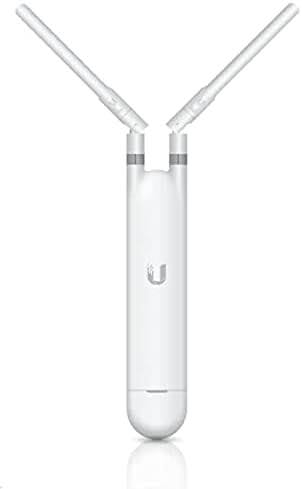
Ubiquiti UAP-AC-M
Buy Ubiquiti UAP-AC-M in Kenya from Orbitlink Solutions. Indoor/outdoor WiFi 5 mesh AP with dual-band AC1200, Gigabit Ethernet, PoE and external antennas.
Ubiquiti UniFi UAP-AC-M AC Mesh Access Point in Kenya

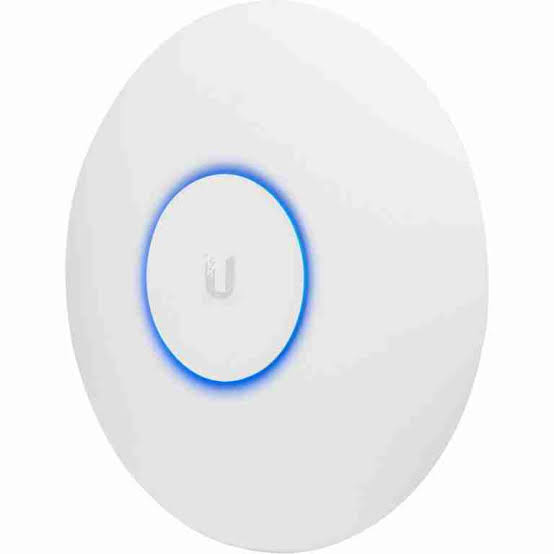
The Ubiquiti UniFi UAP-AC-M, also known as the UniFi AC Mesh, is a compact indoor/outdoor WiFi 5 access point designed for homes, offices, hotels, schools, restaurants, compounds, warehouses and other environments requiring flexible wireless coverage. Ubiquiti continues to list the model in its outdoor UniFi range and describes it as a compact WiFi 5 AP with four spatial streams and optional external antenna support.
The UAP-AC-M operates simultaneously on 2.4GHz and 5GHz, using 2×2 MIMO radios. Ubiquiti's current technical specifications list maximum theoretical PHY rates of 300Mbps on 2.4GHz and 867Mbps on 5GHz, giving it the familiar AC1200-class combination. It includes a Gigabit Ethernet uplink, PoE power and wireless meshing.
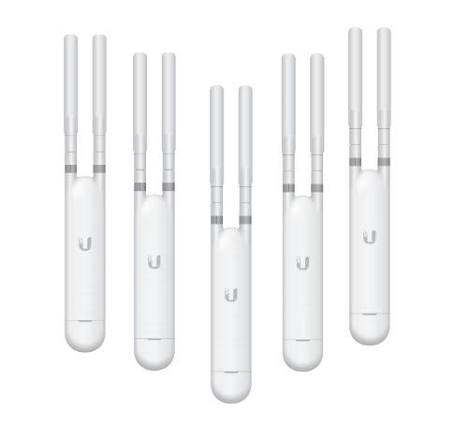
A major advantage of the UAP-AC-M is its flexible antenna system. It has two external dual-band omnidirectional antennas and RP-SMA connections that allow compatible external antennas, including Ubiquiti's directional UMA-D, to be used for more specialized coverage patterns.
Ubiquiti UAP-AC-M Key Features
| Feature | Specification |
|---|---|
| Product Name | UniFi AC Mesh |
| Model | UAP-AC-M |
| Wi-Fi Standard | WiFi 5 / 802.11ac |
| Radio Bands | 2.4GHz + 5GHz |
| Spatial Streams | 4 total |
| 5GHz MIMO | 2×2 DL MU-MIMO |
| 2.4GHz MIMO | 2×2 DL MU-MIMO |
| 5GHz Max PHY Rate | 867Mbps |
| 2.4GHz Max PHY Rate | 300Mbps |
| 5GHz Max Channel Width | 80MHz |
| Ethernet | 1 × Gigabit RJ45 |
| Current Coverage Rating | 140m² / 1,500ft² |
| Current Client Rating | 200+ |
| 5GHz Antenna Gain | 4dBi |
| 2.4GHz Antenna Gain | 3dBi |
| Maximum TX Power | 20dBm per radio |
| External Antennas | 2 × dual-band omnidirectional |
| Optional Directional Antenna | UMA-D |
| Power | PoE |
| Maximum Power Consumption | 8.5W |
| Weatherproofing | IPX4 |
| Mounting | Wall / Pole |
| Dimensions | 353 × 46 × 34.4mm |
| Weight | 152g |
| Management | UniFi Network |
| Best For | Indoor/outdoor Wi-Fi, mesh and flexible antenna deployments |
These figures follow Ubiquiti's current online specifications. Older Ubiquiti datasheets sometimes show different planning figures, including 250+ concurrent clients and a 183m/600ft range under optimal conditions. For current product pages, the newer 140m² coverage and 200+ client ratings are the safer figures to use.
Dual-Band WiFi 5
The UAP-AC-M supports both 2.4GHz and 5GHz Wi-Fi.
Its 5GHz radio supports 802.11ac WiFi 5 with theoretical rates up to 867Mbps, while the 2.4GHz 802.11n radio supports up to 300Mbps.
This makes the AP suitable for mixed networks containing newer and older wireless devices.
2.4GHz
Useful for:
-
IoT devices
-
Printers
-
POS terminals
-
Older smartphones
-
Longer-range connections
-
Devices behind more obstacles
5GHz
Better suited to:
-
Laptops
-
Smartphones
-
Tablets
-
Video streaming
-
Office applications
-
Higher-throughput clients
Four Spatial Streams
Ubiquiti lists the UAP-AC-M with four total spatial streams.
These are distributed as:
2 × 2.4GHz
plus
2 × 5GHz
The AP therefore uses a 2×2 radio architecture on both frequency bands.
It should not be confused with the larger UAP-AC-M-PRO, which has six spatial streams and 3×3 radios.
867Mbps 5GHz Wi-Fi
The 5GHz radio supports theoretical PHY rates up to:
867Mbps at 80MHz channel width.
Supported channel widths include:
20MHz
40MHz
80MHz
The 867Mbps figure is a radio-link rate rather than guaranteed internet throughput.
Actual speeds will normally be lower because of Wi-Fi overhead, signal strength, interference, client capabilities and upstream internet capacity.
300Mbps 2.4GHz Wi-Fi
The 2.4GHz radio supports theoretical rates up to:
300Mbps at 40MHz.
For congested environments, 20MHz channels can sometimes provide a more stable network because they allow better channel reuse and reduce interference.
2.4GHz is generally preferable for range and compatibility, while 5GHz normally provides better throughput when the client is sufficiently close to the AP.
External Dual-Band Antennas
One of the UAP-AC-M's distinguishing features is its external antenna design.
It includes two external dual-band omnidirectional antennas. Ubiquiti specifies antenna gains of:
3dBi at 2.4GHz
and
4dBi at 5GHz.
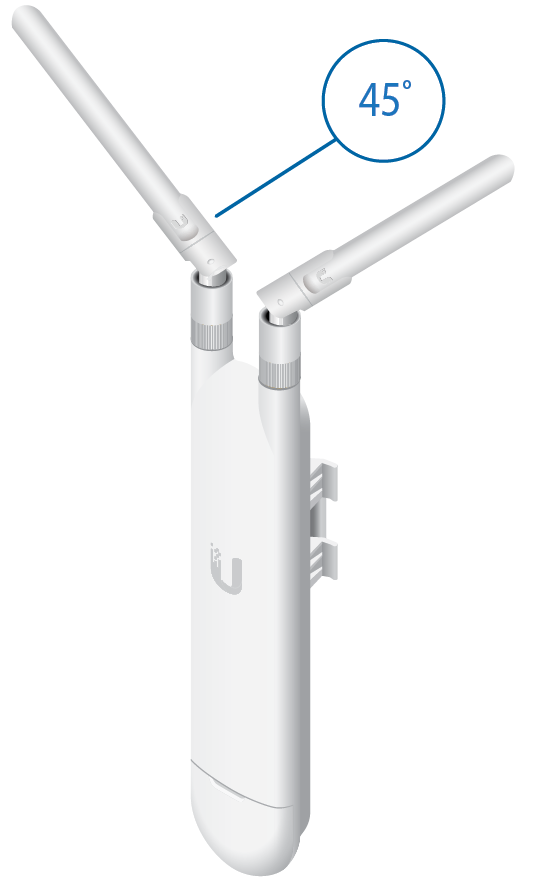
The antennas can be adjusted to help optimize coverage according to the AP's mounting position.
RP-SMA External Antenna Connections
The UAP-AC-M provides two RP-SMA connections, allowing its standard antennas to be replaced with compatible external antennas.
This makes the UAP-AC-M more flexible than many UniFi APs with permanently integrated antennas.
External antenna support can be useful where the installer needs to change the wireless coverage pattern.
However, antenna selection and transmit-power configuration must comply with applicable local radio regulations.
Ubiquiti UMA-D Directional Antenna Support
Ubiquiti specifically lists the UMA-D Dual-Band Antenna as an accessory for the UAP-AC-M.
The standard antennas provide relatively broad omnidirectional coverage.
A directional antenna can instead concentrate coverage toward a particular area.
For example:
UAP-AC-M + Standard Antennas
→ General surrounding coverage
UAP-AC-M + Compatible Directional Antenna
→ More focused coverage toward a target area
This can be useful for courtyards, outdoor seating areas, compounds or other installations where Wi-Fi needs to be concentrated in one direction.
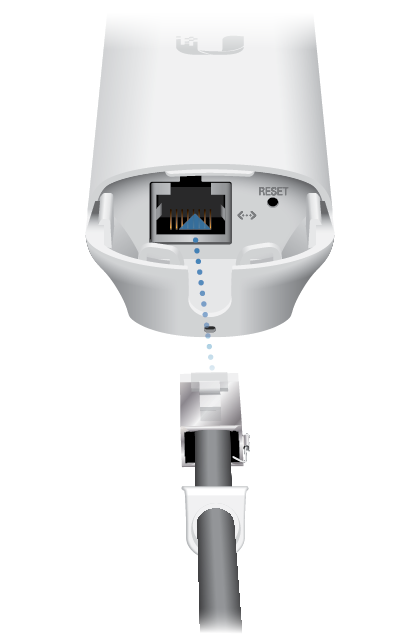
Gigabit Ethernet Port
The UAP-AC-M includes:
1 × 10/100/1000Mbps Ethernet RJ45 port.
This port provides both wired network connectivity and PoE power.
A typical deployment can therefore use:
Router / Gateway
↓
PoE Switch
↓
Ethernet Cable
↓
UAP-AC-M
↓
Wi-Fi Clients
Gigabit Ethernet is sufficient for this AP's WiFi 5 radio class.
PoE Power
The UAP-AC-M can be powered over Ethernet, simplifying outdoor and wall installations where an electrical socket may not be available near the AP.
Ubiquiti's documentation supports 802.3af PoE Alternative A as well as 24V passive PoE on applicable hardware.
This deserves particular attention when choosing an injector or switch because not every PoE mode is interchangeable.
The current technical page lists a supported voltage range of 44–57V DC for its standard PoE operation.
Important PoE Compatibility Note
Ubiquiti's installation documentation specifically warns that the UAP-AC-M does not support 802.3af Mode B power delivery.
Installers should therefore confirm:
-
PoE standard
-
Voltage
-
Pinout
-
Switch compatibility
before powering the AP.
Do not assume that any device labelled simply "PoE" will automatically be compatible.
PoE Adapter Included
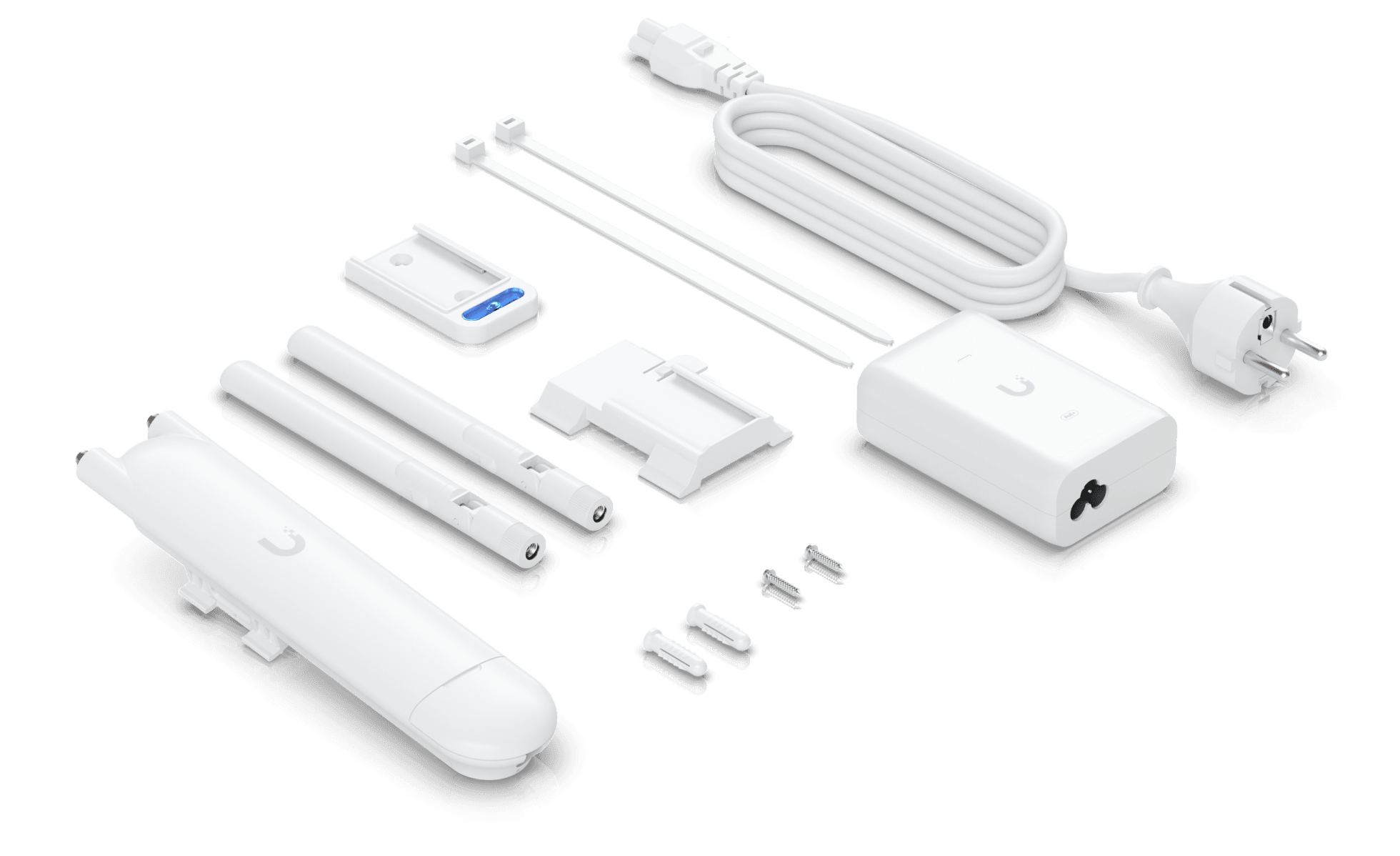
Ubiquiti currently states that a PoE power adapter is included with a single-unit purchase of the UAP-AC-M.
The older official datasheet similarly notes that only the single-pack includes the PoE adapter.
Package contents can vary by region, distributor, pack size and stock source, so buyers in Kenya should confirm the exact contents before purchasing.
Low 8.5W Power Consumption
The UAP-AC-M has a maximum rated power consumption of only:
8.5W.
For example:
4 APs × 8.5W = 34W
8 APs × 8.5W = 68W
This relatively low consumption makes it easier to deploy several APs from a suitably sized PoE switch.
The switch's complete PoE budget should still account for all connected equipment and suitable design margin.
Indoor and Outdoor Deployment
Ubiquiti describes the UAP-AC-M as an indoor/outdoor access point.
The current technical specifications list IPX4 weatherproofing.
IPX4 indicates protection against splashing water, but it should not be interpreted as complete waterproofing or permission to install the unit in any exposed environment without proper planning.
Correct cable routing, drip loops, outdoor-rated Ethernet cable, surge protection and mounting location remain important.
Operating Temperature
Ubiquiti specifies an operating temperature range of:
-30°C to 70°C
with:
5–95% non-condensing humidity.
This broad temperature range supports use in demanding indoor and outdoor environments when installed according to Ubiquiti's requirements.
Wall Mounting
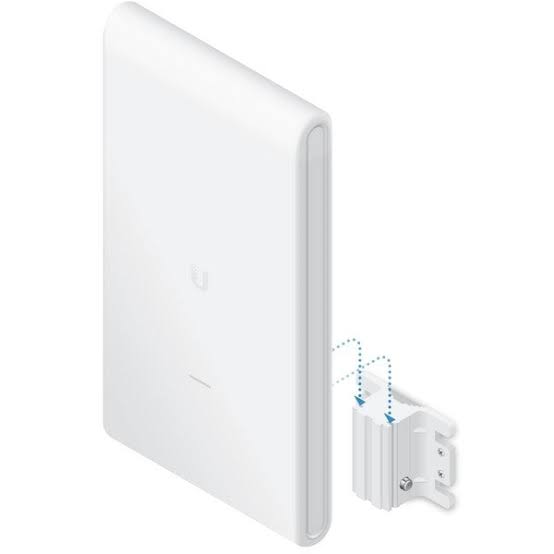
The UAP-AC-M supports wall mounting, with the required mounting hardware included.
Wall mounting can work well for:
-
Offices
-
Restaurants
-
Outdoor terraces
-
Building exteriors
-
Warehouses
-
Corridors
-
Compounds
The antenna orientation and mounting position should be selected according to the intended coverage area.
Pole Mounting
The UAP-AC-M can also be mounted on a pole.
Ubiquiti's current specifications support pole diameters from approximately:
25–76mm / 1–3 inches.
Pole mounting can be particularly useful for:
-
Outdoor compounds
-
Gardens
-
Hospitality areas
-
Schools
-
Warehouses
-
Parking areas
Wireless Mesh Support
As its name suggests, the UniFi AC Mesh supports wireless meshing.
A mesh configuration can look like:
Router
↓
PoE Switch
↓
Wired UniFi AP
↓
Wireless Mesh Link
↓
UAP-AC-M
↓
Wi-Fi Clients
This can extend UniFi coverage to locations where Ethernet cabling is difficult.
Wired Backhaul vs Wireless Mesh
Although the UAP-AC-M supports mesh, Ethernet backhaul is generally preferable whenever cabling is practical.
Wired Backhaul
Switch → Ethernet → UAP-AC-M
Advantages include:
-
More predictable performance
-
No wireless backhaul airtime consumption
-
Better capacity
-
Easier troubleshooting
Wireless Mesh
Wired AP → Wireless Link → UAP-AC-M
Useful where running Ethernet is difficult or uneconomical.
Wireless mesh performance depends heavily on the quality of the link between the APs.
Band Steering
The UAP-AC-M supports band steering.
This can help encourage compatible dual-band devices toward 5GHz when appropriate, leaving 2.4GHz available for older devices and clients that benefit from its propagation characteristics.
The client device still plays a role in determining which band it ultimately uses.
Fast Roaming
Despite being an older WiFi 5 model, Ubiquiti's current feature set includes:
802.11k Radio Resource Management
802.11v BSS Transition Management
802.11r Fast Roaming.
These features can help compatible devices transition between multiple UniFi access points.
For example:
Reception AP
↓
Office AP
↓
Outdoor UAP-AC-M
can share consistent network settings while users move around the property.
Guest Wi-Fi and Captive Portal
The UAP-AC-M supports UniFi guest-network capabilities including:
-
Custom landing pages
-
Voucher authentication
-
Payment-based authentication
-
External portal servers
-
Password authentication
-
Guest-network isolation
This can be particularly useful for:
Hotels
Restaurants
Cafés
Schools
Guest houses
Commercial compounds
PPSK Support
Ubiquiti's current software feature set lists Private Pre-Shared Key (PPSK) support for the AC Mesh.
PPSK allows different users or groups to have different passwords while connecting through the same SSID.
This can simplify access management in shared environments.
Dynamic RADIUS VLAN Assignment
The current UniFi feature set also includes:
Dynamic RADIUS-assigned VLANs
and
RADIUS over TLS / RadSec.
This makes the AP useful in networks where users need to be placed into different VLANs according to their authentication credentials.
Wi-Fi Speed Limiting
The UAP-AC-M supports Wi-Fi speed limiting.
For example:
Staff Wi-Fi → Higher bandwidth
Guest Wi-Fi → Controlled bandwidth
This can help prevent guest traffic from consuming an excessive portion of the available internet connection.
Client Isolation
The AP supports:
Guest-network isolation
and
client-device isolation.
These features are useful for public or semi-public wireless networks where connected users should not be able to communicate directly with other clients.
140m² Coverage Rating
Ubiquiti's current technical specifications give the UAP-AC-M a coverage-area rating of:
140m²
or
1,500ft².
This should be treated as a planning figure rather than guaranteed coverage.
Actual performance depends on:
-
Building materials
-
Interference
-
Antenna orientation
-
Mounting height
-
Obstacles
-
Client devices
-
Channel configuration
-
Transmit-power settings
What About the Older 183m / 600ft Range Specification?
Older Ubiquiti documentation published a 183m / 600ft range figure, with a clear note that speed and range values could vary and were based on optimal environments.
This is not directly equivalent to saying the AP provides a 183-metre radius of reliable real-world Wi-Fi in every installation.
For current product descriptions, the newer 140m² coverage-area rating is more appropriate.
200+ Client Rating
Ubiquiti's current specification lists the UAP-AC-M for:
200+ clients.
Older Ubiquiti documentation listed 250+ concurrent clients, illustrating how manufacturer planning metrics can change over the life of a product.
The 200+ figure also does not mean 200 people can simultaneously perform high-bandwidth activities at maximum speed.
Actual usable capacity depends on airtime, traffic patterns, signal quality and upstream bandwidth.
UAP-AC-M for Outdoor Wi-Fi
Outdoor coverage is one of the strongest use cases for the AC Mesh.
It can be installed to serve:
-
Compounds
-
Gardens
-
Restaurant terraces
-
School grounds
-
Hotel common areas
-
Outdoor workspaces
-
Parking areas
-
Building surroundings
The external antenna system makes it particularly flexible when coverage direction needs to be adjusted.
UAP-AC-M for Hotels
Hotels can use the UAP-AC-M for:
Pool areas
Gardens
Outdoor restaurants
Walkways
Courtyards
Guest common areas
Its UniFi management capabilities allow it to operate alongside indoor UniFi APs under the same centrally managed network.
UAP-AC-M for Restaurants
A restaurant can use the AP to extend Wi-Fi from indoor dining areas into:
-
Outdoor seating
-
Terraces
-
Gardens
-
Entrances
-
Waiting areas
Separate SSIDs and VLANs can be created for staff, POS equipment and guests.
UAP-AC-M for Schools
Possible installations include:
-
Courtyards
-
Walkways
-
Outdoor learning spaces
-
Staff areas
-
Administration blocks
-
Sports-area surroundings
For very large outdoor grounds, several correctly positioned APs or newer purpose-built outdoor UniFi models may be preferable.
UAP-AC-M for Warehouses
Warehouses can use the UAP-AC-M for:
-
Handheld scanners
-
Tablets
-
Inventory terminals
-
Smartphones
-
IoT devices
Metal shelving and stored goods can substantially affect radio propagation, so AP placement is particularly important in warehouse environments.
UAP-AC-M for CCTV Compounds
The UAP-AC-M can provide general Wi-Fi connectivity around properties containing CCTV equipment.
However, it should not automatically be treated as a dedicated long-distance point-to-point wireless bridge.
For fixed high-bandwidth building-to-building or camera backhaul, purpose-built directional wireless bridge equipment may be more appropriate.
UAP-AC-M for Starlink
The UAP-AC-M can distribute a Starlink connection across a property.
For example:
Starlink
↓
Router / Gateway
↓
PoE Switch
↓
UAP-AC-M
↓
Indoor / Outdoor Wi-Fi Clients
The UAP-AC-M improves local Wi-Fi distribution.
It does not increase the bandwidth provided by Starlink itself.
UAP-AC-M for Fibre Internet
The AP can also be connected behind a fibre router or gateway.
For example:
Fibre ONT
↓
Router / Firewall
↓
Gigabit PoE Switch
↓
UAP-AC-M
The Gigabit Ethernet interface is appropriately matched to the AP's WiFi 5 radio capabilities.
UAP-AC-M vs UAP-AC-M-PRO
| Feature | UAP-AC-M | UAP-AC-M-PRO |
|---|---|---|
| Wi-Fi | WiFi 5 | WiFi 5 |
| Spatial Streams | 4 | 6 |
| 5GHz MIMO | 2×2 | 3×3 |
| 2.4GHz MIMO | 2×2 | 3×3 |
| 5GHz Max PHY | 867Mbps | 1.3Gbps |
| 2.4GHz Max PHY | 300Mbps | 450Mbps |
| Coverage | 140m² | 185m² |
| Clients | 200+ | 250+ |
| Ethernet | 1 × GbE | 2 × GbE |
| Max Power | 8.5W | 9W |
| Weatherproofing | IPX4 | IPX4 |
The AC Mesh Pro provides substantially more radio capacity and a larger manufacturer coverage rating.
The standard UAP-AC-M is smaller, lighter and particularly attractive when external antenna flexibility is useful.
UAP-AC-M vs Modern UniFi WiFi 6 and WiFi 7 APs
The UAP-AC-M remains a WiFi 5 product. Ubiquiti now offers newer outdoor UniFi models based on WiFi 6 and WiFi 7, including the U6 Mesh, U6 Mesh Pro, U7 Outdoor, U7 Pro Outdoor and U7 Mesh.
Newer models can provide advantages such as:
-
WiFi 6 or WiFi 7
-
Higher theoretical capacity
-
OFDMA
-
Faster uplinks on selected models
-
Improved efficiency with newer clients
-
Newer hardware platforms
However, the UAP-AC-M remains attractive where cost, external antenna support, compatibility with existing UniFi networks and straightforward outdoor WiFi 5 coverage are priorities.
Advantages of Ubiquiti UAP-AC-M
The UAP-AC-M provides several useful advantages:
-
Indoor/outdoor deployment
-
Dual-band WiFi 5
-
Four spatial streams
-
867Mbps 5GHz PHY
-
300Mbps 2.4GHz PHY
-
Gigabit Ethernet
-
Two external dual-band antennas
-
RP-SMA antenna connections
-
Optional directional antenna support
-
PoE
-
Low 8.5W maximum consumption
-
Wireless meshing
-
Band steering
-
Fast roaming
-
Guest portal
-
PPSK
-
Dynamic RADIUS VLANs
-
Wall and pole mounting
-
Centralized UniFi management
Limitations of Ubiquiti UAP-AC-M
WiFi 5 Rather Than WiFi 6 or WiFi 7
It is an older-generation 802.11ac access point.
2×2 Radios
Both radios use 2×2 architecture rather than higher-stream designs.
867Mbps Maximum 5GHz PHY
Newer UniFi APs provide substantially higher theoretical radio capacity.
No 6GHz
The AP supports only 2.4GHz and 5GHz.
Gigabit Ethernet Only
There is no 2.5GbE uplink.
IPX4 Weatherproofing
The AP is intended for indoor/outdoor use, but installation still needs appropriate weather and cable protection.
Who Should Buy the Ubiquiti UAP-AC-M?
The UAP-AC-M remains particularly suitable for:
Existing UniFi installations
Outdoor Wi-Fi extensions
Hotels
Restaurants
Schools
Warehouses
Compounds
Large homes
Small offices
Gardens and terraces
Sites requiring external antenna flexibility
For a completely new premium network, newer WiFi 6 or WiFi 7 UniFi models should also be compared before making the final selection.
Typical UAP-AC-M Installation
A wired installation can use:
Internet
↓
Router / Gateway
↓
Gigabit PoE Switch
↓
Cat6 Ethernet
↓
UAP-AC-M
↓
2.4GHz + 5GHz Clients
For a larger property:
PoE Switch
├── Indoor UniFi AP – Office
├── Indoor UniFi AP – Reception
├── UAP-AC-M – Outdoor Restaurant
└── UAP-AC-M – Compound
All compatible UniFi APs can then be managed through the same UniFi Network environment.
Ubiquiti UAP-AC-M Price in Kenya
Ubiquiti's U.S. store currently lists the single UAP-AC-M at US$99 before its displayed surcharge. This is a manufacturer-store reference for the U.S. market and not Orbitlink Solutions' Kenya selling price.
Kenya pricing can differ because of exchange rates, freight, taxes, distributor pricing, warranty arrangements and stock availability.
Contact Orbitlink Solutions for the current Ubiquiti UAP-AC-M price and stock availability in Kenya.
Why Buy Ubiquiti UAP-AC-M from Orbitlink Solutions?
The UAP-AC-M remains useful where a network needs a compact UniFi AP capable of serving both indoor and outdoor locations. Its external antenna system is particularly valuable because it allows installers to retain the supplied omnidirectional antennas or use compatible specialized antennas when a different coverage pattern is required.
Correct installation is also important. Outdoor Ethernet runs may need appropriate outdoor-rated cable and surge protection, while the PoE source must match Ubiquiti's supported power requirements. Wireless mesh should be used where cabling is impractical rather than automatically replacing a wired Ethernet backhaul.
Orbitlink Solutions can help match the UAP-AC-M with compatible PoE equipment, routers, switches, Ethernet cabling and other UniFi products according to the size and requirements of the installation.
Watch the Ubiquiti UAP-AC-M Video
The UAP-AC-M's strongest differentiator is not raw wireless speed but deployment flexibility. Its compact weather-resistant design, pole/wall mounting options, wireless mesh support and replaceable external antennas allow it to solve coverage problems that a conventional indoor ceiling AP may not address as conveniently. Ubiquiti specifically supports its optional UMA-D antenna for applications requiring more directional coverage.
Its radio hardware is now relatively modest compared with modern WiFi 6 and WiFi 7 UniFi equipment. The 867Mbps 5GHz and 300Mbps 2.4GHz figures are theoretical PHY rates, and real application throughput will be lower. Nevertheless, for ordinary internet access, hospitality Wi-Fi, outdoor coverage and existing UniFi installations, the hardware can remain perfectly practical when its capacity matches the application.
The decision between keeping or buying a UAP-AC-M and moving to a newer model should therefore depend on the actual requirement. Sites needing basic outdoor Wi-Fi and external antenna flexibility may still find the AC Mesh attractive. New high-density networks, multi-gigabit fibre deployments or installations dominated by WiFi 6/7 clients should also evaluate Ubiquiti's newer AP families.
Frequently Asked Questions About Ubiquiti UAP-AC-M
What is the Ubiquiti UAP-AC-M?
The UAP-AC-M, or UniFi AC Mesh, is a compact indoor/outdoor dual-band WiFi 5 access point with four spatial streams, Gigabit Ethernet, PoE and external antennas.
Is UAP-AC-M WiFi 5?
Yes. Ubiquiti currently identifies it as a WiFi 5 access point.
Is UAP-AC-M dual-band?
Yes. It operates on both 2.4GHz and 5GHz.
What is the maximum 5GHz speed?
Up to 867Mbps theoretical PHY rate at 80MHz.
What is the maximum 2.4GHz speed?
Up to 300Mbps theoretical PHY rate at 40MHz.
Is UAP-AC-M AC1200?
It is commonly described as AC1200-class because its two maximum radio rates are approximately 867Mbps + 300Mbps. These figures are not additive throughput available to a single client.
How many spatial streams does it have?
Four total: two on each radio.
Does UAP-AC-M have Gigabit Ethernet?
Yes. It has one Gigabit RJ45 interface.
Does UAP-AC-M support PoE?
Yes. Ubiquiti documents 802.3af Alternative A and 24V passive PoE support for the model.
Is a PoE injector included?
Ubiquiti states that the PoE adapter is included with a single-unit purchase. Pack and regional contents should still be confirmed before ordering.
How much power does UAP-AC-M consume?
Maximum rated power consumption is 8.5W.
Is UAP-AC-M waterproof?
Ubiquiti lists IPX4 weatherproofing. It is designed for indoor/outdoor deployment, but IPX4 should not be interpreted as complete waterproofing.
Can UAP-AC-M be mounted on a pole?
Yes. Pole mounting is officially supported.
Can it be wall mounted?
Yes.
Can I replace the antennas?
Yes. The AP has RP-SMA connections for compatible external antennas.
Does it support the Ubiquiti UMA-D antenna?
Yes. Ubiquiti lists the UMA-D directional antenna as an accessory.
Does UAP-AC-M support mesh?
Yes. Wireless meshing is supported.
Does it need Ethernet when using mesh?
It still needs power, but wireless meshing can provide the network backhaul instead of a wired Ethernet data connection. A wired backhaul is preferable where practical.
Does UAP-AC-M support fast roaming?
Yes. Ubiquiti currently lists 802.11k, 802.11v and 802.11r.
Does it support guest Wi-Fi?
Yes. UniFi supports captive portal, guest isolation and several authentication options on this model.
Does it support PPSK?
Yes.
Does it support RADIUS VLAN assignment?
Yes. Dynamic RADIUS-assigned VLAN and RadSec are included in Ubiquiti's current feature list.
How much area does UAP-AC-M cover?
Ubiquiti's current planning specification is approximately 140m² / 1,500ft². Actual coverage varies.
Why do older specifications say 600ft range?
Older Ubiquiti documentation used a 183m/600ft optimal-environment range figure. Ubiquiti's current specification instead uses a 140m² coverage-area rating.
How many clients can UAP-AC-M support?
Ubiquiti's current specification states 200+ clients.
Can UAP-AC-M work with MikroTik?
Yes. It can operate behind a MikroTik router or gateway when Ethernet, DHCP, VLAN and firewall settings are correctly configured.
Can UAP-AC-M work with TP-Link switches?
Yes, provided the switch offers compatible Ethernet and PoE requirements. Check the exact PoE mode before connecting power.
Can UAP-AC-M work with Starlink?
Yes. It can distribute a Starlink internet connection over Wi-Fi.
Does UAP-AC-M increase Starlink speed?
No. It can improve Wi-Fi coverage and local network design but cannot increase the bandwidth supplied by Starlink.
Is UAP-AC-M still worth buying?
It can still make sense for existing UniFi networks, cost-conscious deployments, outdoor Wi-Fi and installations needing external antennas. For new high-performance deployments, compare it with newer WiFi 6 and WiFi 7 UniFi APs.
What is the Ubiquiti UAP-AC-M price in Kenya?
Contact Orbitlink Solutions for the current exact-model price and stock availability.
Buy Ubiquiti UAP-AC-M in Kenya
The Ubiquiti UniFi UAP-AC-M AC Mesh remains a versatile option for indoor and outdoor Wi-Fi installations. Its combination of dual-band WiFi 5, four spatial streams, Gigabit Ethernet, PoE, wireless mesh, external antennas and wall/pole mounting makes it particularly useful where deployment flexibility matters more than having the newest Wi-Fi generation.
For new networks, buyers should also compare the AC Mesh with Ubiquiti's newer WiFi 6 and WiFi 7 outdoor models. The UAP-AC-M remains most compelling for existing UniFi deployments, conventional internet connections and projects where its replaceable antenna design provides a specific advantage.
Contact Orbitlink Solutions
Orbitlink Solutions
Lyric House, 7th Floor, Room S9, Kimathi Street, Nairobi
Call / Text / WhatsApp: +254 743 720 551
Email: info@orbitlinksolutions.co.ke
Alternative Email: orbitlinksolutions@gmail.com
Opening Hours: Monday–Saturday, 9:00 AM–6:00 PM
Availability: Nairobi pickup and nationwide delivery
Contact Orbitlink Solutions for the current Ubiquiti UAP-AC-M price in Kenya, stock availability, compatible PoE switches and injectors, external antennas, structured cabling, UniFi configuration and professional Wi-Fi installation.
Need Help Choosing? Ask a Technician
Get guidance on setup, compatibility, stock, and delivery before buying for your project.