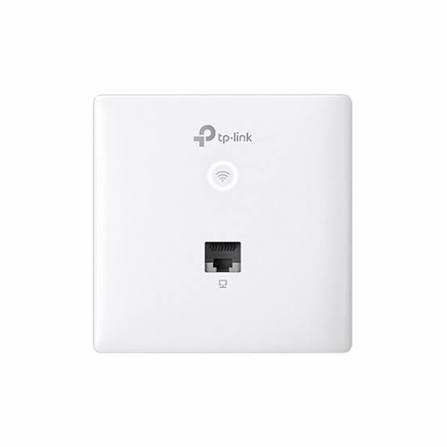
TP-Link EAP115-Wall In-Wall Access Point
Buy TP-Link EAP115-Wall in Kenya from Orbitlink Solutions. Get 300Mbps 2.4GHz WiFi, 802.3af PoE, Omada management and discreet in-wall installation.
TP-Link EAP115-Wall 300Mbps Wireless N In-Wall Access Point
The TP-Link EAP115-Wall is a compact 300Mbps Wireless N wall-plate access point designed for hotels, offices, apartments, campuses, hostels and other indoor environments where discreet room-by-room WiFi coverage is required. It fits into compatible wall junction boxes and replaces the appearance of a conventional wall plate, making it a neat alternative to ceiling-mounted access points in bedrooms, offices and individual rooms.
The EAP115-Wall operates on the 2.4GHz frequency band and supports IEEE 802.11b/g/n with theoretical wireless rates of up to 300Mbps. It also provides one uplink 10/100Mbps Ethernet port and one downlink 10/100Mbps Ethernet port, allowing the unit to deliver both WiFi and a wired network connection at the room level.
For professional installations, the EAP115-Wall is powered using IEEE 802.3af PoE, eliminating the need for a separate power socket beside the access point. It also integrates with TP-Link Omada SDN for centralized management, making it suitable for multi-room deployments where several access points need to be managed together.
TP-Link EAP115-Wall Key Features
| Feature | Specification |
|---|---|
| Model | TP-Link EAP115-Wall |
| Product Type | Wall-Plate / In-Wall Access Point |
| WiFi Technology | Wireless N / WiFi 4 |
| Wireless Standard | IEEE 802.11b/g/n |
| Frequency | 2.4GHz |
| Maximum Wireless Rate | Up to 300Mbps |
| Uplink Port | 1 × 10/100Mbps Ethernet |
| Downlink Port | 1 × 10/100Mbps Ethernet |
| Power Supply | IEEE 802.3af PoE |
| Maximum Power Consumption | 2.8W |
| Antennas | 2 × internal 1.8dBi omnidirectional |
| Dimensions | 86.8 × 86.8 × 30.2mm |
| Mounting | Wall-plate installation |
| Compatible Junction Boxes | 86mm and standard EU junction boxes |
| Coverage | Up to 25m² / approximately 300ft² under TP-Link test conditions |
| Concurrent Clients | 100+ under TP-Link test conditions |
| Multiple SSIDs | Up to 8 |
| Omada SDN | Supported |
| Omada App | Supported |
| Captive Portal | Supported |
| Management VLAN | Supported |
| Hardware Watchdog | Supported |
| PoE Passthrough | No |
The current TP-Link regional specification for the EAP115-Wall lists two Fast Ethernet ports, 802.3af PoE, two 1.8dBi internal antennas, up to 25m² test coverage and support for 100+ concurrent clients.
300Mbps Wireless N Performance
The TP-Link EAP115-Wall operates exclusively on the 2.4GHz frequency band and supports IEEE 802.11b/g/n.
| Wireless Standard | Maximum Signal Rate |
|---|---|
| IEEE 802.11n | Up to 300Mbps |
| IEEE 802.11g | Up to 54Mbps |
| IEEE 802.11b | Up to 11Mbps |
| Frequency | 2.4GHz |
The 2.4GHz band provides broad compatibility with smartphones, laptops, tablets and many IoT devices. This makes the EAP115-Wall suitable for general business internet access, email, messaging, cloud applications and normal web browsing.
The advertised 300Mbps figure is a theoretical wireless link rate rather than guaranteed internet throughput. Actual speeds depend on interference, connected client capabilities, distance, Ethernet infrastructure and internet bandwidth.
Designed for In-Wall Installation
One of the EAP115-Wall's biggest advantages is its wall-plate design.
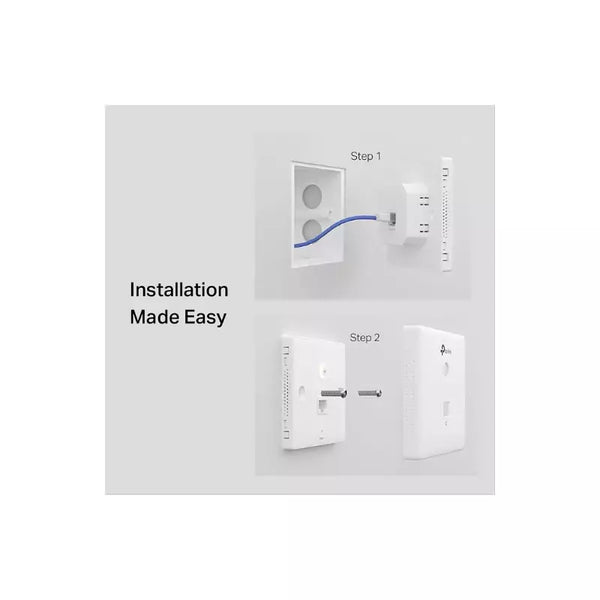
Rather than being mounted visibly on a ceiling, the EAP115-Wall fits onto a compatible wall junction box and resembles a light switch or electrical outlet faceplate.
TP-Link describes the front casing as approximately 11mm thick, giving it a discreet appearance in hotel rooms, offices and apartments.
Benefits of the In-Wall Design
| Benefit | Description |
|---|---|
| Discreet Appearance | Blends into interior décor |
| Room-Level WiFi | Places WiFi close to users |
| No Ceiling AP Required | Useful where ceiling mounting is undesirable |
| Wall Junction Box Installation | Integrates into structured cabling |
| Wired + Wireless Connectivity | Provides both WiFi and Ethernet |
| Ideal for Hotels | One AP can be deployed in individual rooms |
| Compact Design | Similar footprint to a standard wall plate |
Compatible with Standard Junction Boxes
The EAP115-Wall is designed to fit commonly used wall junction boxes.
| Junction Box Type | Compatibility |
|---|---|
| 86mm Wall Junction Box | Supported |
| Standard EU Junction Box | Supported |
Installation typically involves removing the existing faceplate, connecting the in-wall Ethernet cable to the EAP115-Wall's uplink PoE port, securing the access point to the junction box and reinstalling its faceplate.
IEEE 802.3af Power over Ethernet
The TP-Link EAP115-Wall uses IEEE 802.3af PoE for power.
This allows both network data and electrical power to reach the access point through its Ethernet connection, helping reduce separate electrical wiring requirements.
| PoE Feature | Details |
|---|---|
| PoE Standard | IEEE 802.3af |
| Power Input | Through uplink Ethernet port |
| Separate DC Adapter Required | No |
| PoE Switch Compatible | Yes, with suitable 802.3af equipment |
| PoE Injector Compatible | Yes, if IEEE 802.3af compliant |
| Maximum Power Consumption | 2.8W |
| PoE Passthrough on Downlink Port | No |
Importantly, the downlink Ethernet port does not provide PoE passthrough. A PoE IP phone, camera or other powered device cannot therefore receive PoE directly from the EAP115-Wall's downlink port.
Two Fast Ethernet Ports
Unlike a basic wireless-only access point, the EAP115-Wall includes both an uplink and downlink Ethernet connection.
| Ethernet Port | Function |
|---|---|
| Uplink Port | 10/100Mbps Ethernet + 802.3af PoE input |
| Downlink Port | 10/100Mbps Ethernet for wired client device |
The downlink port can be useful in hotel rooms and offices where a desktop computer, smart TV, printer or other Ethernet device requires a wired network connection.
This combination of WiFi plus wired Ethernet makes the EAP115-Wall particularly practical for hospitality and room-level network deployments.
Internal Omnidirectional Antennas
The EAP115-Wall uses two internal 1.8dBi omnidirectional antennas.
| Antenna Specification | Details |
|---|---|
| Number of Antennas | 2 |
| Antenna Type | Internal omnidirectional |
| Gain | 1.8dBi each |
| Frequency | 2.4GHz |
| External Antennas | No |
The internal antenna design helps maintain the access point's clean wall-plate appearance while providing localized room coverage.
TP-Link EAP115-Wall Coverage
TP-Link lists coverage of approximately 25m² / 300ft² under its specified testing conditions.
| Coverage Parameter | Specification |
|---|---|
| TP-Link Test Coverage | Up to 25m² / 300ft² |
| Concurrent Clients | 100+ |
| Frequency | 2.4GHz |
| Maximum Signal Rate | 300Mbps |
The EAP115-Wall is therefore primarily designed for localized room-level coverage, rather than providing WiFi across a very large floor from one device.
Real-world coverage depends on wall materials, furniture, interference, AP positioning and connected client devices.
Ideal for Hotels
The EAP115-Wall is particularly suitable for hotel WiFi installations.
Hotel rooms frequently need both wireless connectivity and wired Ethernet. Installing a wall-plate AP in each room or selected groups of rooms allows wireless coverage to be brought closer to guests while maintaining a clean interior appearance.
| Hotel Area | Application |
|---|---|
| Guest Rooms | Dedicated room WiFi |
| Suites | Wireless and wired connectivity |
| Hotel Apartments | Room-level coverage |
| Corridor Rooms | Reduce reliance on distant corridor APs |
| Business Rooms | WiFi and Ethernet for work devices |
| Long-Stay Rooms | Reliable localized connectivity |
TP-Link EAP115-Wall for Offices

The EAP115-Wall can also be installed in offices where localized wireless coverage is preferred.
It works well in individual offices, meeting rooms, reception rooms and other enclosed areas.
The downlink Ethernet port can provide wired connectivity for a desktop computer, printer, IP device or other network equipment while the same wall unit delivers WiFi to mobile devices.
TP-Link EAP115-Wall for Apartments and Hostels
Apartment buildings, student residences and hostels can benefit from wall-plate access points because each room can have a nearby WiFi source rather than relying entirely on access points positioned in corridors.
This can help reduce signal loss caused by reinforced concrete walls and closed doors.
| Property Type | Suitable Use |
|---|---|
| Apartments | Room-level WiFi |
| Hostels | Student or guest rooms |
| Student Residences | Individual accommodation units |
| Serviced Apartments | WiFi + wired Ethernet |
| Dormitories | Managed room connectivity |
Multiple SSIDs
The EAP115-Wall supports up to eight SSIDs, allowing administrators to create multiple wireless networks.
| Example SSID | Intended Users |
|---|---|
| Hotel-Guest | Hotel guests |
| Hotel-Staff | Employees |
| Office-Staff | Employees |
| Office-Guest | Visitors |
| Management | Management team |
| Student-WiFi | Students |
| Staff-WiFi | Teachers or administrators |
TP-Link also lists access control, wireless MAC filtering, client isolation, SSID-to-VLAN mapping and 802.1X support among the EAP115-Wall's business networking capabilities.
Guest WiFi and Captive Portal
The EAP115-Wall supports captive portal authentication, making it particularly useful for guest-network environments.
| Environment | Guest WiFi Application |
|---|---|
| Hotels | Guest authentication |
| Serviced Apartments | Visitor connectivity |
| Offices | Guest network |
| Hostels | Resident/visitor WiFi |
| Campus Accommodation | Controlled user connectivity |
TP-Link also lists multiple authentication methods within compatible Omada deployments.
Omada SDN Centralized Management
The EAP115-Wall integrates with TP-Link Omada SDN, allowing compatible network equipment to be centrally managed.
This is particularly important in hotels and multi-room properties where dozens of access points may be installed.
| Omada Function | Benefit |
|---|---|
| Centralized Management | Manage many APs together |
| Cloud Access | Remote management through compatible deployment |
| Omada App | Smartphone/tablet administration |
| SSID Management | Configure wireless networks centrally |
| Client Monitoring | View connected devices |
| Network Monitoring | Monitor network status |
| Guest WiFi Management | Centralize visitor network configuration |
| Multi-Site Support | Useful for organizations with several properties |
TP-Link lists Omada Controller Software, Omada hardware controller compatibility and Omada App support for the wall-plate series.
TP-Link EAP115-Wall Wireless Features
| Wireless Feature | Support |
|---|---|
| Multiple SSIDs | Up to 8 |
| Automatic Channel Assignment | Yes |
| Transmit Power Control | Yes |
| QoS / WMM | Yes |
| Rate Limiting | Supported |
| Wireless Scheduling | Supported |
| Captive Portal | Supported |
| Client Isolation | Supported |
| SSID-to-VLAN Mapping | Supported |
| MAC Filtering | Supported |
| 802.1X | Supported |
| Management VLAN | Supported |
TP-Link EAP115-Wall vs Standard EAP115
The standard TP-Link EAP115 and the EAP115-Wall both provide 300Mbps Wireless N connectivity, but they are designed for different types of installation.
| Feature | EAP115-Wall | EAP115 Ceiling Mount |
|---|---|---|
| WiFi Speed | 300Mbps | 300Mbps |
| Frequency | 2.4GHz | 2.4GHz |
| WiFi Standard | 802.11b/g/n | 802.11b/g/n |
| Installation | In-wall / wall plate | Ceiling / wall |
| Uplink Ethernet | 10/100Mbps | 10/100Mbps |
| Downlink Ethernet | Yes | No |
| PoE | 802.3af | 802.3af |
| Antennas | 2 × 1.8dBi internal | 2 × 4dBi internal |
| Typical Coverage | 25m² test figure | 60m² test figure |
| Best Application | Individual rooms | Larger common areas |
| Hotels | Excellent room-level choice | Better for corridors/common areas |
The EAP115-Wall is the better fit for individual hotel rooms, offices and apartments, while the standard ceiling-mounted EAP115 is intended to distribute WiFi over a broader open area.
Advantages of TP-Link EAP115-Wall
| Advantage | Why It Matters |
|---|---|
| Compact Wall-Plate Design | Blends into room interiors |
| 300Mbps WiFi | Suitable for everyday internet connectivity |
| 802.3af PoE | Simplifies installation |
| Uplink + Downlink Ethernet | Provides wireless and wired access |
| Omada SDN | Centralized management |
| Multiple SSIDs | Separates different users |
| Captive Portal | Useful for hotel/guest WiFi |
| VLAN Support | Helps segment network traffic |
| 100+ Client Test Rating | Designed for multi-user environments |
| Low Power Consumption | Rated at 2.8W maximum |
| Compact Dimensions | Fits standard wall junction boxes |
| Room-Level Deployment | Ideal for hotels and apartments |
Important Limitations to Consider
The TP-Link EAP115-Wall is an entry-level wall-plate access point, so customers should understand its limitations before buying.
| Limitation | What It Means |
|---|---|
| 2.4GHz Only | No 5GHz WiFi |
| WiFi 4 / Wireless N | Older wireless generation |
| Fast Ethernet | Ethernet ports are limited to 100Mbps |
| No PoE Passthrough | Downlink port cannot power another PoE device |
| Localized Coverage | Designed mainly for individual rooms |
| No WiFi 6 | Customers requiring newer technology should consider newer Omada wall APs |
For basic hotel rooms, offices and apartments, these limitations may be acceptable. For high-speed modern networks, a newer dual-band or WiFi 6 wall-plate model may be a better investment.
Who Should Buy TP-Link EAP115-Wall?
The TP-Link EAP115-Wall is a strong option for customers who need affordable room-level WiFi with discreet wall installation.
It is particularly suitable for:
| Customer | Why It Fits |
|---|---|
| Hotels | Dedicated room WiFi |
| Hostels | Affordable individual-room coverage |
| Serviced Apartments | WiFi + wired Ethernet |
| Offices | Meeting rooms and individual offices |
| Student Residences | Room-level connectivity |
| Apartment Buildings | Localized coverage |
| Guest Houses | Affordable managed WiFi |
Why Buy TP-Link EAP115-Wall from Orbitlink Solutions?
Choosing a wall-plate access point requires more than checking the advertised WiFi speed. The network should also have compatible PoE infrastructure, structured Ethernet cabling, routers, switches and centralized management equipment where required.
Orbitlink Solutions can supply the TP-Link EAP115-Wall together with the supporting networking equipment required for a professional installation. This is particularly useful for hotels, apartments, hostels and offices where several wall access points may need to be deployed together.
| Why Orbitlink Solutions? | Customer Benefit |
|---|---|
| TP-Link Networking Equipment | Convenient access to compatible products |
| Wall-Plate Access Points | Solutions for room-level installations |
| PoE Switches | Correct powering for EAP115-Wall |
| Network Switches | Build structured LAN infrastructure |
| Routers | Complete the network |
| Ethernet Cabling | Connect each room AP |
| Omada Equipment | Centralized network management |
| Product Guidance | Choose APs according to project requirements |
| Hotel WiFi Solutions | Build multi-room wireless networks |
| Kenya-Based Supplier | Convenient local sourcing |
Watch: TP-Link EAP115-Wall In-Wall Access Point
The TP-Link EAP115-Wall is particularly useful where the appearance and location of wireless equipment matter as much as basic connectivity. Instead of mounting an access point on a ceiling or placing a router on furniture, this model installs directly into a compatible wall junction box and resembles a conventional faceplate. That makes it especially attractive for hotels, serviced apartments, hostels and individual offices where every room needs nearby WiFi without introducing bulky networking equipment into the interior.
Its 300Mbps 2.4GHz Wireless N connection, 802.3af PoE powering and separate downlink Ethernet port create a practical room-level networking solution. A single Ethernet cable from a compatible PoE switch can provide both power and network connectivity to the AP, while the front Ethernet port can connect a wired client such as a desktop computer or smart TV. The EAP115-Wall additionally supports multiple SSIDs, captive portal authentication and Omada centralized management, making it considerably more suitable for managed commercial networks than a simple household WiFi extender.
Buying the TP-Link EAP115-Wall from Orbitlink Solutions allows customers to source not only the access point but also the PoE switches, routers, Ethernet cabling and Omada networking equipment needed for a complete deployment. For a hotel or serviced apartment project, Orbitlink Solutions can help customers select a combination of wall-plate APs for individual rooms and other TP-Link access points for corridors, reception areas and shared spaces. This approach makes it easier to build a scalable wireless network rather than relying on one router or access point to serve an entire property.
Frequently Asked Questions About TP-Link EAP115-Wall
What is the TP-Link EAP115-Wall?
The EAP115-Wall is a 300Mbps Wireless N wall-plate access point designed for room-level indoor WiFi installations.
Is EAP115-Wall the same as EAP115?
No. The EAP115-Wall is an in-wall/wall-plate model, while the standard EAP115 is designed primarily for ceiling or wall surface mounting.
What is the maximum WiFi speed?
It provides theoretical wireless signal rates of up to 300Mbps using IEEE 802.11n.
Does EAP115-Wall support 5GHz?
No. The EAP115-Wall operates on 2.4GHz only.
Is EAP115-Wall WiFi 6?
No. It uses IEEE 802.11b/g/n Wireless N technology.
Does TP-Link EAP115-Wall support PoE?
Yes. It supports IEEE 802.3af PoE.
Does EAP115-Wall support PoE passthrough?
No. TP-Link specifically states that the EAP115-Wall does not provide PoE passthrough through its downlink port.
How many Ethernet ports does EAP115-Wall have?
It provides two 10/100Mbps Ethernet interfaces: one uplink PoE port and one downlink port.
Can I connect a computer to EAP115-Wall?
Yes. A wired client device can connect to the downlink Ethernet port.
Can it be installed in a standard wall box?
Yes. TP-Link lists compatibility with 86mm and standard EU wall junction boxes.
How thick is the EAP115-Wall?
TP-Link describes the visible casing as approximately 11mm thick, allowing it to blend into room interiors.
What is the coverage of EAP115-Wall?
TP-Link lists up to approximately 25m² / 300ft² under its testing conditions. Real-world coverage varies with room construction, interference and placement.
How many devices can connect?
TP-Link specifies 100+ concurrent clients under its test conditions. Actual usable capacity depends heavily on bandwidth demand.
Does EAP115-Wall support multiple SSIDs?
Yes. It supports up to eight SSIDs.
Does it support guest WiFi?
Yes. The EAP115-Wall supports captive portal authentication and other business wireless security functions.
Does EAP115-Wall support VLANs?
Yes. TP-Link lists SSID-to-VLAN mapping and management VLAN support.
Can several EAP115-Wall access points be managed together?
Yes. Compatible units can be centrally managed through the TP-Link Omada ecosystem.
Is EAP115-Wall suitable for hotels?
Yes. Its compact wall-plate design, wired downlink port and centralized management capabilities make it particularly suitable for hotel guest rooms.
Where can I buy TP-Link EAP115-Wall in Kenya?
You can buy the TP-Link EAP115-Wall from Orbitlink Solutions together with compatible PoE switches, routers, Ethernet cabling and other TP-Link Omada networking equipment.
Buy TP-Link EAP115-Wall in Kenya
Get professional room-level WiFi with the TP-Link EAP115-Wall 300Mbps Wireless N Wall-Plate Access Point from Orbitlink Solutions. Its combination of 300Mbps 2.4GHz WiFi, 802.3af PoE, compact in-wall installation, wired Ethernet connectivity, multiple SSIDs, captive portal and Omada centralized management makes it ideal for hotels, apartments, hostels, offices and other multi-room properties.
Contact Orbitlink Solutions
Orbitlink Solutions
Address: Lyric House, 7th Floor, Room S9, Kimathi Street, Nairobi, Kenya
Phone: +254 743 720 551
Email: info@orbitlinksolutions.co.ke
Contact Orbitlink Solutions today for the TP-Link EAP115-Wall, TP-Link Omada access points, PoE switches, routers, network switches, Ethernet cabling and complete networking solutions in Kenya.
Need Help Choosing? Ask a Technician
Get guidance on setup, compatibility, stock, and delivery before buying for your project.