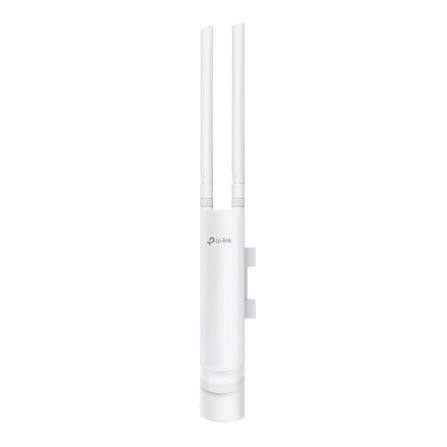
TP-Link EAP113-Outdoor no poe
Buy TP-Link EAP113-Outdoor in Kenya from Orbitlink Solutions. Get 300Mbps outdoor WiFi, IP65 protection, Omada management and PoE support. PoE adapter not included.
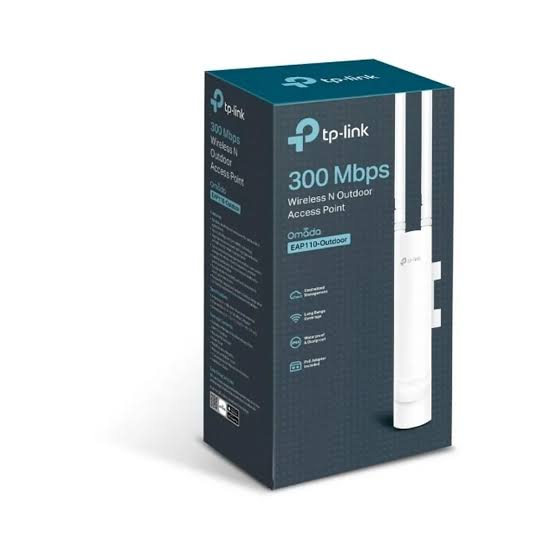
TP-Link EAP113-Outdoor 300Mbps Wireless N Outdoor Access Point – No PoE Adapter Included

The TP-Link EAP113-Outdoor is a 300Mbps Wireless N outdoor access point designed to extend reliable WiFi connectivity across compounds, gardens, hotels, resorts, schools, restaurants, offices, warehouses, farms, apartment complexes and other outdoor environments. It operates on the 2.4GHz frequency band and supports up to 300Mbps wireless speeds with 2×2 MIMO, making it suitable for general internet access and business connectivity where WiFi 5 or WiFi 6 speeds are not required.
A key distinction with this model is that although the EAP113-Outdoor supports PoE power, the passive PoE adapter is not supplied in the package according to TP-Link's installation documentation. The access point itself supports IEEE 802.3af PoE and 48V Passive PoE, so customers need a compatible PoE switch, injector or passive PoE adapter to power it.
With an IP65 weatherproof enclosure, external detachable omnidirectional antennas, pole/wall mounting, Omada centralized management, multiple SSIDs and guest-network features, the TP-Link EAP113-Outdoor offers a practical way to build affordable managed outdoor WiFi. Orbitlink Solutions supplies the EAP113-Outdoor in Kenya together with compatible PoE switches, injectors, routers, Ethernet cabling and other networking equipment.
TP-Link EAP113-Outdoor Key Features
| Feature | Specification |
|---|---|
| Model | TP-Link EAP113-Outdoor |
| Product Type | Outdoor Wireless Access Point |
| WiFi Technology | Wireless N / WiFi 4 |
| Wireless Standard | IEEE 802.11b/g/n |
| Frequency | 2.4GHz |
| Maximum Wireless Speed | Up to 300Mbps |
| MIMO | 2×2 MIMO |
| Ethernet Interface | 1 × 10/100Mbps Fast Ethernet RJ45 |
| PoE Support | IEEE 802.3af PoE / 48V Passive PoE |
| PoE Adapter Included | No |
| Maximum Power Consumption | 4.11W |
| Antennas | 2 × 3dBi external omnidirectional waterproof antennas |
| Antennas Detachable | Yes |
| Weatherproof Rating | IP65 |
| Mounting | Pole / Wall |
| Mounting Kits | Included |
| Concurrent Clients | 100+ under TP-Link test conditions |
| Multiple SSIDs | Up to 8 |
| Omada SDN | Supported |
| Omada App | Supported |
| Cloud Management | Supported through compatible Omada deployment |
| Captive Portal | Supported |
| Guest Network Features | Supported |
| Dimensions | 214.9 × 46 × 37.7mm |
TP-Link's published specifications list the EAP113-Outdoor with 300Mbps 2.4GHz wireless performance, 100+ client capacity, IP65 weather protection, two external 3dBi antennas and both 802.3af and 48V passive PoE input.
Important: TP-Link EAP113-Outdoor Does Not Include a PoE Adapter
The EAP113-Outdoor supports PoE, but the passive PoE adapter is not included with the access point. This is important when purchasing the device because it still requires a suitable power source before installation.
TP-Link's installation guide specifically states that the EAP113-Outdoor does not provide the passive PoE adapter. It can instead be powered through a compatible PoE switch or a separately purchased compatible PoE adapter.
EAP113-Outdoor Power Options
| Power Option | Supported? | Included? |
|---|---|---|
| IEEE 802.3af PoE Switch | Yes | No |
| 48V Passive PoE | Yes | No |
| 48V Passive PoE Adapter | Yes | No – purchased separately |
| Direct Standard AC Adapter to AP | No conventional DC input listed | No |
This makes the EAP113-Outdoor different from some TP-Link outdoor AP packages that include a passive PoE injector.
When ordering from Orbitlink Solutions, customers should therefore confirm whether they already have a compatible PoE switch or whether they also require a PoE injector/adaptor.
300Mbps 2.4GHz Wireless N Performance
The TP-Link EAP113-Outdoor operates exclusively on the 2.4GHz wireless band.
| WiFi Standard | Maximum Signal Rate |
|---|---|
| IEEE 802.11n | Up to 300Mbps |
| IEEE 802.11g | Up to 54Mbps |
| IEEE 802.11b | Up to 11Mbps |
| Frequency Band | 2.4GHz |
| MIMO Configuration | 2×2 |
The 2.4GHz frequency band provides broad compatibility with smartphones, laptops, tablets, IoT equipment and other WiFi devices. It can also provide useful outdoor coverage where absolute maximum throughput is less important than signal availability.
The stated 300Mbps is the theoretical wireless link rate rather than guaranteed internet throughput. Actual speeds depend on the connected client, Ethernet interface, interference, distance, internet connection and environmental conditions.
Long-Range Outdoor WiFi Coverage
TP-Link positions the EAP113-Outdoor as a long-range outdoor wireless access point, using a dedicated high-power amplifier together with professional omnidirectional antennas.
TP-Link reports outdoor coverage of up to approximately 200 metres under its field-test conditions. Actual transmission distance can vary significantly depending on obstacles, interference, receiving devices, mounting height and the surrounding environment.
Factors Affecting Outdoor WiFi Range
| Factor | Effect on WiFi |
|---|---|
| Clear Line of Sight | Can improve usable range |
| Trees & Vegetation | Can weaken signal |
| Walls & Buildings | Can substantially reduce coverage |
| Mounting Height | Correct positioning can improve propagation |
| Wireless Interference | Can reduce speed and reliability |
| Client Device Antenna | Affects return communication to the AP |
| Distance | Greater distance usually means lower throughput |
| AP Placement | Strategic positioning improves coverage |
| Weather & Environment | Can influence real-world performance |
For larger properties, multiple appropriately positioned access points can provide a better experience than relying on a single AP at extreme range.
IP65 Weatherproof Outdoor Construction
The TP-Link EAP113-Outdoor uses an IP65-rated weatherproof enclosure designed for outdoor wireless applications.
This makes it suitable for mounting outside buildings where ordinary indoor WiFi equipment would not be appropriate.
Outdoor Protection Benefits
| Feature | Benefit |
|---|---|
| IP65 Enclosure | Designed for outdoor conditions |
| Dust Protection | Helps prevent dust entering the enclosure |
| Water-Jet Protection | Better suited to exposed installations |
| Outdoor Antennas | Designed for external deployment |
| Pole Mounting | Useful in compounds and open areas |
| Wall Mounting | Suitable for building exteriors |
| Compact Construction | Easier to position discreetly |
Proper installation is still important. Ethernet connections, PoE equipment and other network components should be protected and installed according to appropriate outdoor networking practices.
Two Detachable Outdoor Antennas
The EAP113-Outdoor includes two detachable 3dBi external omnidirectional waterproof antennas.
Unlike fixed antennas, the detachable design allows the supplied antennas to be removed and replaced with suitable compatible antennas where a specific deployment requires a different antenna configuration.
| Antenna Feature | Specification |
|---|---|
| Number of Antennas | 2 |
| Type | External omnidirectional |
| Gain | 3dBi each |
| Frequency | 2.4GHz |
| Waterproof | Yes |
| Detachable | Yes |
The standard omnidirectional antennas are intended to distribute wireless coverage around the AP rather than concentrating the signal into one narrow direction.
Pole and Wall Mounting
The TP-Link EAP113-Outdoor can be mounted either on a pole or wall, and TP-Link includes the required mounting kits.
This provides installation flexibility depending on the property.
| Mounting Location | Example |
|---|---|
| Exterior Wall | Office, hotel or residential compound |
| Pole | Garden or open compound |
| Lighting Pole | Outdoor public area |
| Warehouse Exterior | Loading or operational areas |
| School Building | Playground/campus coverage |
| Restaurant Exterior | Outdoor seating area |
| Resort Building | Gardens and guest areas |
Fast Ethernet Connection
The EAP113-Outdoor contains one 10/100Mbps Fast Ethernet port.
| Wired Specification | Details |
|---|---|
| Ethernet Ports | 1 |
| Port Type | RJ45 |
| Maximum Ethernet Rate | 100Mbps |
| 802.3af PoE | Supported |
| 48V Passive PoE | Supported |
This is particularly important when comparing the EAP113-Outdoor with higher-end outdoor APs. Although its wireless radio can negotiate up to 300Mbps, the wired interface itself is Fast Ethernet rather than Gigabit Ethernet.
For general internet connectivity this may be sufficient, but customers requiring significantly higher throughput should consider a Gigabit-equipped outdoor access point.
Omada SDN Centralized Management
The TP-Link EAP113-Outdoor integrates with Omada SDN, providing centralized network management for compatible deployments.
Network administrators can use Omada to configure supported access points, monitor network status and manage connected clients. TP-Link also provides access through the Omada App for supported deployments.
Omada Management Benefits
| Omada Feature | Benefit |
|---|---|
| Centralized AP Management | Manage multiple compatible access points |
| Cloud Management | Remote administration |
| Omada App | Smartphone/tablet management |
| Client Monitoring | View connected devices |
| SSID Management | Configure wireless networks |
| Network Monitoring | Monitor AP/network condition |
| Guest WiFi Management | Manage visitor access |
| Multi-AP Deployment | Easier scaling of large networks |
This makes the EAP113-Outdoor particularly useful where several TP-Link access points need to be installed across the same property.
Multiple SSIDs
The EAP113-Outdoor supports up to eight wireless SSIDs, allowing several separate WiFi networks to operate from the same access point.
For example:
| SSID | Example Users |
|---|---|
| Hotel-Guest | Guests |
| Hotel-Staff | Employees |
| Office-WiFi | Staff |
| Office-Guest | Visitors |
| School-Staff | Teachers |
| School-Students | Students |
| Restaurant-Guest | Customers |
| Operations | Business equipment |
Multiple SSIDs become particularly useful when businesses want to separate staff, guests and operational devices.
Secure Guest WiFi
TP-Link lists secure guest-network capabilities with multiple authentication options, including voucher and SMS-related options when used with the appropriate Omada deployment.
This makes the EAP113-Outdoor useful for organizations offering outdoor WiFi to visitors.
Suitable Guest WiFi Environments
| Environment | Typical Application |
|---|---|
| Hotels | Outdoor guest WiFi |
| Restaurants | Customer connectivity |
| Resorts | Gardens and recreation areas |
| Schools | Visitor/student access |
| Offices | Guest connectivity |
| Event Venues | Attendee access |
| Apartment Complexes | Shared-area WiFi |
TP-Link EAP113-Outdoor Applications
The EAP113-Outdoor can be used wherever reliable 2.4GHz outdoor wireless connectivity is required.
| Application | Typical Use |
|---|---|
| Hotels | Gardens, pools and parking areas |
| Resorts | Outdoor guest connectivity |
| Schools | Playgrounds and campuses |
| Restaurants | Outdoor seating |
| Cafés | Customer WiFi |
| Office Compounds | Employee and visitor connectivity |
| Warehouses | Loading areas and yards |
| Homes | Gardens and compounds |
| Apartments | Outdoor common areas |
| Churches | Compounds and outdoor gathering areas |
| Farms | WiFi around buildings and work areas |
| Retail Centres | Outdoor customer areas |
| Event Venues | Basic outdoor wireless access |
TP-Link EAP113-Outdoor vs EAP110-Outdoor
The EAP113-Outdoor and EAP110-Outdoor share several wireless characteristics, but their power configurations are an important consideration.
| Feature | EAP113-Outdoor | EAP110-Outdoor |
|---|---|---|
| WiFi Standard | 802.11b/g/n | 802.11b/g/n |
| Maximum WiFi Rate | 300Mbps | 300Mbps |
| Frequency | 2.4GHz | 2.4GHz |
| Ethernet | 10/100Mbps | 10/100Mbps |
| Antennas | 2 × 3dBi external | 2 × 3dBi external on current V3 |
| IP Rating | IP65 | IP65 |
| Client Capacity | 100+ | 100+ |
| Multiple SSIDs | Up to 8 | Up to 8 |
| Pole/Wall Mount | Yes | Yes |
| 48V Passive PoE | Yes | Different passive-PoE specification depending on version |
| IEEE 802.3af PoE | Yes | Model/version dependent |
| Passive PoE Adapter Included | No | Included with some EAP110-Outdoor versions |
| Omada Management | Yes | Yes |
TP-Link's EAP datasheet confirms that both models provide 300Mbps 2.4GHz connectivity and Fast Ethernet, while the EAP113-Outdoor supports 48V passive PoE/802.3af power.
EAP113-Outdoor vs EAP225-Outdoor
Customers requiring faster outdoor WiFi should understand the difference between the entry-level EAP113-Outdoor and a dual-band model such as the EAP225-Outdoor.
| Specification | EAP113-Outdoor | EAP225-Outdoor |
|---|---|---|
| WiFi Technology | Wireless N | WiFi 5 |
| 2.4GHz | 300Mbps | 300Mbps |
| 5GHz | No | 867Mbps |
| Combined WiFi | 300Mbps | AC1200 |
| Ethernet | Fast Ethernet | Gigabit Ethernet |
| Client Capacity | 100+ | 220+ |
| Antennas | 2 × 3dBi 2.4GHz | Dual-band external antennas |
| IP65 | Yes | Yes |
| Best For | Basic affordable outdoor WiFi | Faster dual-band outdoor networks |
TP-Link's outdoor AP datasheet lists the EAP225-Outdoor at 300Mbps on 2.4GHz plus 867Mbps on 5GHz, compared with the EAP113-Outdoor's 300Mbps 2.4GHz-only connection.
Advantages of TP-Link EAP113-Outdoor
| Advantage | Why It Matters |
|---|---|
| Affordable Outdoor WiFi | Suitable for cost-conscious deployments |
| 300Mbps Wireless N | Supports everyday connectivity |
| 2×2 MIMO | Improves wireless performance |
| IP65 Protection | Designed for outdoor installation |
| Long-Range Design | Built for larger outdoor areas |
| Detachable Antennas | Greater installation flexibility |
| 802.3af PoE | Works with compatible standard PoE infrastructure |
| 48V Passive PoE | Additional powering option |
| Omada SDN | Centralized network management |
| 100+ Client Rating | Suitable for multi-user deployments under test conditions |
| Multiple SSIDs | Separate different user groups |
| Pole/Wall Mounting | Flexible outdoor installation |
Who Should Buy the TP-Link EAP113-Outdoor?
The TP-Link EAP113-Outdoor is well suited to customers who require an affordable outdoor access point for general WiFi connectivity without needing dual-band WiFi 5, WiFi 6 or extremely high throughput.
It can be a particularly practical solution for hotel compounds, school grounds, restaurants, residential compounds, offices, warehouses and outdoor business areas where users primarily need browsing, messaging, email, cloud applications and normal internet connectivity.
Customers who already have an 802.3af PoE switch may find the EAP113-Outdoor particularly convenient because the access point can connect directly to compatible PoE infrastructure without purchasing the passive adapter.
What You Need to Install TP-Link EAP113-Outdoor
Because the PoE adapter is not included, customers should check their existing network equipment before purchasing.
| Equipment | Required? | Notes |
|---|---|---|
| TP-Link EAP113-Outdoor | Yes | Main access point |
| Router/Internet Gateway | Yes | Provides network/internet access |
| Ethernet Cable | Yes | Connects AP to the network |
| 802.3af PoE Switch | One powering option | No separate injector required |
| Compatible 48V Passive PoE Adapter | Alternative | Purchased separately |
| Pole/Wall Mounting Kit | Yes | Included with EAP |
| Outdoor-Rated Ethernet Cable | Recommended outdoors | Better suited to external installation |
| Omada Controller | Optional | For centralized management |
Why Buy TP-Link EAP113-Outdoor from Orbitlink Solutions?
Buying an outdoor access point is not simply a matter of choosing an advertised WiFi range. Proper outdoor WiFi requires consideration of coverage distance, line of sight, building structures, interference, installation height, user numbers, Ethernet cabling and available PoE power.
Orbitlink Solutions can help customers identify whether the EAP113-Outdoor is appropriate for their application and supply the additional equipment required to make it work, particularly because this model does not include the PoE adapter.
Customers can purchase compatible PoE equipment, routers, switches, network cables and other networking products together with the access point, helping reduce compatibility problems during installation.
Why Choose Orbitlink Solutions?
| Orbitlink Advantage | Customer Benefit |
|---|---|
| TP-Link Networking Products | Source compatible equipment conveniently |
| EAP113-Outdoor Supply | Access to affordable outdoor AP solutions |
| PoE Equipment | Add the required power solution |
| Network Switches | Build complete wired infrastructure |
| Routers | Complete the internet network |
| Ethernet Cabling | Reliable wired backhaul |
| Omada Products | Build centrally managed TP-Link networks |
| Product Guidance | Choose equipment for the actual environment |
| Outdoor WiFi Solutions | Equipment for compounds and external spaces |
| Kenya-Based Supplier | Local sourcing and support |
Watch: TP-Link Outdoor Access Point Setup
The video above demonstrates TP-Link outdoor access point setup and can help customers understand the general installation process involved in deploying TP-Link outdoor wireless equipment. The specific video is titled around the EAP110-Outdoor, so some hardware and powering details differ from the EAP113-Outdoor. In particular, customers purchasing the EAP113-Outdoor should remember that TP-Link's installation documentation states that its passive PoE adapter is not supplied, even though the access point supports both 802.3af and 48V passive PoE.
When installing the EAP113-Outdoor, the access point should be positioned according to the actual area that requires wireless coverage rather than simply selecting the highest possible mounting point. Obstacles, buildings, trees and interference can affect performance, while a clear path between users and the access point generally improves connectivity. The pole/wall mounting design, external omnidirectional antennas and IP65 enclosure give installers flexibility when positioning the device around compounds, gardens, schools, hotels, warehouses and other outdoor properties. TP-Link reports outdoor transmission of up to around 200 metres under its field-test conditions, although actual coverage varies according to the environment and client equipment.
Buying the TP-Link EAP113-Outdoor from Orbitlink Solutions makes it easier to purchase the access point together with the supporting equipment required for a complete installation. Since the model is supplied without a passive PoE adapter, Orbitlink Solutions can provide an appropriate power solution along with routers, PoE switches, Ethernet cabling and related networking equipment. Whether you are extending WiFi around a hotel, school, restaurant, office compound, residential property, warehouse or commercial site, Orbitlink Solutions can help you select a complete TP-Link outdoor networking solution rather than purchasing the access point alone.
Frequently Asked Questions About TP-Link EAP113-Outdoor
What is TP-Link EAP113-Outdoor?
The TP-Link EAP113-Outdoor is a 300Mbps Wireless N outdoor access point designed for managed 2.4GHz WiFi deployments. It supports Omada centralized management and outdoor installation.
Does TP-Link EAP113-Outdoor come with a PoE adapter?
No. TP-Link's installation documentation specifically states that the EAP113-Outdoor does not provide the passive PoE adapter.
Does EAP113-Outdoor support PoE?
Yes. It supports IEEE 802.3af PoE and 48V passive PoE.
Can I power EAP113-Outdoor with a PoE switch?
Yes. A compatible 802.3af PoE switch can power the EAP113-Outdoor.
Does EAP113-Outdoor support 5GHz WiFi?
No. It operates on 2.4GHz only.
What is the maximum WiFi speed of EAP113-Outdoor?
It provides up to 300Mbps theoretical wireless speeds using 802.11n with 2×2 MIMO.
Is EAP113-Outdoor waterproof?
The enclosure has an IP65 weatherproof rating designed for outdoor installations.
How far can TP-Link EAP113-Outdoor reach?
TP-Link reports outdoor wireless coverage of up to around 200 metres under its field-test conditions. Actual range depends on obstacles, interference, client devices and other environmental conditions.
How many antennas does the EAP113-Outdoor have?
It has two external detachable 3dBi omnidirectional waterproof antennas.
Can I replace the antennas?
Yes. TP-Link describes the antennas as detachable, allowing compatible antennas to be substituted where necessary.
How many devices can connect to EAP113-Outdoor?
TP-Link specifies 100+ concurrent wireless clients under its testing conditions. Real-world usable capacity depends on the applications and bandwidth requirements of those clients.
Does EAP113-Outdoor have Gigabit Ethernet?
No. It has one 10/100Mbps Fast Ethernet port.
Does EAP113-Outdoor support multiple SSIDs?
Yes. It supports up to eight SSIDs.
Does EAP113-Outdoor work with Omada?
Yes. The access point integrates with TP-Link Omada SDN for centralized network management.
Can EAP113-Outdoor be mounted on a pole?
Yes. It supports both pole and wall mounting, and mounting kits are included.
Is EAP113-Outdoor suitable for hotels?
Yes. It can be used for outdoor connectivity around gardens, pool areas, parking spaces and other hotel grounds where its bandwidth and coverage meet the project's requirements.
Is EAP113-Outdoor suitable for schools?
Yes. It can extend WiFi to playgrounds, open campus areas and external school facilities.
Where can I buy TP-Link EAP113-Outdoor in Kenya?
You can buy the TP-Link EAP113-Outdoor from Orbitlink Solutions together with compatible PoE switches or injectors, routers, switches, Ethernet cabling and other networking equipment.
Buy TP-Link EAP113-Outdoor in Kenya
Get reliable outdoor WiFi with the TP-Link EAP113-Outdoor 300Mbps Wireless N Access Point from Orbitlink Solutions. Its combination of 300Mbps 2.4GHz WiFi, IP65 weather protection, detachable external antennas, Omada management, 802.3af PoE and 48V passive PoE support makes it a practical option for affordable outdoor networking.
Please note: the PoE adapter is not included with the EAP113-Outdoor, so customers who do not already have a compatible 802.3af PoE switch will require a suitable PoE power solution.
Contact Orbitlink Solutions
Orbitlink Solutions
Address: Lyric House, 7th Floor, Room S9, Kimathi Street, Nairobi, Kenya
Phone: +254 743 720 551
Email: info@orbitlinksolutions.co.ke
Contact Orbitlink Solutions today for the TP-Link EAP113-Outdoor, compatible PoE adapters and switches, TP-Link Omada access points, routers, Ethernet cabling and complete networking solutions in Kenya.
Need Help Choosing? Ask a Technician
Get guidance on setup, compatibility, stock, and delivery before buying for your project.