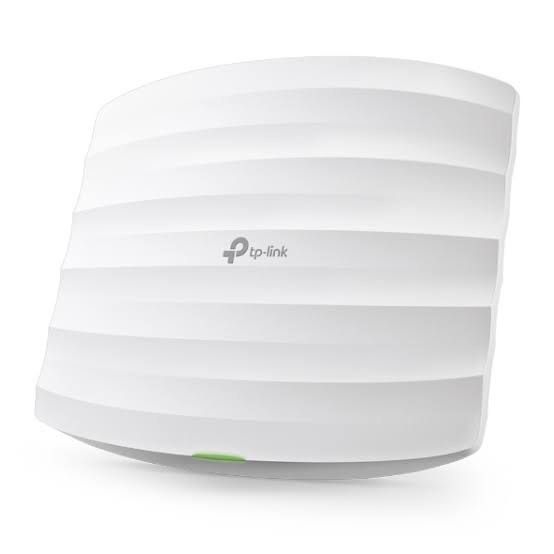
TP-Link EAP110 Indoor
Buy TP-Link EAP110 Indoor Access Point in Kenya from Orbitlink Solutions. Get 300Mbps WiFi, passive PoE, Omada management and reliable indoor coverage.
TP-Link EAP110 Indoor 300Mbps Wireless N Ceiling Mount Access Point
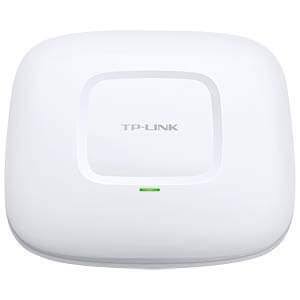
The TP-Link EAP110 Indoor Access Point is an affordable business-class wireless access point designed to provide reliable 2.4 GHz WiFi connectivity at speeds of up to 300Mbps. Its ceiling/wall-mount design makes it suitable for professional indoor deployments in offices, hotels, schools, restaurants, retail shops, clinics, apartments and other commercial environments where consistent wireless coverage is required.
The EAP110 supports IEEE 802.11b/g/n, multiple SSIDs, captive portal authentication, VLAN mapping and centralized Omada management. The current EAP110 V4 also uses 24V passive PoE, allowing power and network connectivity to reach the access point through Ethernet infrastructure for flexible installation.
For organizations that need dependable WiFi without the higher cost of newer dual-band WiFi 6 access points, the EAP110 provides a practical entry-level solution. Orbitlink Solutions supplies TP-Link EAP110 access points in Kenya together with networking equipment required to build complete indoor wireless networks.
TP-Link EAP110 Key Features
| Feature | TP-Link EAP110 |
|---|---|
| Product Type | Indoor Ceiling/Wall Mount Access Point |
| Wireless Technology | Wireless N |
| WiFi Standard | IEEE 802.11b/g/n |
| Frequency | 2.4 GHz |
| Maximum Wireless Rate | Up to 300Mbps |
| Ethernet Interface | 1 × Fast Ethernet RJ45 |
| Power | 24V Passive PoE |
| PoE Adapter | Included with current V4 specification |
| Internal Antennas | 2 × 4 dBi omnidirectional on current US V4 |
| Multiple SSIDs | Up to 8 |
| Captive Portal | Supported |
| SSID-to-VLAN Mapping | Supported |
| Omada Management | Supported |
| Cloud Access | Through supported Omada controllers |
| Installation | Ceiling/Wall |
| Indoor/Outdoor | Indoor |
| Maximum Power Consumption | 2.8W on current US V4 |
| Coverage | Up to 60 m² / 650 ft² under TP-Link test conditions |
| Concurrent Clients | 100+ under TP-Link test conditions |
| Dimensions | 189.5 × 170.5 × 29.7 mm on current US V4 |
TP-Link's current EAP110 V4 documentation specifies 300Mbps 2.4GHz WiFi, Fast Ethernet, 24V passive PoE, 60m² test coverage and 100+ concurrent clients under its stated laboratory conditions. Specifications can differ between hardware versions and markets.
300Mbps Wireless N Performance
The TP-Link EAP110 operates on the 2.4GHz frequency band and provides a theoretical wireless signal rate of up to 300Mbps using 802.11n.
| Wireless Standard | Maximum Signal Rate |
|---|---|
| IEEE 802.11n | Up to 300Mbps |
| IEEE 802.11g | Up to 54Mbps |
| IEEE 802.11b | Up to 11Mbps |
| Frequency Band | 2.4–2.4835GHz |
The 2.4GHz band provides broad compatibility with older and newer WiFi devices and is useful for general internet access, email, web applications and everyday business connectivity. The EAP110 is not a dual-band 5GHz access point, so customers requiring higher throughput or less congested 5GHz connectivity should consider a dual-band Omada model instead.
TP-Link EAP110 Hardware Specifications
| Hardware Specification | Details |
|---|---|
| Model | EAP110 |
| Access Point Type | Ceiling/Wall Mount |
| Ethernet Port | 1 × 10/100Mbps Fast Ethernet RJ45 |
| PoE Support | 24V Passive PoE |
| Reset Button | Yes |
| Security Slot | Kensington Lock Slot |
| Antenna Type | Internal Omnidirectional |
| Antennas | 2 × 4 dBi on current US V4 |
| Maximum Power Consumption | 2.8W on current US V4 |
| Mounting | Ceiling or Wall |
| Mounting Kit | Included |
| Operating Temperature | 0°C to 40°C |
| Operating Humidity | 10%–90% non-condensing |
| Storage Temperature | -40°C to 70°C |
| Storage Humidity | 5%–90% non-condensing |
Passive PoE for Flexible Installation
One of the important advantages of the TP-Link EAP110 is 24V passive Power over Ethernet. The current EAP110 V4 package includes a passive PoE adapter, allowing the AP to receive power through the Ethernet connection.
This is especially useful for ceiling installations where conventional electrical outlets may not be conveniently located.
| PoE Advantage | Benefit |
|---|---|
| Power Through Ethernet | Reduces the need for power near the AP |
| Flexible Placement | Position the AP according to coverage requirements |
| Ceiling Installation | Suitable for professional ceiling deployment |
| Cleaner Cabling | Helps reduce visible power cabling |
| Longer Installation Runs | TP-Link specifies passive PoE deployment up to 100 metres |
| Included Adapter | Current V4 package includes a passive PoE adapter |
Passive PoE is not the same as standard 802.3af/at PoE. Installers should therefore ensure that the correct power equipment is used with the EAP110.
Designed for Indoor Ceiling and Wall Installation
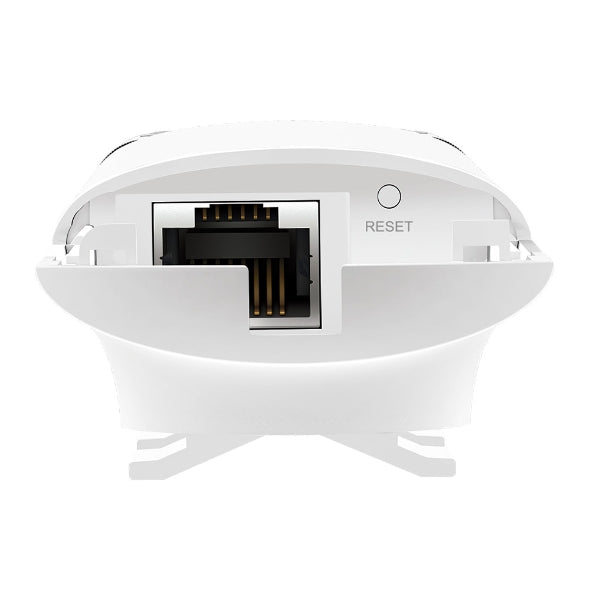
The TP-Link EAP110 has been designed for discreet installation on a ceiling or wall. This makes it more suitable for professional environments than placing conventional wireless routers on desks throughout a building.
Its ceiling-mounted positioning can help distribute wireless coverage around rooms and open indoor spaces while keeping networking equipment away from desks and work surfaces.
The mounting kit is included with the current model.
TP-Link EAP110 Wireless Features
| Wireless Feature | Supported |
|---|---|
| Multiple SSIDs | Yes – up to 8 |
| Automatic Channel Assignment | Yes |
| Transmit Power Control | Yes |
| QoS (WMM) | Yes |
| Rate Limiting | Yes |
| Wireless Scheduling | Yes |
| Reboot Scheduling | Yes |
| Wireless Statistics | Yes |
| Captive Portal Authentication | Yes |
| Access Control | Yes |
| MAC Address Filtering | Yes |
| Client Isolation | Yes |
| SSID-to-VLAN Mapping | Yes |
| Rogue AP Detection | Yes |
| 802.1X | Supported |
Multiple SSIDs and VLAN Support
The TP-Link EAP110 can provide up to eight SSIDs, allowing organizations to create several wireless networks from the same access point.
For example, a business could create one wireless network for employees and another for visitors. A school could separate administrative and student wireless access, while a hotel or restaurant could maintain separate internal and guest networks.
SSID-to-VLAN mapping also allows supported network infrastructure to separate traffic logically, making the EAP110 more suitable for structured business WiFi than a basic home wireless extender.
Example Network Segmentation
| SSID | Users | Example Purpose |
|---|---|---|
| Company-Staff | Employees | Internal business access |
| Company-Guest | Visitors | Guest internet |
| Management | Managers | Restricted internal access |
| Operations | Operational staff | Business applications |
| Student-WiFi | Students | Internet and learning resources |
| Teacher-WiFi | Teachers | Staff connectivity |
Captive Portal for Guest WiFi
The EAP110 supports captive portal authentication, making it useful for environments that provide wireless connectivity to visitors.
A captive portal can present users with an authentication or access page before allowing them onto the network.
This can be useful for:
| Environment | Application |
|---|---|
| Hotels | Guest WiFi |
| Restaurants | Customer internet |
| Cafés | Visitor WiFi |
| Offices | Guest connectivity |
| Schools | Controlled student/visitor access |
| Clinics | Patient and visitor connectivity |
| Retail Stores | Customer WiFi |
Omada Centralized Management
The EAP110 can be centrally managed through TP-Link's Omada ecosystem. TP-Link lists compatibility with the OC200 and OC300 hardware controllers and Omada Software Controller, with cloud access available through supported controller deployments.
This allows administrators to manage multiple compatible access points instead of logging into each AP individually.
Omada Management Benefits
| Feature | Benefit |
|---|---|
| Centralized Management | Manage multiple APs from one system |
| Omada App | Manage supported features from a smartphone or tablet |
| Cloud Access | Remote access through compatible controllers |
| Multi-Site Management | Useful for organizations with multiple locations |
| Wireless Statistics | Monitor APs, SSIDs and clients |
| Management VLAN | Helps separate management traffic |
| System Logging | Supports network administration and troubleshooting |
| HTTP/HTTPS Management | Web-based administration |
| SNMP | Supports network monitoring |
TP-Link EAP110 Coverage and Client Capacity
TP-Link currently specifies up to 60m² (650ft²) coverage and 100+ concurrent clients for the EAP110 V4 under its test conditions. These numbers should be treated as planning references rather than guaranteed real-world results.
| Parameter | TP-Link Specification |
|---|---|
| Specified Coverage | Up to 60m² / 650ft² |
| Specified Concurrent Clients | 100+ |
| Frequency | 2.4GHz |
| Maximum Signal Rate | 300Mbps |
Actual performance depends on walls, floors, interference, AP placement, client capabilities, network traffic and the internet connection. Commercial installations should therefore be planned around the actual building rather than relying only on the maximum coverage figure.
Where Can the TP-Link EAP110 Be Used?
/product/98/8590723/1.jpg?4862)
The EAP110 is particularly suitable where affordable and manageable 2.4GHz WiFi is more important than extremely high wireless speeds.
| Application | Why EAP110 Works |
|---|---|
| Small Offices | Affordable centralized business WiFi |
| Hotels | Guest and staff wireless connectivity |
| Schools | Classroom and administrative WiFi |
| Restaurants | Staff and customer connectivity |
| Cafés | Guest WiFi |
| Retail Shops | Staff and general internet connectivity |
| Clinics | Indoor wireless coverage |
| Apartments | Common-area connectivity |
| Churches | General indoor WiFi |
| Reception Areas | Staff and visitor connectivity |
| Small Businesses | Cost-effective managed WiFi |
TP-Link EAP110 Advantages
| Advantage | Why It Matters |
|---|---|
| Affordable Business AP | Suitable for budget-conscious deployments |
| 300Mbps Wireless N | Adequate for general internet connectivity |
| 2.4GHz Coverage | Broad compatibility with WiFi devices |
| Passive PoE | Flexible installation |
| Ceiling/Wall Mount | Professional indoor appearance |
| Multiple SSIDs | Separate different wireless users |
| VLAN Mapping | Useful for segmented networks |
| Captive Portal | Suitable for guest WiFi |
| Omada Management | Central management of compatible APs |
| Low Power Consumption | Efficient operation |
| 100+ Client Specification | Designed for multi-user environments under TP-Link test conditions |
TP-Link EAP110 vs a Normal WiFi Router
| Feature | TP-Link EAP110 | Typical Home Router |
|---|---|---|
| Primary Purpose | Business wireless access | Internet routing + WiFi |
| Ceiling Mount | Yes | Usually No |
| Wall Mount | Yes | Model dependent |
| Passive PoE | Yes | Usually No |
| Multiple SSIDs | Up to 8 | Usually fewer |
| VLAN Mapping | Yes | Model dependent |
| Captive Portal | Yes | Usually limited/absent |
| Centralized Management | Omada | Usually standalone |
| 2.4GHz | Yes | Yes |
| 5GHz | No | Common on newer routers |
| Routing Function | No | Yes |
The EAP110 is an access point rather than a replacement for the network router. It normally connects to an existing router, switch or network infrastructure and provides wireless connectivity to users.
Who Should Buy the TP-Link EAP110?
The TP-Link EAP110 is a good option for customers who need cost-effective indoor WiFi, basic business network features and centralized management without requiring high-speed 5GHz or WiFi 6 connectivity.
It can be particularly attractive for small businesses, restaurants, schools, reception areas and other locations where users primarily require browsing, messaging, email, cloud applications and everyday internet connectivity.
Customers requiring substantially higher wireless throughput, dual-band operation or newer WiFi technology should consider other TP-Link Omada access points such as the EAP610 or EAP650.
Why Buy TP-Link EAP110 from Orbitlink Solutions?
Orbitlink Solutions supplies TP-Link networking equipment in Kenya and can help customers select the appropriate equipment for their wireless network rather than simply purchasing an access point without considering the rest of the infrastructure.
Customers can source the EAP110 alongside routers, network switches, PoE equipment, Ethernet cabling and other networking accessories, making it easier to create a complete installation.
| Why Orbitlink Solutions? | Customer Benefit |
|---|---|
| TP-Link Networking Equipment | Convenient sourcing of TP-Link solutions |
| Product Guidance | Help choosing suitable APs |
| Business WiFi Equipment | Solutions for professional networks |
| Network Switches | Build complete LAN infrastructure |
| Routers | Complete the internet network |
| Cabling Solutions | Connect APs to the network |
| Installation Guidance | Better planning of AP placement |
| Kenya-Based Supplier | Local purchasing and assistance |
| Multiple Networking Products | Source equipment from one supplier |
| Scalable Solutions | Upgrade as network requirements grow |
Watch: TP-Link EAP110 Indoor Access Point
The TP-Link EAP110 Indoor Access Point provides an affordable way to introduce professionally installed wireless connectivity into offices, hotels, schools, restaurants and other indoor environments. Instead of depending entirely on a conventional WiFi router positioned in one room, businesses can deploy EAP110 access points at strategic locations throughout a property. Its ceiling and wall mounting options help create a cleaner installation, while 24V passive PoE provides additional flexibility when determining where each access point should be installed.
From a networking perspective, the EAP110 is designed primarily for organizations that require reliable 2.4GHz connectivity rather than extremely high wireless throughput. Its 300Mbps Wireless N capability is complemented by business-oriented functions such as multiple SSIDs, captive portal authentication, SSID-to-VLAN mapping, client isolation, access controls and centralized Omada management. This combination makes the EAP110 more suitable for structured small-business wireless deployments than a basic consumer WiFi extender.
Buying the TP-Link EAP110 from Orbitlink Solutions also makes it easier to source the supporting networking equipment required for a complete installation. Orbitlink Solutions can help customers identify appropriate routers, network switches, Ethernet cabling and related equipment according to the size and requirements of the network. Whether you need a single indoor access point for a small office or several EAP110 units distributed around a school, restaurant, hotel or commercial facility, Orbitlink Solutions can help you build a practical and scalable TP-Link wireless network.
Frequently Asked Questions About TP-Link EAP110
What is the TP-Link EAP110?
The TP-Link EAP110 is an N300 Wireless N ceiling/wall-mount access point designed primarily for indoor business wireless networks.
What is the maximum WiFi speed of the EAP110?
The EAP110 provides a theoretical wireless signal rate of up to 300Mbps using 802.11n.
Does the TP-Link EAP110 support 5GHz?
No. The EAP110 operates on 2.4GHz. Customers requiring 5GHz should choose a suitable dual-band TP-Link access point.
Is the TP-Link EAP110 WiFi 6?
No. The EAP110 uses IEEE 802.11b/g/n Wireless N technology.
Does EAP110 support PoE?
Yes. The current EAP110 V4 supports 24V passive PoE, and TP-Link lists the passive PoE adapter as included.
Can the EAP110 be mounted on a ceiling?
Yes. The EAP110 supports ceiling and wall mounting, and mounting hardware is included.
Can EAP110 be used in an office?
Yes. It is suitable for offices that require affordable indoor 2.4GHz wireless connectivity and business networking features.
Is the EAP110 suitable for hotels?
It can be used for hotel indoor WiFi where its 2.4GHz performance and capacity meet the requirements of the deployment.
Does EAP110 support multiple WiFi networks?
Yes. The current EAP110 specification supports up to eight SSIDs.
Does the EAP110 support VLANs?
Yes. TP-Link lists SSID-to-VLAN mapping among its wireless security/network functions.
Does EAP110 support guest WiFi?
Yes. It supports captive portal authentication and multiple SSIDs, which can be useful when creating guest wireless networks.
Can several EAP110 access points be managed together?
Yes. The EAP110 supports centralized management using compatible Omada controllers and Omada Software Controller.
How many users can connect to EAP110?
TP-Link specifies 100+ concurrent clients for the current EAP110 V4 under its testing methodology. Actual usable capacity depends heavily on what those users are doing on the network.
What is the coverage of TP-Link EAP110?
TP-Link specifies approximately 60m² (650ft²) under its test conditions. Real-world coverage varies according to walls, interference, installation height and other environmental factors.
Where can I buy TP-Link EAP110 in Kenya?
You can buy the TP-Link EAP110 Indoor Access Point from Orbitlink Solutions for offices, schools, hotels, restaurants, retail businesses and other indoor networking projects.
Buy TP-Link EAP110 Indoor Access Point in Kenya
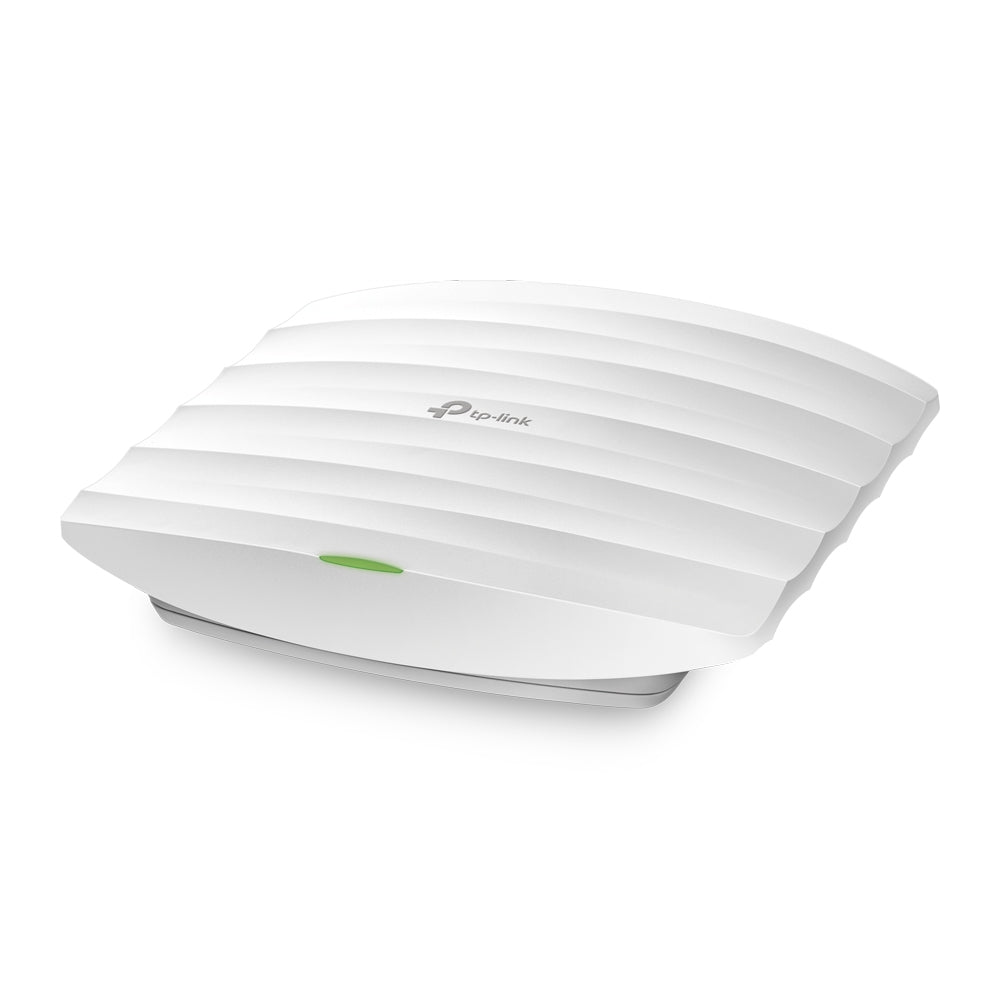
Get the TP-Link EAP110 Indoor 300Mbps Wireless N Access Point from Orbitlink Solutions for affordable, centrally manageable indoor WiFi. Its combination of 300Mbps Wireless N connectivity, passive PoE, ceiling/wall mounting, multiple SSIDs, captive portal and Omada management makes it a practical option for many small and medium-sized indoor networks.
Contact Orbitlink Solutions
Orbitlink Solutions
Address: Lyric House, 7th Floor, Room S9, Kimathi Street, Nairobi, Kenya
Phone: +254 743 720 551
Email: info@orbitlinksolutions.co.ke
Contact Orbitlink Solutions today for the TP-Link EAP110, TP-Link Omada access points, routers, network switches, PoE equipment, Ethernet cabling and other networking solutions in Kenya.
Need Help Choosing? Ask a Technician
Get guidance on setup, compatibility, stock, and delivery before buying for your project.