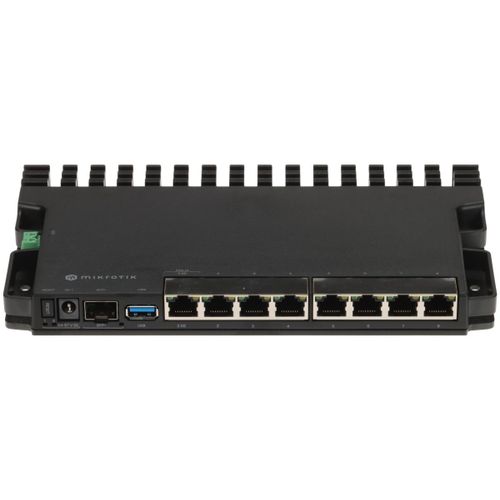
MikroTik RB5009UG+S+IN
Buy MikroTik RB5009UG+S+IN in Kenya from Orbitlink Solutions. Quad-core ARM64 CPU, 1GB RAM, 2.5G Ethernet, 10G SFP+, USB 3.0, PoE and RouterOS v7.
MikroTik RB5009UG+S+IN Router in Kenya

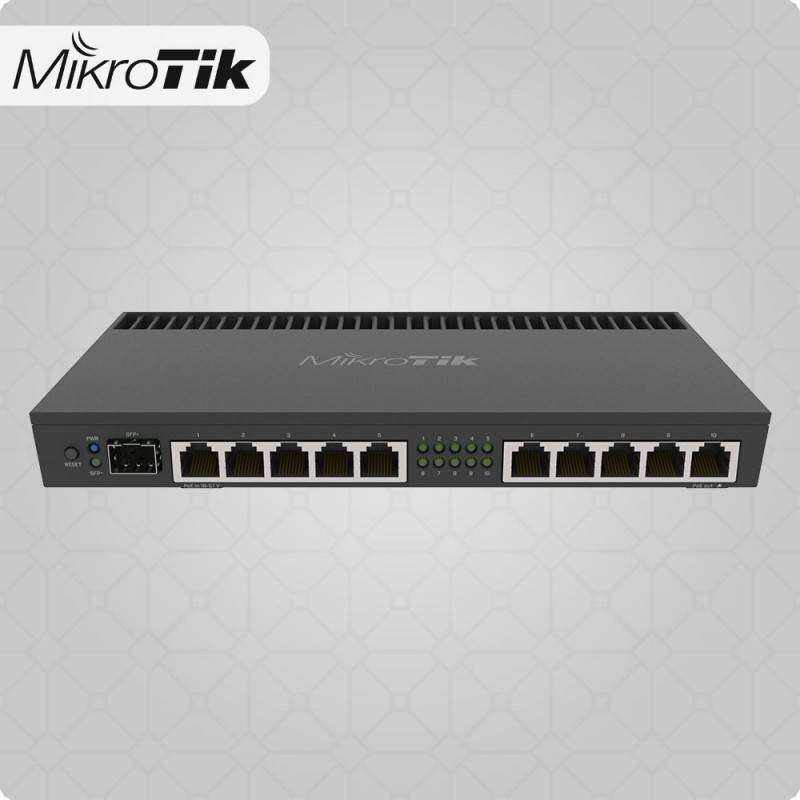
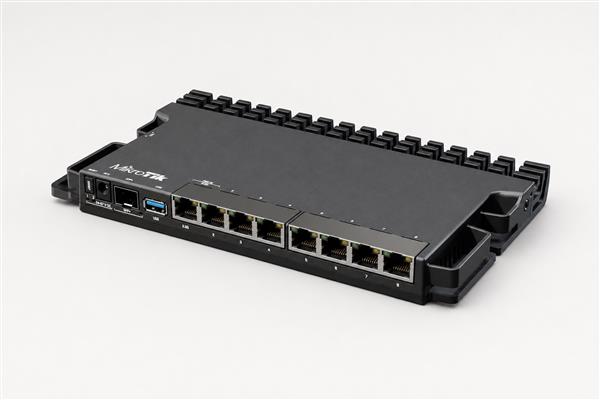
The MikroTik RB5009UG+S+IN is a high-performance compact wired router designed for advanced home labs, small and medium businesses, fibre internet, Starlink deployments, branch networks, CCTV systems and demanding RouterOS environments. It combines seven Gigabit Ethernet ports, one 2.5 Gigabit Ethernet port, one 10G SFP+ cage, USB 3.0, a quad-core ARM64 processor, 1GB DDR4 RAM and three powering options in a compact fanless enclosure.
MikroTik built the RB5009 around the Marvell Armada 88F7040 quad-core ARMv8 processor, operating automatically between 350MHz and 1.4GHz. All wired interfaces connect through a Marvell Amethyst-family switch chip that has a 10Gbps full-duplex connection to the CPU, giving the router a much stronger internal architecture than many conventional Gigabit routers.
The RB5009UG+S+IN is especially attractive where a network has begun moving beyond standard Gigabit speeds but does not yet require a Cloud Core Router. Its combination of 1G, 2.5G and 10G connectivity makes it suitable for modern fibre connections, high-speed switches, NAS devices and business networks requiring room for future expansion.
MikroTik RB5009UG+S+IN Key Features
| Feature | Specification |
|---|---|
| Product Code | RB5009UG+S+IN |
| Architecture | ARM 64-bit |
| CPU | Marvell 88F7040 |
| CPU Cores | 4 |
| CPU Threads | 4 |
| CPU Frequency | 350–1400MHz automatic |
| RAM | 1GB DDR4 |
| Storage | 1GB NAND |
| Gigabit Ethernet | 7 × 10/100/1000 |
| 2.5G Ethernet | 1 × 2.5GbE |
| 10G SFP+ | 1 × SFP+ |
| Total Wired Network Ports | 9 |
| Switch Chip | Marvell 88E6393 |
| USB | 1 × USB 3.0 Type-A |
| PoE-In | Ether1, 802.3af/at |
| DC Jack | 24–57V |
| 2-Pin Terminal | 24–57V |
| RouterOS | RouterOS v7 |
| RouterOS Licence | Level 5 |
| Cooling | Passive |
| Dimensions | 220 × 125 × 22mm |
| Operating Temperature | -40°C to +60°C |
| Best For | SMB, fibre, Starlink, VPN, VLAN, multi-WAN, home lab |
Powerful Quad-Core ARM64 Processor
At the centre of the RB5009UG+S+IN is the Marvell 88F7040 quad-core ARM64 processor.
MikroTik specifies:
-
4 CPU cores
-
4 threads
-
ARM 64-bit architecture
-
Automatic frequency between 350MHz and 1400MHz
-
Hardware acceleration for supported workloads
The ARM64 architecture makes the RB5009 a significant step above older MikroTik platforms such as the RB4011 in terms of platform generation and software flexibility.
The CPU is suitable for RouterOS workloads involving:
-
NAT
-
Firewall
-
VLAN routing
-
VPN
-
IPsec
-
Multi-WAN
-
Queues
-
OSPF
-
BGP
-
Policy routing
-
Hotspot
-
PPPoE
-
Containers
-
Monitoring
1GB DDR4 RAM
The RB5009UG+S+IN includes 1GB DDR4 RAM and 1GB NAND storage.
This gives RouterOS considerably more resources than entry-level MikroTik routers.
The memory can support more demanding configurations involving:
Multiple VLANs
Large firewall configurations
VPN tunnels
Multi-WAN
Dynamic routing
Containers
Monitoring
Large numbers of active connections
The 1GB NAND storage also provides considerably more internal storage than many older RouterBOARD products.
7 Gigabit Ethernet Ports
The RB5009 provides seven standard Gigabit Ethernet interfaces.
These can be assigned through RouterOS according to the intended network design.
For example:
| Port | Possible Use |
|---|---|
| Ether1 | Primary WAN / PoE-In |
| Ether2 | Starlink |
| Ether3 | Secondary ISP |
| Ether4 | Office LAN |
| Ether5 | CCTV |
| Ether6 | Server network |
| Ether7 | Wi-Fi access points |
RouterOS does not force the interfaces into fixed WAN and LAN roles.
They can instead be used for:
-
VLAN trunks
-
Multiple WANs
-
Separate LANs
-
Server connections
-
CCTV networks
-
Guest networks
-
Management networks
Dedicated 2.5 Gigabit Ethernet Port
One of the most important features of the RB5009 is its 2.5Gbps Ethernet interface.
This provides a useful step above conventional Gigabit Ethernet without requiring fibre transceivers.
The 2.5G port can be useful for connecting:
-
2.5G fibre ONTs
-
Multi-gigabit ISP equipment
-
NAS systems
-
Servers
-
2.5G switches
-
WiFi 6 / WiFi 7 infrastructure
-
High-speed workstations
A possible network design is:
2.5G Fibre ONT
↓
RB5009 2.5G Port
↓
10G SFP+
↓
Core Switch
↓
Gigabit / 2.5G Access Network
10G SFP+ Interface
The RB5009 includes one 10 Gigabit SFP+ cage.
This is particularly useful for connecting the router to:
-
10G core switches
-
Distribution switches
-
Fibre backbone
-
Servers
-
NAS infrastructure
-
Data-centre equipment
-
High-speed ISP networks
Suitable SFP+ optical modules or DAC cables are selected separately according to the network design.
A common deployment might be:
Internet
↓
RB5009
↓
10G SFP+
↓
Managed Core Switch
↓
Access Switches / APs / Servers / CCTV
1G + 2.5G + 10G Connectivity
The RB5009's interface combination is one of its strongest advantages.
It provides:
7 × 1G Ethernet
1 × 2.5G Ethernet
1 × 10G SFP+
This means one router can connect older Gigabit devices while also supporting newer multi-gigabit infrastructure.
MikroTik specifically designed the RB5009 around this combination of different network speeds.
Marvell 88E6393 Switch Chip
All Ethernet and SFP+ interfaces are connected through a Marvell 88E6393 switch chip.
The switch chip connects to the CPU using a 10Gbps full-duplex internal link.
This is an important architectural improvement because the network ports are not connected to the CPU through a narrow Gigabit internal link.
The block architecture is essentially:
7 × 1G + 1 × 2.5G + 1 × 10G
↓
Marvell 88E6393 Switch Chip
↓
10Gbps Full-Duplex
↓
Quad-Core ARM64 CPU
RouterOS v7
The RB5009UG+S+IN runs RouterOS v7 with a Level 5 licence.
RouterOS provides professional networking features including:
-
Firewall
-
NAT
-
DHCP
-
VLANs
-
IPv6
-
OSPF
-
BGP
-
Static routing
-
VPN
-
IPsec
-
WireGuard
-
Policy routing
-
Multi-WAN
-
QoS
-
Queues
-
PPPoE
-
Hotspot
-
SNMP
-
Monitoring
-
Scripting
-
Containers
MikroTik currently lists RouterOS v7.24.2 as the stable ARM64 release on the RB5009 product page. Its updated quick guide recommends running at least v7.10 or the latest applicable software version.
RouterOS Level 5 Licence
The router comes with a RouterOS Level 5 licence already installed.
No separate RouterOS licence purchase is required. MikroTik states that the device arrives with the operating system preinstalled and licensed.
This makes the RB5009 ready for professional RouterOS configuration once connected and updated.
USB 3.0 Type-A Port

The RB5009UG+S+IN includes a full-size USB 3.0 Type-A port capable of providing up to 1.5A to supported devices.
Depending on RouterOS support, the USB interface can be useful for:
-
External storage
-
USB peripherals
-
Container storage
-
Supported LTE modems
-
Logging
-
File storage
The USB interface also supports RouterOS USB power reset functionality.
Container Support
Because the RB5009 uses an ARM64 CPU and provides 1GB RAM plus USB 3.0, it is also suitable for selected RouterOS container applications.
MikroTik currently lists the container package among the downloadable packages for this ARM64 platform.
Possible lightweight container applications can include:
-
DNS services
-
Network monitoring
-
Utility services
-
Ad-blocking DNS tools
-
Custom network applications
Containers should still be used carefully because routing remains the primary role of the device.
Three Different Powering Options
The RB5009UG+S+IN can be powered in three different ways:
1. PoE-In
Through Ether1.
2. DC Jack
Using a 24–57V DC supply.
3. Two-Pin Terminal
Using the dedicated 24–57V terminal connector.
This provides excellent flexibility for:
-
Network cabinets
-
Telecom racks
-
UPS installations
-
Remote sites
-
DC power systems
-
Centralized PoE deployments
802.3af/at PoE Input
Unlike several older MikroTik routers that depend primarily on passive PoE, the RB5009UG+S+IN officially supports 802.3af/at PoE input on Ether1.
The documented PoE input voltage is:
24–57V DC.
This can simplify installation where the router needs to be powered from a suitable PoE switch or injector.
Important: RB5009UG+S+IN Does Not Provide PoE-Out
The RB5009UG+S+IN supports PoE input, but it is not the RB5009 model designed to power multiple downstream devices.
For installations where PoE output is required on the Ethernet ports, the RB5009UPr+S+IN should instead be considered.
This distinction is important when designing networks containing:
-
Wireless access points
-
CCTV cameras
-
Wireless CPE
-
VoIP phones
A separate PoE switch can also be used with the RB5009UG+S+IN.
Power Consumption
Official specifications list:
| Power Specification | Value |
|---|---|
| Power Inputs | 3 |
| DC Jack Voltage | 24–57V |
| 2-Pin Terminal Voltage | 24–57V |
| PoE-In | 802.3af/at |
| PoE Voltage | 24–57V |
| Without Attachments | 14W |
| Maximum Consumption | 25W |
Its relatively low consumption is useful for UPS-backed business networks.
Fanless Passive Cooling
The RB5009UG+S+IN is passively cooled, meaning it does not require a fan.
MikroTik designed the internal board so that the CPU and switch chip are positioned beneath the board and transfer heat into the metal enclosure, effectively allowing the case to function as a large heatsink.
This provides several advantages:
-
Silent operation
-
No fan maintenance
-
Fewer moving parts
-
Suitable for office environments
-
Useful in quiet server rooms
Adequate ventilation should still be maintained.
Compact Design
The RB5009 measures approximately:
220 × 125 × 22mm.
Despite its compact dimensions, it contains:
9 network ports
USB 3.0
Three power inputs
Quad-core CPU
1GB RAM
This high density is one of the major strengths of the RB5009 platform.
Four RB5009 Routers in One 1U Rack Space
MikroTik designed the enclosure so that up to four RB5009 units can fit into a single 1U rack space with the appropriate mounting accessories.
This makes the platform especially attractive for:
-
ISPs
-
Network laboratories
-
Branch infrastructure
-
Server rooms
-
MSPs
-
Multi-router installations
The K-79 rackmount kit is available for RB5009 and L009 devices.
MikroTik RB5009 Performance
MikroTik publishes RFC2544 Ethernet performance tests for the RB5009UG+S+IN.
With 1518-byte packets, the manufacturer reports approximately:
| Test | MikroTik Lab Result |
|---|---|
| Fast-path Bridging | 9.85Gbps |
| Fast-path Routing | 9.85Gbps |
| Routing + 25 Simple Queues | 9.85Gbps |
| Routing + 25 IP Filter Rules | 9.37Gbps |
These large-packet figures show the substantial capability of the platform, but they should not be interpreted as guaranteed internet throughput.
Small-Packet Performance Matters
With 64-byte packets, performance changes significantly.
For example, MikroTik's test shows approximately:
2.70Gbps fast-path routing
and around:
414Mbps with 25 IP filter rules.
This illustrates why professional router performance cannot be described using one simple number.
Real throughput depends on:
-
Packet size
-
Firewall rules
-
NAT
-
Queues
-
VPN
-
FastTrack
-
Routing protocols
-
Connection count
-
RouterOS configuration
MikroTik Performance Disclaimer
MikroTik states that its benchmarks use specialized Xena Networks equipment under RFC2544 methodology.
The company also explicitly states that the results represent the device's maximum performance under specified configurations and that other configurations will most likely produce lower results.
For a business deployment, expected throughput should therefore be assessed based on the actual RouterOS configuration.
RB5009 IPsec Performance
The RB5009 also performs strongly in MikroTik's IPsec benchmarks.
Using AES-128-CBC + SHA1 and 1400-byte packets, MikroTik reports approximately:
| VPN Test | Result |
|---|---|
| Single Tunnel | ~1.35Gbps |
| 256 Tunnels | ~1.42Gbps |
MikroTik's AES-256 tests also reach around 1.41Gbps at 1400 bytes in the published laboratory configuration.
These are laboratory benchmarks rather than guaranteed production VPN speeds.
MikroTik RB5009 for Fibre Internet
The RB5009 is particularly suitable for modern fibre connections.
A typical network might be:
Fibre ONT
↓
2.5G Ethernet
↓
RB5009
↓
10G SFP+
↓
Core Switch
↓
Office / Wi-Fi / CCTV / Servers
This architecture allows the business network to grow beyond traditional Gigabit bottlenecks.
MikroTik RB5009 for Starlink
The RB5009 can also work as an advanced RouterOS gateway behind Starlink.
A possible deployment is:
Starlink
↓
Ethernet
↓
RB5009
↓
Managed Switch
↓
Wi-Fi APs / CCTV / Servers / Users
RouterOS can then manage:
-
Firewall
-
DHCP
-
VLANs
-
VPN
-
Guest networks
-
CCTV segmentation
-
Bandwidth policies
-
Multi-WAN
-
Monitoring
The exact Starlink Ethernet setup depends on the Starlink hardware and network configuration.
Fibre + Starlink Failover
One particularly useful business application is:
Primary Fibre
↓
RB5009
↑
Starlink Backup
↓
Business LAN
RouterOS can monitor the primary route and move traffic to the backup WAN when appropriate.
This can improve continuity for:
-
Cloud systems
-
POS systems
-
Remote access
-
Email
-
VoIP
-
CCTV
-
Online services
Once the preferred fibre service becomes usable again, routing can return according to the configured policy.
MikroTik RB5009 for Multi-WAN
The RB5009 can manage several internet connections.
For example:
Ether1 → Primary Fibre
Ether2 → Starlink
Ether3 → Secondary Fibre
Ether4 → 4G/5G Backup
RouterOS can then implement:
-
Automatic failover
-
Policy routing
-
WAN health checks
-
Connection distribution
-
Different WANs for different VLANs
Load balancing does not inherently bond the speed of several ISPs into one faster individual connection.
MikroTik RB5009 for VLAN Networks
A business can use the RB5009 as a central gateway for multiple network segments.
| VLAN | Function |
|---|---|
| 10 | Management |
| 20 | Staff |
| 30 | Guest Wi-Fi |
| 40 | CCTV |
| 50 | VoIP |
| 60 | Servers |
| 70 | IoT |
| 80 | POS |
RouterOS firewall policies can control communication between them.
For example:
Guest → Internet only
CCTV → NVR only
IoT → Restricted services
Staff → Internet + approved servers
Management → Network equipment
MikroTik RB5009 for CCTV Networks
The RB5009 can provide routing and security for CCTV installations.
A typical architecture is:
Internet
↓
RB5009
↓
Managed PoE Switch
↓
IP Cameras + NVR
The router can place cameras in a dedicated VLAN and prevent them from communicating unnecessarily with office computers or guest Wi-Fi devices.
Because the RB5009UG+S+IN does not provide PoE-Out for all access ports, a separate PoE switch would normally power the cameras.
MikroTik RB5009 for Wi-Fi Networks
The RB5009UG+S+IN has no built-in Wi-Fi.
For business deployments, this is often an advantage because routing and wireless coverage can be designed independently.
A typical architecture is:
Internet
↓
RB5009
↓
PoE Managed Switch
↓
Multiple WiFi 6 / WiFi 7 Access Points
Dedicated access points can be positioned where users actually need coverage instead of relying on one wireless router in a cabinet.
MikroTik RB5009 for VPN
The RB5009 is a strong option for business VPN environments.
Possible applications include:
Head Office ↔ Branch
Office ↔ Data Centre
Remote Worker ↔ Office
Office ↔ Cloud
Its ARM64 processor and hardware-assisted cryptographic capabilities make it substantially more capable than many entry-level MikroTik devices.
Published IPsec results exceeding 1Gbps in favourable test conditions further demonstrate its suitability for substantial VPN workloads.
MikroTik RB5009 for OSPF
RouterOS v7 supports OSPF, allowing the RB5009 to participate in dynamic-routing networks.
A possible topology is:
Head Office RB5009
↕
Branch Router
↕
Warehouse
↕
Remote Site
This is useful for:
-
Enterprises
-
ISPs
-
Campuses
-
Multi-building networks
-
Branch environments
MikroTik RB5009 for BGP
RouterOS v7 also supports BGP.
The RB5009 can therefore be useful for:
-
Network laboratories
-
Small ISP edge applications
-
Enterprise dynamic routing
-
Multi-homed businesses
For very large BGP environments or full Internet routing tables, however, Cloud Core Routers such as the CCR2004, CCR2116 or CCR2216 should also be evaluated.
RB5009UG+S+IN vs MikroTik L009UiGS-RM
| Feature | RB5009UG+S+IN | L009UiGS-RM |
|---|---|---|
| CPU Architecture | ARM64 | ARM |
| CPU Cores | 4 | 2 |
| CPU Maximum | 1.4GHz | 800MHz |
| RAM | 1GB DDR4 | 512MB |
| Storage | 1GB NAND | 128MB |
| 1G Ethernet | 7 | 8 |
| 2.5G RJ45 | 1 | None |
| SFP | 10G SFP+ | Up to 2.5G |
| USB | USB 3.0 | USB 3.0 |
| Main Focus | High-performance SMB | Gigabit SMB / RB2011 replacement |
The L009 provides more conventional Gigabit RJ45 interfaces.
The RB5009 is considerably stronger where processing capability, 2.5GbE and 10G networking are priorities.
RB5009UG+S+IN vs RB4011iGS+RM
| Feature | RB5009UG+S+IN | RB4011iGS+RM |
|---|---|---|
| Architecture | ARM64 | ARM |
| CPU Cores | 4 | 4 |
| RAM | 1GB DDR4 | 1GB |
| Storage | 1GB NAND | 512MB |
| Gigabit Ethernet | 7 | 10 |
| 2.5G Ethernet | 1 | None |
| 10G SFP+ | 1 | 1 |
| USB 3.0 | Yes | No |
| PoE-In | 802.3af/at | Passive |
| Main Strength | Newer architecture | More 1G copper ports |
For a new performance-focused installation, the RB5009 generally offers the more modern platform.
The RB4011 remains attractive where ten built-in Gigabit Ethernet interfaces are more valuable than the RB5009's 2.5GbE and newer ARM64 architecture.
RB5009UG+S+IN vs CCR2004-16G-2S+
| Feature | RB5009UG+S+IN | CCR2004-16G-2S+ |
|---|---|---|
| CPU Cores | 4 | 4 |
| Architecture | ARM64 | ARM64 |
| RAM | 1GB | 4GB |
| Gigabit Ethernet | 7 | 16 |
| 2.5G Ethernet | 1 | None |
| 10G SFP+ | 1 | 2 |
| RouterOS Licence | L5 | L6 |
| Target | SMB / prosumer / ISP edge | Enterprise / ISP |
The RB5009 is more practical for many small and medium networks.
The CCR2004 becomes more appropriate where greater RAM, more Ethernet ports and multiple 10G connections are required.
RB5009UG+S+IN vs CCR2116-12G-4S+
The CCR2116 is in a substantially higher performance class.
The CCR2116 provides:
-
16 CPU cores
-
16GB RAM
-
Multiple 10G SFP+ interfaces
-
Layer 3 hardware offloading
-
Enterprise/ISP routing capacity
The RB5009 is intended for much smaller networks but consumes less power, is fanless and has a much smaller physical footprint.
RB5009UG+S+IN vs RB5009UPr+S+IN
These models are closely related but target different PoE requirements.
The RB5009UG+S+IN provides PoE input and is aimed primarily at routing.
The RB5009UPr+S+IN extends the RB5009 concept with PoE output on all Ethernet ports, making it much more attractive where the router also needs to power access points, cameras or other compatible equipment.
Choose the UG model when a separate PoE switch is already available.
Choose the UPr model when integrated multi-port PoE power delivery is important.
Advantages of MikroTik RB5009UG+S+IN
The RB5009's biggest strengths include:
-
Modern ARM64 architecture
-
Quad-core CPU
-
1GB DDR4 RAM
-
1GB NAND
-
Seven Gigabit ports
-
Dedicated 2.5GbE port
-
10G SFP+
-
USB 3.0
-
802.3af/at PoE-In
-
Three powering options
-
Passive cooling
-
RouterOS v7
-
VPN
-
VLAN
-
Multi-WAN
-
OSPF
-
BGP
-
Containers
-
Compact rack-friendly design
Limitations of MikroTik RB5009UG+S+IN
The RB5009 is highly capable, but several limitations should be considered.
It has only one 10G SFP+ interface, so networks requiring multiple 10G links may require a CCR platform. It provides seven ordinary Gigabit ports rather than the ten found on the RB4011.
The UG version does not provide multi-port PoE-Out, so installations with many access points or cameras generally require a PoE switch or the RB5009UPr+S+IN variant.
It also has no built-in Wi-Fi, meaning dedicated access points are needed for wireless coverage.
Finally, physical 10G and 2.5G interface speeds should not be interpreted as guaranteed routed throughput under every firewall, queue, NAT or VPN configuration.
Who Should Buy the MikroTik RB5009UG+S+IN?
The RB5009 is particularly suitable for:
Small and Medium Businesses
Where advanced firewalling, VLANs, VPN and multi-WAN are required.
Fibre Internet Users
Especially where the ISP connection is moving beyond 1Gbps.
Starlink Business Networks
Where advanced RouterOS control is needed behind the Starlink connection.
Home Labs
MikroTik itself markets the device heavily toward demanding home-lab environments.
CCTV Networks
As a central routing and segmentation platform.
Hotels and Apartments
For multiple VLANs, access points and WAN failover.
Small ISPs
For POPs, edge routing and smaller aggregation networks.
Advanced Network Administrators
Who need RouterOS, containers, VPN, routing protocols and multi-gigabit connectivity.
Typical MikroTik RB5009 Network Architecture
A professional deployment could look like:
Primary Fibre – 2.5G
↓
RB5009UG+S+IN
↑
Starlink Backup – 1G
↓
10G SFP+
↓
Core Managed Switch
↓
PoE Switches
↓
Wi-Fi Access Points / CCTV / Servers / VoIP / Staff
This type of design makes good use of the RB5009's multi-gigabit interfaces without expecting the router itself to provide every access-layer function.
What's Included in the Box?
MikroTik currently lists:
| Included Item | Status |
|---|---|
| RB5009UG+S+IN Router | Included |
| 24V 1.5A Power Adapter | Included |
| K-55 Screw Kit | Included |
Rackmount accessories such as the K-79 kit may be selected separately depending on the installation.
SFP/SFP+ optical modules or DAC cables are also selected separately according to the required link.
MikroTik RB5009UG+S+IN Price in Kenya
MikroTik currently lists a manufacturer suggested price of US$219 for the RB5009UG+S+IN. This is MikroTik's international suggested price and not an Orbitlink Solutions Kenya retail quotation.
Local pricing can vary depending on:
-
Exchange rates
-
Freight
-
Taxes
-
Distributor pricing
-
Stock availability
Contact Orbitlink Solutions for the current MikroTik RB5009UG+S+IN price and stock availability in Kenya.
A complete installation may additionally require an SFP+ transceiver or DAC, fibre patch cords, access points, a PoE switch, UPS equipment and RouterOS configuration.
Why Buy MikroTik RB5009UG+S+IN from Orbitlink Solutions?
The RB5009 should be selected according to the actual network requirements rather than simply because it supports 10G.
For a conventional Gigabit network with lower routing requirements, an L009 may provide better value. If ten copper ports are required directly on the router, the RB4011 remains worth considering. For networks requiring several 10G interfaces or larger BGP and firewall workloads, a CCR2004 or CCR2116 may be a better fit.
Orbitlink Solutions can also help match the RB5009 with suitable SFP+ modules, fibre infrastructure, managed switches, access points and cabling so the complete network is designed around the intended bandwidth and number of users.
Watch the MikroTik RB5009UG+S+IN Video
The RB5009UG+S+IN represents a major modernization of MikroTik's compact wired router concept. Rather than simply adding a faster CPU, MikroTik combines a quad-core ARM64 processor with seven Gigabit Ethernet ports, dedicated 2.5GbE, 10G SFP+, USB 3.0 and a Marvell switch chip linked to the CPU at 10Gbps full duplex. This gives the platform a much stronger foundation for modern multi-gigabit networks.
Its official performance tests also show why the RB5009 can serve demanding SMB and advanced networking environments. MikroTik records close to 10Gbps in favourable large-packet fast-path routing conditions and more than 1.3Gbps in selected IPsec laboratory tests. However, small packets, firewall rules, queues and other processing requirements can reduce throughput substantially, so the network configuration must always be considered alongside the physical port speeds.
The RB5009 is therefore best understood not simply as a “10G router,” but as a compact multi-gigabit RouterOS platform. Its 2.5G copper interface can connect modern ISP or server equipment, the SFP+ cage can provide a high-speed backbone, while the seven Gigabit interfaces remain useful for existing infrastructure. This balance makes it one of MikroTik's most versatile routers for businesses that are starting to outgrow conventional Gigabit-only networking.
Frequently Asked Questions About MikroTik RB5009UG+S+IN
What is the MikroTik RB5009UG+S+IN?
It is a compact high-performance RouterOS v7 router featuring a quad-core ARM64 CPU, 1GB DDR4 RAM, seven Gigabit ports, one 2.5GbE port, one 10G SFP+ cage and USB 3.0.
How many Ethernet ports does RB5009UG+S+IN have?
It has seven Gigabit Ethernet ports plus one 2.5 Gigabit Ethernet port, for eight copper Ethernet interfaces in total.
Does RB5009 have 10G?
Yes. It includes one 10G SFP+ cage.
Does RB5009 have 2.5G Ethernet?
Yes. It includes one dedicated 2.5Gbps RJ45 Ethernet interface.
What CPU does RB5009 use?
It uses the Marvell 88F7040 quad-core ARM64 processor.
What is the RB5009 CPU speed?
MikroTik currently specifies an automatic frequency range of 350–1400MHz.
How much RAM does RB5009 have?
It has 1GB DDR4 RAM.
How much storage does it have?
It provides 1GB NAND storage.
Does RB5009 run RouterOS v7?
Yes. It is a RouterOS v7 platform.
What RouterOS licence does RB5009 have?
It includes RouterOS Level 5.
Does RB5009 support VLANs?
Yes. RouterOS v7 supports VLAN configuration, routing and firewall policies.
Does RB5009 support OSPF?
Yes. RouterOS v7 supports OSPF.
Does RB5009 support BGP?
Yes. RouterOS v7 supports BGP, although larger carrier-scale BGP environments may require CCR-class hardware.
Does RB5009 support VPN?
Yes. RouterOS provides multiple VPN options, and MikroTik publishes IPsec benchmark results above 1Gbps under selected laboratory conditions.
Does RB5009 have Wi-Fi?
No. The RB5009UG+S+IN is a wired router. Dedicated access points are required for wireless coverage.
Does RB5009 have USB?
Yes. It has one USB 3.0 Type-A port.
Does RB5009 support PoE input?
Yes. Ether1 supports 802.3af/at PoE-In.
Does RB5009UG+S+IN provide PoE output?
This UG model is primarily a PoE-input router. For integrated PoE-Out across Ethernet interfaces, consider the RB5009UPr+S+IN variant.
How many ways can the RB5009 be powered?
Three: PoE-In, DC jack and 2-pin terminal input.
Is RB5009 fanless?
Yes. It uses passive cooling.
Can RB5009 work with fibre?
Yes. It can connect through its 2.5GbE interface, conventional Ethernet or the 10G SFP+ cage depending on the network design.
Can RB5009 work with Starlink?
Yes. It can be used as an advanced RouterOS gateway behind a Starlink Ethernet connection.
Can I use fibre and Starlink together?
Yes. RouterOS can implement multi-WAN, failover and policy-based routing between fibre and Starlink.
Can RB5009 load balance multiple internet connections?
Yes, but load balancing does not automatically combine several WAN connections into one faster individual session.
Can RB5009 be used for CCTV?
Yes. It can route and isolate CCTV traffic using VLANs and firewall rules. A separate PoE switch would normally power the cameras.
Can RB5009 run containers?
Yes. MikroTik currently provides the RouterOS container package for the ARM64 RB5009 platform.
Can RB5009 be rackmounted?
Yes. MikroTik designed the enclosure so that up to four units can fit in a single 1U rack space with appropriate accessories.
Is RB5009 suitable for an ISP?
Yes, especially for smaller ISP edge, POP, aggregation and network-management applications. Larger ISP core environments should evaluate CCR platforms.
Is RB5009 better than RB4011?
For many new installations, the RB5009 offers a newer ARM64 architecture, 2.5GbE, USB 3.0 and flexible powering. The RB4011's main advantage is having ten built-in Gigabit Ethernet ports.
Is RB5009 better than L009?
The RB5009 is substantially more powerful and provides 2.5GbE plus 10G SFP+. The L009 is a lower-cost option for ordinary Gigabit RouterOS networks.
What is the MikroTik RB5009UG+S+IN price in Kenya?
Contact Orbitlink Solutions for the current exact-model price and stock availability.
Buy MikroTik RB5009UG+S+IN in Kenya
/product/96/1060723/1.jpg?4854)
The MikroTik RB5009UG+S+IN is one of MikroTik's strongest compact routing platforms for businesses moving beyond traditional Gigabit networking. Its combination of a quad-core ARM64 processor, 1GB DDR4 RAM, seven Gigabit Ethernet ports, dedicated 2.5GbE, 10G SFP+, USB 3.0 and RouterOS v7 provides a strong foundation for fibre, Starlink, VLAN, VPN, CCTV and multi-WAN networks.
It is particularly well suited to networks that need more performance than an L009 but do not yet justify the cost, size or interface capacity of a Cloud Core Router.
Contact Orbitlink Solutions
Orbitlink Solutions
Lyric House, 7th Floor, Room S9, Kimathi Street, Nairobi
Call / Text / WhatsApp: +254 743 720 551
Email: info@orbitlinksolutions.co.ke
Alternative Email: orbitlinksolutions@gmail.com
Opening Hours: Monday–Saturday, 9:00 AM–6:00 PM
Availability: Nairobi pickup and nationwide delivery
Contact Orbitlink Solutions for the current MikroTik RB5009UG+S+IN price in Kenya, stock availability, SFP+ selection, RouterOS configuration and deployment guidance for fibre, Starlink, VLAN, VPN, CCTV and multi-WAN networks.
Need Help Choosing? Ask a Technician
Get guidance on setup, compatibility, stock, and delivery before buying for your project.