TP-Link AX1800 Wi-Fi Range Extender – TL-RE605X
TP-Link AX1800 Wi-Fi Range Extender – TL-RE605X Introduction A weak Wi-Fi signal can be frustrating, causing slow connections, buffering videos, and laggy gaming. The TP-Link AX1800 Wi-Fi Range Extender (TL-RE605X) is designed to eliminate dead zones, extend network coverage, and...
TP-Link AX1800 Wi-Fi Range Extender – TL-RE605X
Introduction
A weak Wi-Fi signal can be frustrating, causing slow connections, buffering videos, and laggy gaming. The TP-Link AX1800 Wi-Fi Range Extender (TL-RE605X) is designed to eliminate dead zones, extend network coverage, and deliver high-speed, low-latency performance with Wi-Fi 6 technology.
With speeds of up to 1.8Gbps and dual-band functionality (2.4GHz & 5GHz), this next-generation range extender provides a seamless, high-speed internet experience for large homes and offices. It is OneMesh™ compatible, meaning you can create a whole-home mesh network when paired with a TP-Link OneMesh™ router.
This in-depth guide will explore the features, setup process, performance, and benefits of the TL-RE605X to help you determine if it's the right choice for your network expansion needs.
Key Features
1. Wi-Fi 6 Technology for Next-Level Performance
The TL-RE605X features Wi-Fi 6 (802.11ax), which enhances speed, efficiency, and capacity. This provides:
✔ Faster speeds for lag-free 4K streaming and gaming
✔ Improved efficiency for multiple connected devices
✔ Lower latency for real-time applications like video calls and VR
2. Ultra-Fast AX1800 Speeds
With dual-band Wi-Fi 6, the extender delivers:
✔ Up to 1201Mbps on the 5GHz band (great for gaming & streaming)
✔ Up to 574Mbps on the 2.4GHz band (ideal for browsing & smart devices)
This ensures that your devices always connect to the fastest, most reliable band available.
3. Extended Coverage & Beamforming Technology
✔ High-performance amplifiers increase signal strength
✔ Beamforming technology directs Wi-Fi signals to connected devices for improved reliability
✔ Eliminates dead zones in large homes, multi-story buildings, and offices
4. OneMesh™ Compatibility for Whole-Home Coverage
The TL-RE605X works with TP-Link’s OneMesh™ routers to create a seamless mesh network, allowing you to:
✔ Roam throughout your home with one unified Wi-Fi name (SSID)
✔ Automatically connect to the strongest signal without switching networks
✔ Improve network performance by optimizing device connections
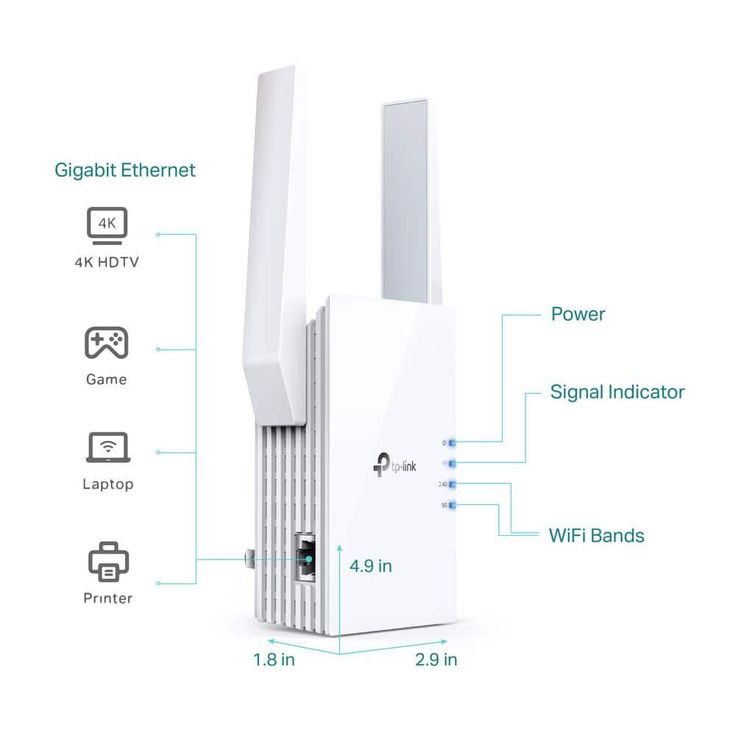
5. Gigabit Ethernet Port for Wired Connections
The extender includes a Gigabit Ethernet port, which allows you to connect wired devices for ultra-fast performance.
✔ Smart TVs
✔ Gaming consoles
✔ Streaming boxes
✔ Desktop PCs
This provides uninterrupted speeds, ideal for data-heavy applications like 4K video streaming and online gaming.
6. Smart Signal Indicator for Easy Placement
✔ Multi-color LED indicator helps you find the best location for maximum coverage
✔ Ensures optimal placement for extended Wi-Fi range and performance
7. Universal Compatibility
Works with any Wi-Fi router or access point, making it an easy upgrade for any network setup.
8. Easy Setup with the TP-Link Tether App
✔ Quick setup using the TP-Link Tether App (iOS & Android)
✔ Manage Wi-Fi settings, monitor devices, and optimize performance remotely
✔ Customizable network settings, including guest Wi-Fi and parental controls
Performance and Coverage
The TP-Link TL-RE605X is designed to enhance Wi-Fi coverage and performance in medium to large homes. Its Wi-Fi 6 technology ensures that multiple devices can connect simultaneously without network slowdowns.
Best for:
✔ Large homes or multi-story buildings
✔ Streaming 4K UHD content and online gaming
✔ Smart homes with multiple connected devices
✔ Offices needing high-speed, reliable internet
How to Set Up the TP-Link TL-RE605X
Method 1: WPS Button (Quick Setup)
- Plug in the extender within range of your router.
- Press the WPS button on your router.
- Press the WPS button on the TL-RE605X within 2 minutes.
- The LED signal indicator will confirm a successful connection.
- Move the extender to your desired location.
Method 2: TP-Link Tether App or Web Interface
- Plug in the extender and connect to the TP-Link_Extender network.
- Open the Tether App or visit tplinkrepeater.net in a web browser.
- Follow the on-screen instructions to connect the extender to your router.
- Once connected, relocate the extender for optimal coverage.
Who Should Buy the TP-Link TL-RE605X?
The TP-Link AX1800 Wi-Fi Range Extender (TL-RE605X) is perfect for:
✔ Homeowners and businesses looking for high-speed Wi-Fi 6 coverage
✔ Gamers and streamers needing low-latency, ultra-fast connectivity
✔ Smart home users with multiple connected devices
✔ Users wanting a mesh network experience with TP-Link OneMesh™ routers
Conclusion: Is the TP-Link TL-RE605X Worth It?
The TP-Link TL-RE605X is a powerful and future-proof Wi-Fi extender that delivers high-speed AX1800 performance, Wi-Fi 6 efficiency, and OneMesh™ compatibility. With dual-band support, a Gigabit Ethernet port, and easy setup options, it ensures seamless, high-performance connectivity for modern homes and offices.
If you need stronger, faster Wi-Fi with next-gen technology, the TL-RE605X is an excellent investment for a smooth and uninterrupted internet experience.
Talk to an expert about TP-Link AX1800 Wi-Fi Range Extender – TL-RE605X
Get guidance on setup, compatibility, and delivery tailored to your needs.