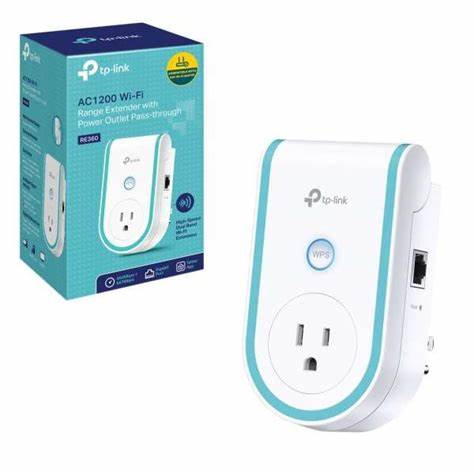
TP-Link AC1200 Wi-Fi Range Extender with AC Passthrough – TL-RE360 7,200.00
TP-Link AC1200 Wi-Fi Range Extender with AC Passthrough – TL-RE360 | Orbitlink Solutions
Free delivery for orders over KSh 10,000
Wishlist Sign in +254743720551

TP-Link AC1200 Wi-Fi Range Extender with AC Passthrough – TL-RE360

KSh 7,200.00

TP-Link AC1200 Wi-Fi Range Extender with AC Passthrough – TL-RE360 Introduction Struggling with weak Wi-Fi signals and dead zones in your home? The TP-Link AC1200 Wi-Fi Range Extender (TL-RE360) offers a simple yet powerful solution to extend your network coverage....

Fast delivery Warranty support Expert help
  • Availability: Available in store

TP-Link AC1200 Wi-Fi Range Extender with AC Passthrough – TL-RE360

Introduction

Struggling with weak Wi-Fi signals and dead zones in your home? The TP-Link AC1200 Wi-Fi Range Extender (TL-RE360) offers a simple yet powerful solution to extend your network coverage. Designed with dual-band speeds up to 1200Mbps, high-gain antennas, and intelligent placement indicators, this extender ensures stable, high-speed connectivity throughout your home.

One of its standout features is the AC passthrough socket, which allows you to retain access to a power outlet while using the extender—perfect for homes with limited plug space. Whether you're streaming 4K content, gaming, or connecting smart devices, the TL-RE360 provides reliable performance without sacrificing convenience.

This guide explores the features, setup process, and benefits of the TL-RE360 to help you determine if it’s the right choice for your network needs.


Key Features

1. AC1200 Dual-Band Speeds for Faster Wi-Fi

Up to 867Mbps on the 5GHz band – ideal for gaming, 4K streaming, and video calls
Up to 300Mbps on the 2.4GHz band – perfect for browsing, email, and smart devices

With dual-band technology, the extender ensures that your devices always connect to the best available band, improving overall speed and performance.

2. Built-in AC Passthrough Socket for Convenience

✔ Unlike most range extenders, the TL-RE360 includes an AC passthrough socket, allowing you to plug in other devices without losing an outlet.
Power-saving design ensures efficient energy use without overloading your electrical system.

3. Intelligent Signal Indicator for Optimal Placement

✔ A multi-color LED indicator helps you find the best location for the extender.
Blue light = strong connection, Red light = move closer to the router.

4. High-Gain Antennas for Superior Coverage

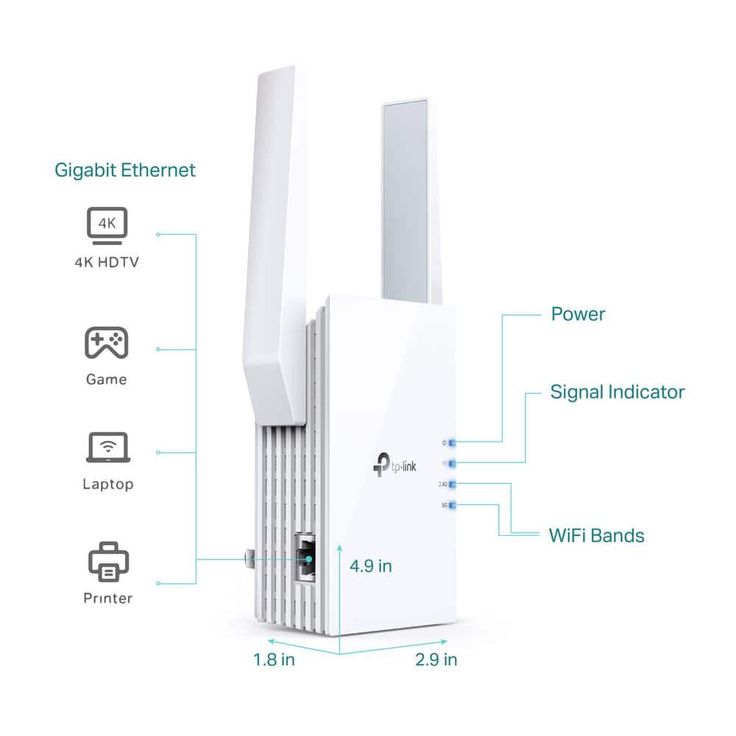
Dual external antennas enhance Wi-Fi coverage and signal reliability.
✔ Ensures stable connections across multiple rooms, ideal for large homes or multi-story buildings.

5. AP Mode for a Wired to Wireless Solution

✔ The TL-RE360 includes an Ethernet port, allowing you to convert a wired connection into a Wi-Fi hotspot (Access Point mode).
✔ Perfect for gaming consoles, smart TVs, or PCs that require a stable wired connection.

6. Universal Compatibility

✔ Works with any Wi-Fi router or access point, making it an easy upgrade for any network.

7. Easy Setup with TP-Link Tether App

Quick setup via the TP-Link Tether App (iOS & Android).
Monitor and manage your network settings with ease.


Performance and Coverage

The TP-Link TL-RE360 enhances Wi-Fi coverage in medium to large homes, ensuring smooth performance for multiple devices.

Best suited for:

Eliminating Wi-Fi dead zones in bedrooms, offices, and basements
4K streaming, online gaming, and video conferencing
Smart home users needing reliable connectivity for multiple devices


How to Set Up the TP-Link TL-RE360

Method 1: WPS Button (Quick Setup)

  1. Plug the extender into a power outlet within range of your router.
  2. Press the WPS button on your router.
  3. Press the WPS button on the TL-RE360 within 2 minutes.
  4. Wait for the LED indicator to confirm a successful connection.
  5. Move the extender to your preferred location.

Method 2: TP-Link Tether App or Web Interface

  1. Plug in the extender and connect to the TP-Link_Extender network.
  2. Open the Tether App or visit tplinkrepeater.net in a web browser.
  3. Follow the on-screen instructions to connect the extender to your router.
  4. Once connected, relocate the extender for optimal coverage.

Who Should Buy the TP-Link TL-RE360?

The TP-Link AC1200 Wi-Fi Range Extender (TL-RE360) is perfect for:
Homeowners needing better Wi-Fi coverage
Users who want to extend Wi-Fi without losing a power outlet
Gamers and streamers looking for fast, lag-free connections
Smart home users with multiple connected devices


Conclusion: Is the TP-Link TL-RE360 Worth It?

The TP-Link TL-RE360 is a versatile and high-performance range extender that offers AC1200 dual-band speeds, a built-in AC passthrough socket, and intelligent placement features. With high-gain antennas, an Ethernet port, and an easy setup process, it provides seamless connectivity for modern homes and offices.

If you need a powerful Wi-Fi range extender with a passthrough socket for added convenience, the TL-RE360 is an excellent investment to enhance your network.

Need help?

Talk to an expert about TP-Link AC1200 Wi-Fi Range Extender with AC Passthrough – TL-RE360

Get guidance on setup, compatibility, and delivery tailored to your needs.

💬 Chat with us