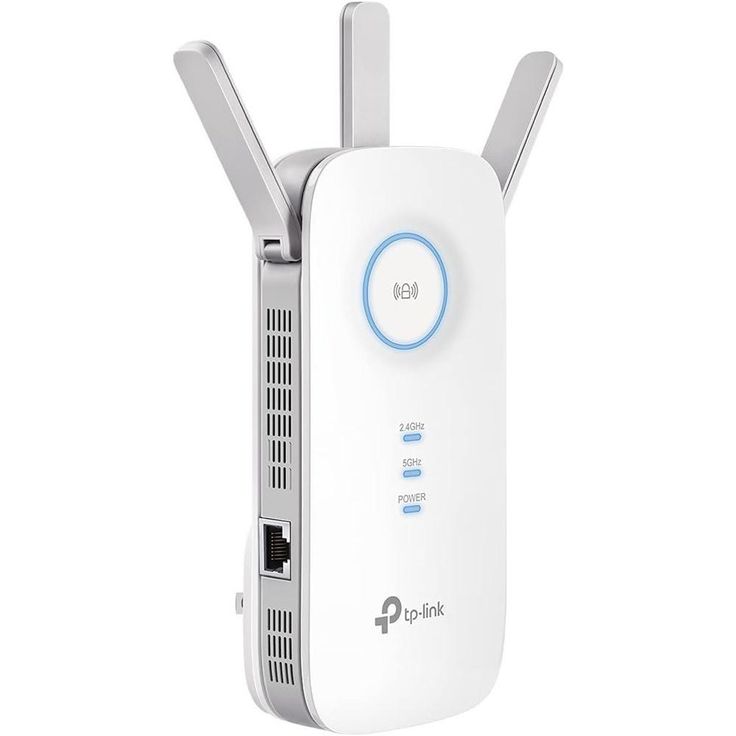
TP-Link AC1750 Gigabit Wifi Range Extenders RE450
The TP-Link RE450 is a high-powered, dual-band Wi-Fi range extender designed to enhance existing networks by eliminating weak signals and boosting coverage. It offers ultra-fast speeds of up to 1750Mbps, making it an excellent choice for homes, offices, and gaming...
The TP-Link RE450 is a high-powered, dual-band Wi-Fi range extender designed to enhance existing networks by eliminating weak signals and boosting coverage. It offers ultra-fast speeds of up to 1750Mbps, making it an excellent choice for homes, offices, and gaming setups.
This extender bridges the gap between your main router and areas with poor signal strength, providing stable, high-speed connections for multiple devices. Let’s dive into its key specifications, features, and performance.
Key Features & Technical Specifications
| Feature | Details |
|---|---|
| Wi-Fi Speed | 1750Mbps (450Mbps on 2.4GHz + 1300Mbps on 5GHz) |
| Wi-Fi Bands | Dual-band (2.4GHz & 5GHz) |
| Antennas | 3 external high-gain antennas |
| Ethernet Port | 1 × Gigabit Ethernet Port |
| Processor | Dual-core CPU for faster performance |
| Setup Method | WPS button & Web-based setup |
| Signal Strength Indicator | Yes (LEDs for best placement) |
| Power Consumption | ≈ 9W |
| Operating Modes | Range Extender, Access Point |
| Security Protocols | WPA, WPA2-PSK (AES) |
| Compatible with All Routers | Yes |
In-Depth Feature Analysis
1. Ultra-Fast Dual-Band Wi-Fi Performance (1750Mbps)
One of the biggest strengths of the TP-Link RE450 is its dual-band capability, allowing it to operate on both 2.4GHz and 5GHz frequencies simultaneously.
✔ 2.4GHz Band (450Mbps) – Ideal for web browsing, emails, and IoT devices.
✔ 5GHz Band (1300Mbps) – Best for 4K streaming, online gaming, and large file transfers.
Why is Dual-Band Important?
✔ Faster Speeds – 5GHz offers higher bandwidth with less interference.
✔ Reduced Congestion – Devices can connect to the least crowded band automatically.
✔ Better Performance for Streaming & Gaming – More bandwidth for high-demand activities.
💡 Ideal Use Case:
✔ Smart Homes – Handles multiple IoT devices seamlessly.
✔ Gaming & Streaming – No lag or buffering during 4K video streaming and online gaming.
2. Three External Antennas – Wider Coverage & Stronger Signals
Unlike compact range extenders with internal antennas, the RE450 is equipped with three adjustable high-gain antennas, delivering stronger signal reception and distribution.
How Do External Antennas Improve Performance?
✔ Better Signal Pickup – Enhances connection even with weak router signals.
✔ Stronger Signal Broadcasting – Expands coverage over large areas.
✔ Adjustable Positioning – Fine-tune signal direction for optimal performance.
💡 Best Placement Tip: Position the antennas vertically for multi-floor coverage or horizontally for a wider range on the same floor.
3. Gigabit Ethernet Port – High-Speed Wired Connectivity
The TP-Link RE450 includes a Gigabit Ethernet port, which allows users to connect wired devices for a stable, high-speed connection.
Why is a Gigabit Port Important?
✔ 1Gbps Speeds – Up to 10x faster than standard 100Mbps ports.
✔ Perfect for Gaming & Streaming – Eliminates lag, reduces latency.
✔ Versatile Usage – Connect smart TVs, gaming consoles, PCs, and media players.
💡 Use Case Example:
✔ Gaming Console (PS5/Xbox) – Prevents Wi-Fi lag and packet loss.
✔ 4K Smart TV – Ensures buffer-free Ultra HD streaming.
4. High-Speed Mode – Optimized Bandwidth for Maximum Performance
The RE450 includes a High-Speed Mode, which dedicates one Wi-Fi band for communication with the router and the other for extending coverage.
✔ Reduces Latency – Ensures smooth, lag-free performance for bandwidth-intensive tasks.
✔ Improves Network Stability – Eliminates congestion when multiple devices are connected.
💡 Best Use Case:
✔ Use 5GHz for streaming/gaming and 2.4GHz for browsing & smart home devices.
5. WPS Button – Instant, Hassle-Free Setup
Setting up the TP-Link RE450 is incredibly simple, thanks to its WPS button.
✔ Press WPS on Your Router → Press WPS on RE450 → Connected in Seconds!
💡 Alternative Setup: You can also configure it manually using the TP-Link Tether App or the web-based interface.
6. Intelligent Signal Indicator LEDs – Optimize Placement
The RE450 includes LED signal indicators, helping users find the best location for the extender.
✔ Blue Light = Strong signal, ideal placement.
✔ Red Light = Weak signal, move closer to the router.
💡 Placement Tip: Install the RE450 halfway between your router and the Wi-Fi dead zone for the best results.
Performance Review – Real-World Testing
The TP-Link RE450 is one of the most powerful Wi-Fi extenders in its class. Users report improved signal strength, reduced buffering, and seamless gaming.
✔ Covers large homes (up to 2,000 sq. ft.).
✔ No drop in speed, even with multiple connected devices.
✔ Handles 4K streaming & online gaming without lag.
User Feedback – What Are Customers Saying?
The RE450 is highly rated for its fast speeds, strong range, and easy setup.
Pros (User Reviews)
✔ Superb Range – Extends Wi-Fi through walls & multiple floors.
✔ Stable High-Speed Connection – Great for gaming & streaming.
✔ Fast & Simple Setup – WPS button makes installation effortless.
Final Verdict – Is the RE450 Worth It?
✅ Recommended For:
✔ Large Homes & Offices needing strong, reliable Wi-Fi extension.
✔ Gamers & 4K Streamers requiring lag-free, high-speed performance.
✔ Smart Homes with multiple IoT devices connected simultaneously.
Final Score: 9/10 – One of the Best Dual-Band Wi-Fi Extenders Available 🚀
If you need fast speeds, strong coverage, and a reliable solution for Wi-Fi dead zones, the TP-Link RE450 AC1750 Gigabit Wi-Fi Range Extender is one of the best investments you can make.
Talk to an expert about TP-Link AC1750 Gigabit Wifi Range Extenders RE450
Get guidance on setup, compatibility, and delivery tailored to your needs.