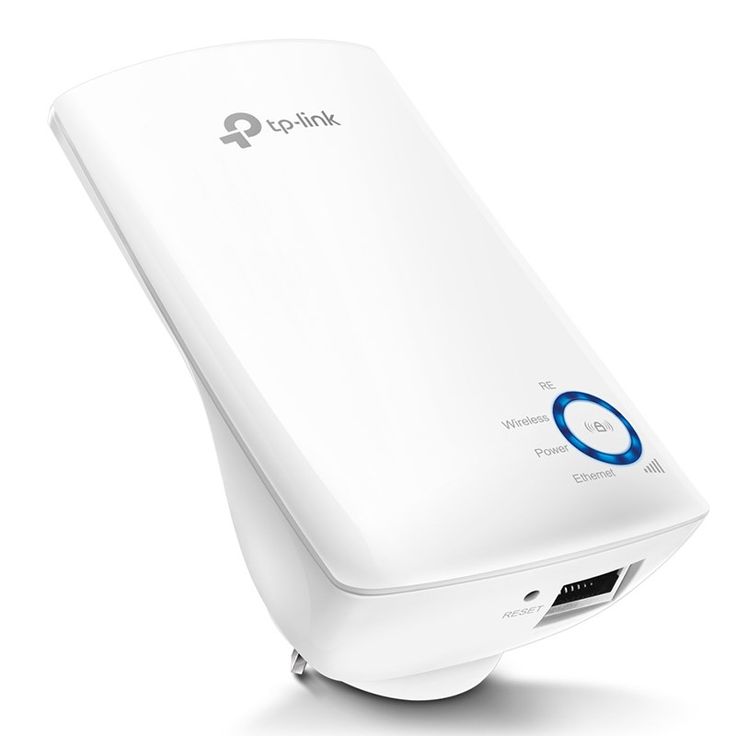
300Mbps Universal Wi-Fi Range Extender Tplink TL-WA850RE
TP-Link TL-WA850RE 300Mbps Universal Wi-Fi Range Extender Introduction A strong and reliable Wi-Fi signal is essential for smooth internet connectivity, yet many households experience weak spots where the signal doesn’t reach. The TP-Link TL-WA850RE 300Mbps Universal Wi-Fi Range Extender is...
TP-Link TL-WA850RE 300Mbps Universal Wi-Fi Range Extender
Introduction
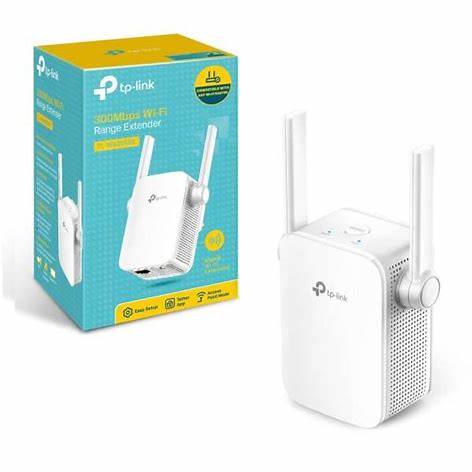
A strong and reliable Wi-Fi signal is essential for smooth internet connectivity, yet many households experience weak spots where the signal doesn’t reach. The TP-Link TL-WA850RE 300Mbps Universal Wi-Fi Range Extender is designed to extend your wireless network, ensuring that every corner of your home has seamless connectivity.
This device is an excellent solution for boosting Wi-Fi coverage, whether in large homes, multi-story buildings, or office environments. Featuring 300Mbps speeds, a compact wall-plug design, an intelligent signal indicator, and Ethernet port functionality, the TL-WA850RE is a user-friendly and efficient way to eliminate Wi-Fi dead zones.
Key Features
1. 300Mbps Wi-Fi Speed for Reliable Performance
The TL-WA850RE operates on the 2.4GHz band, offering speeds of up to 300Mbps. This ensures a smooth and stable connection for:
✔ Web browsing
✔ Social media and emails
✔ HD video streaming
✔ Online gaming
2. Wall-Plugged Compact Design
The sleek wall-plugged design makes it easy to install without cluttering your space. No extra power cords or cables are required—simply plug it into any power outlet, and you're ready to expand your Wi-Fi coverage.
3. Intelligent Signal Indicator for Optimal Placement
Finding the perfect spot for your extender is simple with the LED signal indicator, which helps you identify the best location for maximum coverage.
- Strong Blue Light: Good connection to the router, ideal placement.
- Weak Blue Light: Move closer to the router for a better connection.
4. One-Touch WPS Setup
Setting up the TL-WA850RE is quick and hassle-free using the Wi-Fi Protected Setup (WPS) button:
- Press the WPS button on your router.
- Press the WPS button on the extender within 2 minutes.
- Wait for the LED to stabilize, indicating a successful connection.
Once connected, you can relocate the extender to your preferred position without needing to repeat the setup process.
5. Ethernet Port for Wired Connections
The TL-WA850RE features a Fast Ethernet port, allowing you to connect wired devices such as:
✔ Smart TVs
✔ Gaming consoles
✔ Desktop computers
✔ Streaming devices
This feature enables the extender to function as a Wi-Fi access point (AP mode), converting a wired internet connection into a strong wireless signal.
6. Universal Compatibility with All Routers
The TL-WA850RE works seamlessly with any standard Wi-Fi router, making it an extremely versatile solution for boosting your home or office network.
7. Easy Management with TP-Link Tether App
The TP-Link Tether app, available for both iOS and Android, allows you to:
✔ Monitor and manage the extender remotely
✔ Customize Wi-Fi settings
✔ Set parental controls
✔ Check real-time signal strength
Performance and Coverage
The TP-Link TL-WA850RE effectively extends Wi-Fi coverage in homes, apartments, and offices where weak signals are a problem. It ensures that users experience smooth internet access in bedrooms, basements, and other areas previously affected by connectivity issues.
Best suited for:
✔ Homes and apartments with Wi-Fi dead zones
✔ Small to medium-sized spaces needing better connectivity
✔ Individuals requiring a simple, effective, and affordable range extender
How to Set Up the TP-Link TL-WA850RE
Method 1: WPS Button (Quick Setup)
- Plug in the extender within range of your router.
- Press the WPS button on your router.
- Press the WPS button on the TL-WA850RE within two minutes.
- Wait for the LED signal indicator to turn solid blue, confirming a successful connection.
- Relocate the extender to an optimal position.
Method 2: Web Interface or TP-Link Tether App
- Plug in the extender and connect to the TP-Link_Extender network.
- Open a web browser and visit tplinkrepeater.net or use the Tether app.
- Follow the on-screen instructions to connect the extender to your router.
- Once configured, move the extender to an area where you need better Wi-Fi coverage.
Who Should Buy the TP-Link TL-WA850RE?
The TP-Link TL-WA850RE is an excellent choice for:
- Home users looking to enhance Wi-Fi coverage effortlessly
- Apartment dwellers dealing with weak signals due to thick walls
- Offices needing a quick, effective solution for expanding network coverage
- Users with wired devices who need a reliable Ethernet port connection
Conclusion: Is the TP-Link TL-WA850RE Worth It?
For those seeking a cost-effective, easy-to-use Wi-Fi range extender, the TP-Link TL-WA850RE is a fantastic choice. With 300Mbps speeds, a plug-and-play design, an intelligent signal indicator, and an Ethernet port, it efficiently eliminates weak Wi-Fi spots in homes and small offices.
Whether you need better connectivity in specific rooms, want to connect wired devices wirelessly, or simply wish to expand your network, the TL-WA850RE provides a stable, seamless, and reliable solution for all your internet needs.
Talk to an expert about 300Mbps Universal Wi-Fi Range Extender Tplink TL-WA850RE
Get guidance on setup, compatibility, and delivery tailored to your needs.