MikroTik Network Monitoring Kenya
MikroTik Network Monitoring Kenya: genuine equipment, practical design, supply and support from Orbitlink Solutions Kenya. Plan a reliable, scalable networ

Products Available


MikroTik Network Monitoring Kenya: Visibility Before Outages
MikroTik Network Monitoring Kenya gives Kenyan ISPs, WISPs, property managers and growing businesses a practical way to build a dependable service around real subscribers, traffic patterns and support responsibilities. Orbitlink Solutions helps customers plan genuine MikroTik equipment, compatible switching, fibre accessories, wireless coverage, power protection and implementation support as one connected deployment.
Quick answer: the right MikroTik Network Monitoring Kenya approach begins with a clear service map: who connects, how authentication works, which traffic is important, how faults are detected and what happens when a link or device fails. A well-documented design is easier to support, bill, secure and expand than a network built from isolated settings.
This guide focuses on proactive alerts, capacity trend review and documented incident response. It is written for teams that need practical choices rather than copied configurations. Before ordering, confirm current model specifications, stock, software compatibility and the capabilities of the upstream internet service.
What does MikroTik Network Monitoring Kenya involve?
MikroTik Network Monitoring Kenya is not simply a router purchase or a single configuration task. It combines the edge router, subscriber or site addressing, routing policy, switching, fibre or wireless uplinks, security boundaries, monitoring, power resilience and a handover process. The final design should make it clear which traffic is allowed, which services are protected and how the operator can recover from an error without an extended outage.
For a small deployment, the priorities may be secure administration, stable internet and an organised backup. As users, sites or services increase, the plan should also cover VLANs, upstream diversity, remote access, capacity monitoring, logging, service profiles and a predictable support workflow. MikroTik Network Monitoring Kenya works best when these choices are documented before configuration begins.
Plan the service before selecting hardware
Map subscribers, applications and uplinks
List the subscriber count, expected peak usage, applications that need low latency, local services, upstream links, physical sites and future expansion plans. Separate staff, guests, management, voice, CCTV and customer traffic when their risk or performance requirements differ. This turns a broad request for MikroTik Network Monitoring Kenya into measurable interface, throughput and security requirements.
Allow for real processing load
Port speed alone is not a capacity guarantee. Firewall filtering, queues, NAT, VPN encryption, routing tables, hotspot services and logging all add work. Choose equipment with sensible headroom for the intended services, then test from real devices during handover. A short capacity review now is cheaper than a rushed replacement after customers experience slowdowns.
Design for operation and recovery
Use clear device names, interface labels, an address plan, protected backups and a topology diagram. Restrict administrator access to trusted paths, remove unused services and use encrypted access methods. The outcome of MikroTik Network Monitoring Kenya should be a service that another authorised technician can understand and support without guessing.
Comparison: common deployment priorities
| Environment | Primary need | Recommended focus |
|---|---|---|
| Small ISP or estate network | Reliable shared access | Secure edge policy, managed switching, backups and customer isolation. |
| WISP or remote sites | Stable last-mile connectivity | Link monitoring, aligned uplinks, surge protection and documented failover. |
| Hotel, campus or hotspot | Controlled guest service | Clear access policy, bandwidth fairness, privacy-aware logging and support steps. |
| Multi-site business | Continuity across branches | VPN design, routing policy, monitored WAN health and staged change control. |
| Growing provider | Scalability and accountability | Capacity trends, service segmentation, billing integration and incident records. |
Buying guide for MikroTik Network Monitoring Kenya
Start with the complete bill of materials, not the router alone. Confirm compatible switches, access points, SFP modules, PoE budget, cabinet or mounting space, surge protection, UPS runtime, fibre patching, cabling and labels. If the deployment depends on wireless links, account for location, line of sight, mounting and weather protection. If it depends on fibre, confirm the transceiver type, connector, link budget and the upstream handoff.
Budget for implementation and support as well as hardware. A genuine device with an undocumented configuration can still create downtime. Orbitlink Solutions can help customers compare MikroTik routers, managed switches, networking equipment, fibre accessories and power options so the deployment remains compatible from edge to endpoint.
Recommended practices by use case
- Home office or micro-business: prioritise secure administrator access, a clean address plan, reliable WiFi and a recoverable backup.
- Office, retail or property network: isolate business systems, CCTV and guests; confirm PoE capacity and test critical applications.
- Hotel, school or public hotspot: make access rules easy to explain, apply fair bandwidth policy and retain support records.
- WISP or multi-site provider: monitor link health, capacity, latency and packet loss; document routing and failover behaviour.
- Enterprise or ISP core: use change control, capacity modelling, resilient uplinks and clear escalation paths.
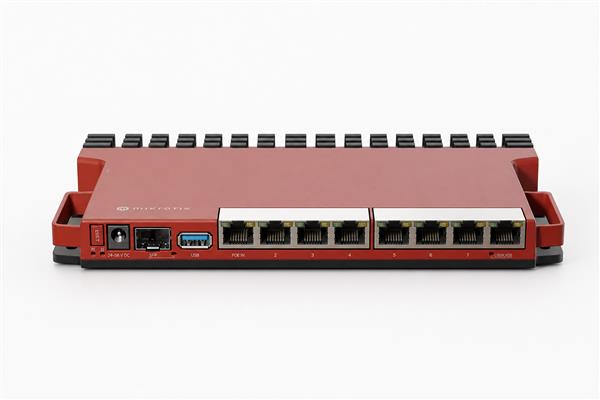
Security, monitoring and maintenance
MikroTik Network Monitoring Kenya should include a deliberate security policy. Define authorised management sources, use strong individual credentials, keep services current after reviewing release guidance, comment rules and retain a rollback path. Do not expose administration interfaces to the internet simply for convenience. Test failover, customer isolation and administrator restrictions as part of the handover, not only after an incident.
Monitoring turns a network from reactive to manageable. Track WAN health, device resources, interface errors, signal or optical link health where applicable, subscriber demand and critical service availability. Review trends so upgrades are planned before peak usage creates a customer-facing problem. The official MikroTik documentation is the source of truth for current RouterOS and product guidance.
Frequently Asked Questions
How do I choose a suitable MikroTik Network Monitoring Kenya design?
Begin with users, applications, link types, security boundaries and growth expectations. Match the hardware and configuration to the real processing load, interfaces and support plan rather than choosing from port count alone. A concise site survey makes this decision more reliable.
Can an existing network be upgraded gradually?
Yes. Take a verified backup, document the existing topology and make staged changes during a suitable maintenance window. Test each stage with real customer or staff traffic. A controlled migration is safer than replacing every setting at once.
Do I need VLANs?
VLANs are useful when groups such as staff, guests, CCTV, voice, management or subscribers need separation. They should be supported by clear switch-port roles, routing policy and testing. Segmentation is valuable only when it is documented and maintained.
How much capacity headroom is sensible?
Leave room for expected subscriber growth, new services, additional rules and upstream changes. The precise amount depends on traffic and features, but a design should avoid operating continuously at the edge of processor, memory, port or power limits.
Can Orbitlink Solutions supply the complete solution?
Yes. Orbitlink Solutions can help align routers, switches, access points, PoE, fibre modules, cabinets, cabling and accessories with the intended service. Use the technical enquiry channel to share site details before ordering.
What should be documented at handover?
Keep the topology, equipment list, configuration export, addressing plan, interface labels, approved administrator process, backup location and support contacts. This information makes a future fault or upgrade much faster to manage.
How often should the service be reviewed?
Review after material changes and on a regular operational schedule. Check access controls, backups, performance trends, logs, link health and whether the original capacity assumptions still fit the users and applications.
Can MikroTik Network Monitoring Kenya support fibre and wireless links together?
Yes, provided the router, switches, SFP modules, wireless equipment and routing policy are selected as one system. Confirm physical compatibility, link capacity and fault behaviour rather than assuming a fast interface alone guarantees end-to-end performance.
What are common mistakes to avoid?
Common mistakes include using default credentials, under-sizing power or PoE, mixing guest and management traffic, skipping backups, leaving undocumented rules and postponing monitoring. These issues usually make support more difficult than the initial hardware choice.
Where can I get current product advice?
Compare the relevant equipment, confirm current availability and request a tailored recommendation from Orbitlink Solutions. For related Kenyan technology resources, see MikroTik Kenya, Fiber Optics Kenya and Starlink Kenya.
Implementation checklist
Before installation, walk the site and verify the physical design. Record incoming service handoffs, router and switch locations, cable paths, rack space, ventilation, grounding, surge protection and UPS capacity. Confirm that critical equipment has clearly labelled power and that staff know which circuits support the network. A tidy physical layer reduces faults that software settings cannot solve.
Next, define the logical design in plain language. Identify each network, gateway, DHCP scope, VLAN, routing path, authentication method and service dependency. Decide how subscriber or guest access begins, what happens when payment or access status changes, how priority traffic is handled and which information the support team needs before troubleshooting. This preparation makes MikroTik Network Monitoring Kenya more predictable and easier to audit.
Test the intended experience
Testing should reflect real use. Check browsing, DNS, voice or video calls, business applications, customer sign-in where relevant, local service access, permitted remote administration and isolation between user groups. Test the failure of an upstream link, a switch uplink or a power-protected device where the design includes redundancy. Document both the expected result and the final observed result.
A successful speed test alone is not enough. A service can show good throughput while a firewall rule exposes management access, a wireless sector is overloaded, a fibre interface reports errors or a customer group can reach a system it should not. The handover test should include security, resilience and recovery alongside performance.
Operational standards that scale
Operators should use a consistent change process. Capture the reason for a change, the affected devices, the maintenance window, the backup reference, the validation method and the rollback step. Comment rules and use names that explain their purpose. This discipline is valuable for a single site and becomes essential as teams, locations and subscriber counts grow.
Keep customer-facing communication simple. When a planned change may affect service, explain the time window, expected effect and support route. During an incident, collect factual symptoms before changing multiple settings. Good records help separate an upstream fault, a local power issue, an overloaded access point and a configuration problem, which reduces unnecessary downtime.
Budget and lifecycle planning
Prices, availability and device capabilities change over time. Before a purchase or refresh, reconfirm the current specification, warranty terms, compatibility notes and lead time. Include spares for essential connectors, power supplies or transceivers when a site is remote or service-critical. Retain serial records and proof of purchase so warranty or replacement discussions are straightforward.
Plan reviews at least after major service additions, growth in subscribers, provider changes or a significant incident. Capacity graphs, support tickets and link-error trends provide better upgrade signals than guesswork. A measured refresh plan protects customer experience while avoiding overbuying equipment that the design will not use.
Trust, delivery and support
Orbitlink Solutions provides genuine networking equipment, practical guidance, delivery support and a contact route for follow-up planning. Customers can combine hardware selection with a discussion of installation, configuration, fibre, wireless, power and future expansion. This one-stop approach reduces compatibility gaps between product ordering and final deployment.
For a tailored recommendation, provide the location type, expected user or subscriber count, upstream services, current equipment, critical applications, desired resilience and expansion timeframe. That information supports a recommendation based on the deployment rather than a generic product list. It also makes the final MikroTik Network Monitoring Kenya design easier to document, verify and maintain.
When to request an expert review
Request an expert review before changing a live service when the site supports many customers, uses multiple upstreams, carries payments or business-critical applications, includes public access, has unexplained packet loss or must meet a strict uptime expectation. A short review can identify bottlenecks in routing, switching, power, wireless coverage, fibre interfaces and policy design before the change affects users.
An effective review starts with evidence: a topology diagram, configuration export, recent monitoring data, error logs, customer symptoms, link details and a record of recent changes. It then considers the whole path from incoming service to customer device. This avoids the common mistake of repeatedly changing router settings when the actual cause is a damaged cable, unsuitable power supply, saturated uplink or poorly placed access point.
Practical procurement checklist
- Confirm the required interfaces, speed, copper or fibre media and physical connector type.
- Check that power supplies, PoE standards, UPS protection and mounting hardware are included.
- Match router capacity to firewalling, queues, VPN, authentication and monitoring workloads.
- Verify switch, SFP, wireless and cabling compatibility before delivery.
- Keep a record of the final model, serial information, warranty details and baseline configuration.
These steps give MikroTik Network Monitoring Kenya a clear operational foundation. They also make comparison shopping more meaningful because the question becomes whether a solution supports the complete service requirement, not only whether it has an attractive initial price. This is especially important when a deployment will grow, serve paying users or support essential business services.
Helpful next action
Use the guide to prepare a short requirements list, then share it with Orbitlink Solutions before purchase or implementation. Include intended users, link types, key applications, physical sites, existing equipment and expansion plans. The resulting conversation can identify suitable equipment, compatible accessories and an implementation sequence that reflects the real network rather than assumptions.
Keep the service current
Review firmware and RouterOS changes carefully, using official release notes and a tested backup before upgrading production devices. Confirm that the selected version is appropriate for the hardware and the services in use. Where possible, stage changes on a non-critical device or during a controlled maintenance period, then validate subscriber access, routing, monitoring and administrator controls.
Update the documentation after every material change. The most useful network record is the one that reflects the live service: current uplinks, address ranges, VLANs, support contacts, access procedures and known limitations. This reduces dependency on an individual technician and gives MikroTik Network Monitoring Kenya a stable foundation for future growth.
Finally, keep expectations realistic. Network performance depends on the full path: provider capacity, edge design, switching, WiFi or fibre quality, client devices and operating discipline. A clear baseline and periodic review make it possible to identify the real constraint quickly and improve MikroTik Network Monitoring Kenya with evidence rather than trial and error.
Final Thoughts
MikroTik Network Monitoring Kenya delivers the best result when equipment selection, implementation, security, monitoring and support are treated as one connected task. Orbitlink Solutions helps customers across Kenya build networks that can be operated confidently today and expanded without avoidable rework tomorrow.
Contact Orbitlink Solutions for a tailored equipment list, practical implementation guidance and support planning.