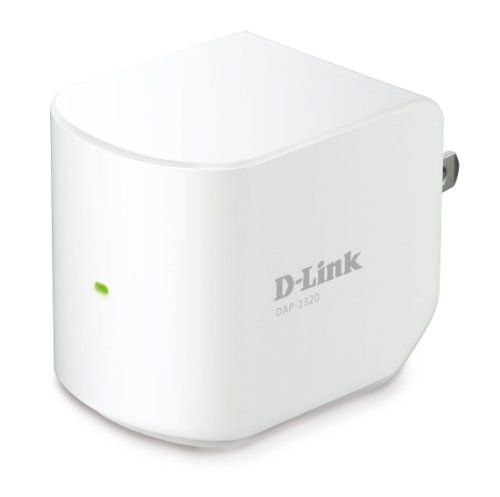
Wi-Fi Extender 300 Mbps D-Link (DAP-1320)
D-Link DAP-1320 Wi-Fi Range Extender (300 Mbps) Overview The D-Link DAP-1320 is a compact, efficient, and affordable wireless range extender that boosts Wi-Fi coverage and helps eliminate weak signal areas in your home or office. Designed for easy plug-in use,...
D-Link DAP-1320 Wi-Fi Range Extender (300 Mbps)
Overview
The D-Link DAP-1320 is a compact, efficient, and affordable wireless range extender that boosts Wi-Fi coverage and helps eliminate weak signal areas in your home or office. Designed for easy plug-in use, this device is ideal for users looking to extend Wi-Fi without complex installations.
With Wireless N technology and speeds of up to 300Mbps, the DAP-1320 is perfect for browsing, social media, video streaming, and smart home devices. Its compact design allows for flexible placement without taking up valuable space.
Key Features & Specifications
1. 300Mbps Wireless N Speed
- Supports up to 300Mbps on the 2.4GHz band, ideal for everyday internet use.
- Provides a stable and reliable connection for browsing, light streaming, and smart devices.
2. Compact Plug-in Design
- Small, space-saving form factor that plugs directly into a wall outlet.
- No cables or bulky equipment—perfect for apartments, small homes, or offices.
3. Easy WPS One-Touch Setup
- Quick and hassle-free installation with a simple push of the WPS (Wi-Fi Protected Setup) button.
- No need for complicated configurations—just press WPS on your router and then on the extender to establish a connection.
4. Wide Wireless Compatibility
- Works with all standard Wi-Fi routers and access points.
- Ensures seamless extension of any existing Wi-Fi network without compatibility issues.
5. Enhanced Coverage – Eliminate Dead Zones
- Extends Wi-Fi signals to hard-to-reach areas, including bedrooms, hallways, basements, and outdoor spaces.
- Provides stable internet for smart TVs, smartphones, laptops, and IoT devices.
6. Secure & Reliable Connection
- WPA/WPA2 encryption ensures a safe and secure wireless connection.
- Protects your network from unauthorized access.
7. Smart LED Signal Indicator
- LED lights guide you to find the best placement for optimal Wi-Fi extension.
- Red LED: Weak signal—move closer to the router.
- Green LED: Strong signal—ideal placement achieved.
Technical Specifications
| Feature | Specification |
|---|---|
| Wi-Fi Standard | IEEE 802.11n/g/b (2.4GHz) |
| Wi-Fi Speeds | Up to 300Mbps (2.4GHz) |
| Ethernet Port | ❌ (No Ethernet Port) |
| Antennas | Internal |
| Security Protocols | WPA, WPA2 |
| Setup Method | WPS Button / Web-Based UI |
| Dimensions | 2.2 x 1.6 x 2.0 inches |
| Power Source | Wall Plug (No External Adapter Needed) |
Performance & User Experience
The D-Link DAP-1320 is designed for basic home Wi-Fi extension needs. It performs well for light to moderate usage, including web browsing, social media, and streaming in 720p.
- Best for: Extending Wi-Fi in small to medium homes.
- Not ideal for: Heavy streaming, gaming, or large spaces due to the lack of dual-band support.
User Feedback:
✔ Pros:
- Super easy setup—just plug in and connect via WPS.
- Compact design blends seamlessly with any space.
- Affordable price for basic Wi-Fi extension needs.
Setup & Installation Guide
Step 1: Plug in the DAP-1320
- Insert the device into a wall socket within range of your existing router’s signal.
Step 2: Connect via WPS or Web UI
- WPS Setup:
- Press the WPS button on your router.
- Press the WPS button on the DAP-1320.
- Wait for the LED light to turn solid, indicating a successful connection.
- Manual Setup (Web UI):
- Connect to the D-Link extender’s Wi-Fi from your smartphone or PC.
- Open a web browser and visit http://dlinkap.local.
- Follow the on-screen setup wizard to complete the installation.
Step 3: Place the Extender in an Optimal Location
- Check the LED indicator to ensure good signal strength.
- If the light is red, move the extender closer to the router.
Who Should Buy the D-Link DAP-1320?
✅ Best for Small Homes & Apartments: Great for extending Wi-Fi in bedrooms, hallways, and offices.
✅ Users with Basic Internet Needs: Ideal for browsing, social media, and light streaming.
✅ Budget-Conscious Buyers: A low-cost solution for improving Wi-Fi coverage.
✅ People Who Want Easy Setup: No technical skills required—just plug in and press WPS.
Conclusion
The D-Link DAP-1320 is a simple, compact, and budget-friendly Wi-Fi extender for users who need to boost their 2.4GHz Wi-Fi signal in a small to medium-sized space. While it lacks dual-band support and advanced features like MU-MIMO or an Ethernet port, it excels in ease of use, affordability, and compact design. If you're looking for a basic Wi-Fi booster without spending too much, the DAP-1320 is an excellent choice.
Video Review & Setup Guide:
📺 Watch a detailed review & setup guide here:
Talk to an expert about Wi-Fi Extender 300 Mbps D-Link (DAP-1320)
Get guidance on setup, compatibility, and delivery tailored to your needs.