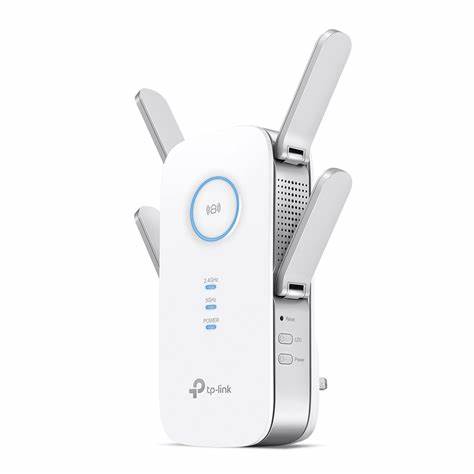
TP-Link AC2600 Wi-Fi Range Extender – TL-RE650
TP-Link AC2600 Wi-Fi Range Extender (RE650) Overview The TP-Link AC2600 RE650 Wi-Fi Range Extender is a premium networking device designed to expand wireless coverage while maintaining high performance and minimal latency. Whether you need to boost Wi-Fi signals in a...
TP-Link AC2600 Wi-Fi Range Extender (RE650)
Overview
The TP-Link AC2600 RE650 Wi-Fi Range Extender is a premium networking device designed to expand wireless coverage while maintaining high performance and minimal latency. Whether you need to boost Wi-Fi signals in a large house, office, or multi-story building, this extender ensures smooth, high-speed internet access for all connected devices. Equipped with MU-MIMO, dual-band technology, beamforming, and a Gigabit Ethernet port, it offers an advanced solution for demanding network environments.
Key Features & Specifications
1. Ultra-Fast Dual-Band Wi-Fi Performance
- 2.4GHz Band: Up to 800Mbps – ideal for browsing, email, and general usage.
- 5GHz Band: Up to 1733Mbps – perfect for high-speed tasks like 4K streaming, video conferencing, and online gaming.
- Total Speed: Up to 2600Mbps, ensuring lag-free performance even in high-traffic environments.
2. 4×4 MU-MIMO Technology – Optimized for Multiple Devices
- Multi-User, Multiple Input, Multiple Output (MU-MIMO) allows the RE650 to communicate with multiple devices simultaneously instead of one at a time, improving efficiency and reducing lag.
- Significantly enhances performance when multiple devices are connected, making it ideal for homes or offices with many users.
3. High-Gain External Antennas for Maximum Coverage
- Four powerful external antennas enhance Wi-Fi coverage, extending the signal throughout large spaces, multi-story homes, and outdoor areas.
- Beamforming technology directs the Wi-Fi signal toward connected devices, ensuring stronger, more reliable connections.
4. Intelligent Signal Indicator – Find the Best Placement
- The built-in LED signal strength indicator helps you find the optimal location for the extender.
- Red light: Weak signal – move the extender closer to the router.
- Blue light: Strong signal – optimal placement achieved.
5. Gigabit Ethernet Port – Wired Connectivity Option
- 1× Gigabit Ethernet port allows you to connect wired devices such as gaming consoles, smart TVs, or PCs for maximum stability and speed.
- Supports Access Point Mode, allowing the RE650 to function as a dedicated wireless AP.
6. High-Speed Mode – Enhanced Performance for Bandwidth-Intensive Tasks
- Uses one Wi-Fi band for backhaul and the other for connecting devices, effectively doubling the bandwidth for performance-intensive applications like 4K streaming and VR gaming.
7. Universal Compatibility – Works with Any Router
- Compatible with all Wi-Fi routers and access points, allowing seamless integration into your existing network.
- Ideal for extending Wi-Fi coverage in multi-room setups, basements, garages, and outdoor areas.
8. Easy Setup & Management via TP-Link Tether App
- Setup in minutes with the TP-Link Tether App (available for Android & iOS).
- Smart management features allow you to adjust settings, control connected devices, and monitor Wi-Fi performance remotely.
9. Secure & Reliable Connection
- Advanced security encryption (WPA/WPA2) protects your network from unauthorized access.
- Auto-sync feature allows the RE650 to copy router settings automatically, reducing setup time.
Technical Specifications
| Feature | Specification |
|---|---|
| Wi-Fi Standard | IEEE 802.11ac/n/g/b/a |
| Wi-Fi Speeds | 2.4GHz: 800Mbps, 5GHz: 1733Mbps (Total: 2600Mbps) |
| MU-MIMO Support | Yes (4×4) |
| Antennas | 4 × External High-Gain Antennas |
| Ethernet Port | 1 × Gigabit Ethernet Port |
| Beamforming | Yes |
| High-Speed Mode | Yes |
| Signal Indicator | Yes (LED Lights) |
| Power Consumption | 12W (Max) |
| Dimensions | 6.4 × 3.4 × 1.6 inches (163 × 86 × 40 mm) |
| Security | WPA-PSK/WPA2-PSK Encryption |
| Compatibility | Works with any router or access point |
Performance & User Experience
The TP-Link RE650 delivers exceptional performance, especially for high-speed applications. It has been tested to handle multiple connected devices without experiencing signal degradation or interruptions.
- 2.4GHz Performance: Suitable for web browsing, smart home devices, and emails.
- 5GHz Performance: Best for online gaming, 4K video streaming, and video conferencing.
- MU-MIMO Advantage: Even when multiple users are connected, network speeds remain fast and stable.
User Feedback:
- Users report that Wi-Fi coverage dramatically improves, even in previously dead-zone areas.
- The plug-and-play setup and Tether App control are highly appreciated.
- Some users noted that placing the extender at the right location is key to getting optimal performance.
Setup & Installation Guide
Step 1: Plug in the RE650
- Plug the extender into a power outlet within the range of your router’s Wi-Fi signal.
Step 2: Connect to Your Router
- Press the WPS button on your router and then press the WPS button on the RE650.
- The RE650 will automatically sync with your router.
- Alternatively, use the TP-Link Tether App or the Web UI to manually configure the extender.
Step 3: Placement Optimization
- Use the signal indicator LED to find the best location.
- Red Light? Move the extender closer to the router.
- Blue Light? The extender is placed in an optimal position.
Step 4: Enjoy Extended Wi-Fi Coverage
- Once set up, connect your devices to the extended network and enjoy seamless, high-speed internet.
Who Should Buy the TP-Link RE650?
✅ Gamers & Streamers: Delivers lag-free gaming and 4K ultra-HD streaming.
✅ Large Homes & Offices: Covers up to 14,000 sq. ft., eliminating dead zones.
✅ Multiple-Device Households: MU-MIMO ensures fast speeds even with multiple connections.
✅ Anyone with a Weak Wi-Fi Signal: Strengthens Wi-Fi coverage, especially in basements, garages, and outdoor areas.
Conclusion
The TP-Link AC2600 Wi-Fi Range Extender (RE650) is one of the most powerful and reliable Wi-Fi extenders on the market. With MU-MIMO technology, high-speed dual-band performance, beamforming, and an easy setup process, it’s the perfect solution for homes and offices needing strong, stable, and extended Wi-Fi coverage. If you want to eliminate Wi-Fi dead zones and enjoy seamless online experiences, this extender is an excellent investment.
Video Review & Setup Guide:
Talk to an expert about TP-Link AC2600 Wi-Fi Range Extender – TL-RE650
Get guidance on setup, compatibility, and delivery tailored to your needs.