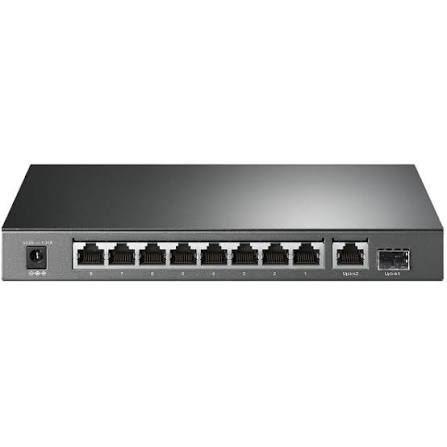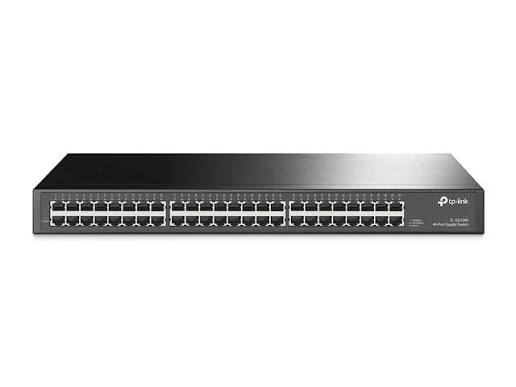
TP-Link 48-Port Fast Ethernet Switch
Buy the TP-Link TL-SF1048 48-Port Fast Ethernet Switch in Kenya from Orbitlink Solutions. Get 48× 10/100Mbps ports, rackmount design, fanless operation and plug-and-play networking.
TP-Link TL-SF1048 48-Port Fast Ethernet Switch in Kenya
The TP-Link TL-SF1048 48-Port 10/100Mbps Rackmount Switch is an unmanaged Ethernet switch designed for offices, schools, computer laboratories, CCTV environments, workgroups and other large wired networks that need a high number of Ethernet connections without complex configuration. It provides 48 × 10/100Mbps RJ45 ports, allowing dozens of wired devices to connect through a single rackmount switch.
The TL-SF1048 is designed for plug-and-play deployment. All 48 ports support Auto-Negotiation and Auto MDI/MDIX, while the switch automatically learns MAC addresses and forwards Ethernet traffic without requiring a controller, web interface or manual configuration. It also uses a fanless steel chassis designed for standard 19-inch rack installation.
Its biggest consideration is speed. Each port is Fast Ethernet, meaning an individual wired link is limited to a nominal maximum of 100Mbps. For older office equipment, printers, POS devices and lighter network segments this may be sufficient, but for modern fibre, Starlink, NAS, high-resolution CCTV or high-volume office networks, a 48-port Gigabit switch is generally a stronger long-term choice.
TP-Link TL-SF1048 Key Features
| Feature | Specification |
|---|---|
| Model | TP-Link TL-SF1048 |
| Product Type | 48-Port Fast Ethernet Rackmount Switch |
| Switch Type | Unmanaged |
| Ethernet Ports | 48 × 10/100Mbps RJ45 |
| Maximum Port Link Rate | 100Mbps |
| Switching Capacity | 9.6Gbps |
| Packet Forwarding Rate | 7.14 Mpps |
| MAC Address Table | 8K |
| Auto-Negotiation | Yes |
| Auto MDI/MDIX | Yes |
| Flow Control | IEEE 802.3x |
| Transmission Method | Store-and-Forward |
| Fan | Fanless |
| PoE | No |
| Management | Unmanaged / Plug-and-play |
| Chassis | Steel |
| Mounting | Standard 19-inch rack |
| Power Supply | 100–240VAC, 50/60Hz |
| Maximum Power Consumption | 9.9W |
| Dimensions | 440 × 180 × 44mm |
| Operating Temperature | 0°C–40°C |
TP-Link specifies a 9.6Gbps switching capacity, 7.14 Mpps packet-forwarding rate and 8K MAC address table for the TL-SF1048 V7.
48 Fast Ethernet Ports
The main advantage of the TL-SF1048 is its 48-port capacity.
Each RJ45 interface automatically negotiates between 10Mbps and 100Mbps depending on the connected equipment.
| Device | Typical Supported Link |
|---|---|
| Older Ethernet device | 10Mbps |
| Fast Ethernet PC | 100Mbps |
| Network printer | Up to 100Mbps |
| POS terminal | Up to 100Mbps |
| Fast Ethernet NVR | Up to 100Mbps |
| Gigabit-capable PC | Connects, but falls back to 100Mbps |
| Gigabit router | Connects, but link is limited to 100Mbps |
A Gigabit-capable device can therefore still communicate through the TL-SF1048, but it cannot establish a 1Gbps link through the switch.
9.6Gbps Switching Capacity
The TL-SF1048 provides a listed 9.6Gbps switching capacity.
This figure represents the aggregate internal switching bandwidth rather than the speed available to one Ethernet device.
Each individual port remains limited to Fast Ethernet speeds of up to 100Mbps.
The internal capacity is nevertheless designed to handle simultaneous traffic across a large number of Fast Ethernet ports without the switching fabric itself becoming the primary bottleneck.
7.14 Mpps Packet Forwarding Rate
TP-Link specifies a 7.14 million packets per second forwarding rate for the TL-SF1048 V7.
This allows the switch to process network traffic efficiently across its 48 ports and makes it suitable for large workgroups where many lower-bandwidth wired devices may be active at the same time.
Plug-and-Play Installation
The TL-SF1048 is an unmanaged switch, so there is no complicated configuration.
A simple network topology can be:
Internet → Router → TL-SF1048 → PCs / Printers / POS / NVR / Other Ethernet Devices
There is no controller to install, no switch IP address to configure and no VLAN design required for basic operation.
Connect the switch to the router or upstream network, connect the devices and power it on.
Auto-Negotiation
Every port automatically detects whether the connected device supports 10Mbps or 100Mbps Ethernet and selects the appropriate link speed.
This makes the TL-SF1048 useful in mixed environments containing older 10Mbps equipment together with newer 100Mbps devices.
Auto MDI/MDIX
All 48 ports support Auto MDI/MDIX.
This eliminates the traditional need to distinguish between crossover and straight-through Ethernet cables for ordinary connections.
It also means there is no dedicated uplink port requirement for most typical deployments.
Non-Blocking Switching Architecture
TP-Link describes the TL-SF1048 as using a non-blocking switching architecture designed to forward and filter packets at full wire speed within its Fast Ethernet specifications.
This can be important in a 48-port environment where many computers, printers or other devices may be communicating simultaneously.
IEEE 802.3x Flow Control
The TL-SF1048 supports IEEE 802.3x flow control in full-duplex mode and backpressure in half-duplex mode.
Flow control helps manage temporary congestion by coordinating traffic transmission between network devices.
8K MAC Address Table
TP-Link lists an 8K MAC address table for the TL-SF1048.
The switch automatically learns which Ethernet device is connected to each port and uses this information to forward traffic to the correct destination.
This happens automatically without requiring manual configuration.
Fanless Operation
The TP-Link TL-SF1048 uses a fanless design.
This provides several practical advantages:
| Environment | Advantage |
|---|---|
| Office | Quiet operation |
| Computer laboratory | No fan noise |
| Network cabinet | Fewer moving parts |
| CCTV control room | Suitable for continuous use |
| School | Low-noise networking |
| Retail environment | Minimal acoustic disturbance |
Although the switch does not contain a cooling fan, it should still be installed in a properly ventilated rack or cabinet.
Standard 19-Inch Rackmount Design
The TL-SF1048 uses a standard 19-inch rackmountable steel case.
This makes it suitable for structured network environments where equipment is installed alongside patch panels, routers, firewalls and other switches.
A typical installation could be:
Router → TL-SF1048 → Patch Panel → 48 Office Network Points
Its dimensions are approximately 440 × 180 × 44mm, which is consistent with a 1U rack-height form factor.
TP-Link Green Ethernet Technology
TP-Link states that the TL-SF1048 can automatically adjust power usage based on link status and cable length. Its official US page advertises potential savings of up to 50% compared with conventional TP-Link switching under specified conditions.
Actual power savings vary according to the number of active ports, cable lengths, network traffic and usage conditions.
TP-Link lists maximum power consumption at approximately 9.9W for the V7 specification.
TP-Link TL-SF1048 for Office Networks
The TL-SF1048 can be useful for offices with many wired devices that do not require Gigabit performance.
A typical deployment may look like:
Router → TL-SF1048 → 40+ PCs / Printers / POS Devices / Other LAN Equipment
The 48-port capacity allows a business to consolidate many wired endpoints into one switch rather than connecting several smaller switches together.
However, where staff regularly transfer large files, use cloud applications extensively or have fibre connectivity above 100Mbps, a 48-port Gigabit switch should generally be preferred.
TP-Link TL-SF1048 for Schools
Schools and computer laboratories can use the TL-SF1048 to connect a large number of desktop computers through one rackmount switch.
Potential applications include:
-
Computer laboratories
-
Administration offices
-
Library computers
-
Network printers
-
Examination systems
-
Staff workstations
For basic web browsing and low-bandwidth educational systems, Fast Ethernet may still be adequate.
For cloud applications, multimedia learning, server access and large downloads, Gigabit switching offers significantly better headroom.
TP-Link TL-SF1048 for CCTV
The TL-SF1048 can carry network traffic for IP CCTV systems where cameras receive power independently.
A possible setup is:
Router → TL-SF1048 → NVR + IP Cameras
However, there are two important limitations.
First, the TL-SF1048 does not provide PoE, so compatible IP cameras require their own power supplies or separate PoE equipment.
Second, Fast Ethernet bandwidth needs to be carefully evaluated in installations involving many high-resolution cameras.
For larger modern surveillance installations, a Gigabit PoE switch is generally a better choice.
TP-Link TL-SF1048 for POS Networks
The TL-SF1048 can be particularly useful in networks containing many POS terminals.
POS systems generally transmit relatively small amounts of data and often do not need Gigabit throughput.
A retail network might therefore look like:
Router → TL-SF1048 → POS Terminals + Receipt Printers + Back-Office PCs
In these low-bandwidth environments, the high port count may be more important than Gigabit Ethernet.
TP-Link TL-SF1048 for Printers
Many network printers have relatively modest bandwidth requirements.
A 48-port Fast Ethernet switch can therefore be useful in large offices, institutions or schools where many printers and low-bandwidth devices need wired connectivity.
Gigabit speed normally offers little practical advantage for basic print jobs compared with devices such as servers or NAS systems.
TP-Link TL-SF1048 for Fibre Internet

The TL-SF1048 can be connected downstream of a fibre router:
Fibre ONT → Router → TL-SF1048 → Wired Devices
The limitation is that each Ethernet port operates at a maximum nominal link rate of 100Mbps.
| Fibre Speed | TL-SF1048 Suitability |
|---|---|
| 10Mbps | Excellent |
| 20Mbps | Excellent |
| 50Mbps | Very suitable |
| 80Mbps | Suitable |
| 100Mbps | Near Fast Ethernet limit |
| 200Mbps | Not recommended for full-speed use |
| 500Mbps | Gigabit switch recommended |
| 1Gbps | Gigabit switch required for meaningful use |
For a business paying for fibre speeds above 100Mbps, installing Fast Ethernet across the entire office can prevent users from benefiting fully from that faster connection.
TP-Link TL-SF1048 for Starlink
The TL-SF1048 can technically be connected downstream of a Starlink router or another gateway where Ethernet connectivity is available:
Starlink → Router/Gateway → TL-SF1048 → Network Devices
However, because the ports are limited to 100Mbps, the switch can become a bottleneck when Starlink provides speeds above 100Mbps.
For most modern Starlink business installations, Orbitlink Solutions should generally recommend a Gigabit switch instead.
The TL-SF1048 makes more sense when it is serving a separate low-bandwidth segment containing printers, POS terminals or legacy devices.
Fast Ethernet vs Gigabit Ethernet
| Feature | Fast Ethernet | Gigabit Ethernet |
|---|---|---|
| Nominal Port Speed | 100Mbps | 1,000Mbps |
| Relative Link Capacity | 1× | 10× |
| Basic Printers | Suitable | Suitable |
| POS Systems | Suitable | Suitable |
| Fibre 50Mbps | Suitable | Suitable |
| Fibre 500Mbps | Major bottleneck | Recommended |
| Starlink | May limit speed | Better |
| NAS / File Sharing | Slow | Much better |
| Modern CCTV | Limited | Better |
| Computer Labs | Basic use | Better for modern workloads |
Fast Ethernet remains useful for cost-sensitive low-bandwidth networks, but Gigabit Ethernet is the preferred standard for most new business deployments.
TL-SF1048 vs TL-SF1024D
| Feature | TL-SF1024D | TL-SF1048 |
|---|---|---|
| Ethernet Ports | 24 | 48 |
| Port Speed | 10/100Mbps | 10/100Mbps |
| Switching Capacity | 4.8Gbps class | 9.6Gbps |
| Management | Unmanaged | Unmanaged |
| Rackmount | Yes | Yes, standard 19-inch |
| Best For | Medium workgroup | Large workgroup |
| Expansion Capacity | Moderate | High |
TP-Link's own historical switch guide lists the TL-SF1024 at 4.8Gbps switching capacity and the TL-SF1048 at 9.6Gbps, reflecting the difference in port count.
TL-SF1048 vs 48-Port Gigabit Switch
| Feature | TL-SF1048 | 48-Port Gigabit Switch |
|---|---|---|
| Ports | 48 | 48 |
| Maximum Link Rate | 100Mbps | 1Gbps |
| Relative Port Capacity | 1× | 10× |
| Modern Fibre | Limited | Recommended |
| Starlink | May bottleneck | Better |
| File Servers | Limited | Better |
| Modern CCTV | Basic | Better |
| Price | Usually lower | Higher |
| Future-Proofing | Limited | Better |
If the network is being built from scratch in 2026, Gigabit switching is generally the more future-proof investment unless budget or legacy equipment strongly favors Fast Ethernet.
Is the TP-Link TL-SF1048 Managed?
No.
The TL-SF1048 is an unmanaged Ethernet switch.
It does not provide the advanced configuration found in TP-Link Omada switches, such as configurable VLANs, ACLs, advanced QoS, centralized management or Layer 3 routing.
Its main advantage is simplicity.
Does the TL-SF1048 Support PoE?
No.
The TL-SF1048 supplies network data only and does not power connected equipment through Ethernet.
For PoE access points, IP phones or surveillance cameras, customers should use a compatible TP-Link PoE or PoE+ switch.
Does the TL-SF1048 Provide Wi-Fi?
No.
It is a wired Ethernet switch.
Wi-Fi must be supplied by a router or wireless access point connected to the network.
Does the TL-SF1048 Need a Router?
For normal internet access, yes.
A common deployment is:
Internet → Router → TL-SF1048 → Network Devices
The router normally handles DHCP, NAT, firewall and internet routing, while the switch expands the number of Ethernet ports.
Advantages and Limitations
| Advantages | Limitations |
|---|---|
| 48 Ethernet ports | Limited to 100Mbps per port |
| Plug-and-play | Not Gigabit |
| No configuration required | No PoE |
| Auto MDI/MDIX | No configurable VLANs |
| Auto-Negotiation | No Omada management |
| 9.6Gbps switching capacity | No SFP/SFP+ uplinks |
| 7.14 Mpps forwarding | Can bottleneck fibre |
| 8K MAC table | Can bottleneck Starlink |
| Fanless operation | Not ideal for NAS |
| Steel enclosure | Limited for high-resolution CCTV |
| Standard 19-inch rackmount | Limited future-proofing |
| Green Ethernet | — |
Who Should Buy the TP-Link TL-SF1048?
The TL-SF1048 is a sensible option for organizations that need a very high number of Ethernet ports but do not require Gigabit performance, PoE or advanced management.
It can be particularly useful for:
-
Legacy office networks
-
POS systems
-
Network printers
-
Basic computer laboratories
-
Low-bandwidth workstations
-
Simple workgroup networks
-
Legacy CCTV segments
For new high-performance office, fibre, Starlink, NAS, Wi-Fi or CCTV deployments, Gigabit switching is generally preferable.
Detailed TP-Link TL-SF1048 Specifications
| Specification | Details |
|---|---|
| Model | TP-Link TL-SF1048 |
| Type | 48-Port 10/100Mbps Rackmount Switch |
| Switch Type | Unmanaged |
| Ports | 48 × 10/100Mbps RJ45 |
| Auto-Negotiation | Yes |
| Auto MDI/MDIX | Yes |
| Standards | IEEE 802.3i, IEEE 802.3u, IEEE 802.3x |
| Switching Capacity | 9.6Gbps |
| Packet Forwarding Rate | 7.14 Mpps |
| MAC Address Table | 8K |
| Transmission Method | Store-and-Forward |
| Flow Control | IEEE 802.3x |
| Fan | Fanless |
| PoE | No |
| Power Supply | 100–240VAC, 50/60Hz |
| Maximum Power Consumption | 9.9W |
| Maximum Heat Dissipation | 33.78 BTU/h |
| Dimensions | 440 × 180 × 44mm |
| Mounting | Standard 19-inch rack |
| Operating Temperature | 0°C–40°C |
| Storage Temperature | -40°C–70°C |
| Operating Humidity | 10%–90%, non-condensing |
| Green Ethernet | Yes |
These specifications are based primarily on TP-Link's official V7 documentation. TP-Link currently lists several hardware versions for the TL-SF1048, and availability differs by market, so exact revision should be confirmed before ordering.
What's Included in the Box?
TP-Link lists the following package contents for the TL-SF1048:
| Package Item | Included |
|---|---|
| TP-Link TL-SF1048 Switch | Yes |
| Power Cord | Yes |
| Installation Guide | Yes |
| Rackmount Kit | Yes |
| Rubber Feet | Yes |
TP-Link TL-SF1048 Price in Kenya
Current Kenyan listings vary significantly. TDK's current TP-Link switch catalogue lists a 48-Port Fast Ethernet unmanaged model at KES 19,500, while recent Jumia listings for the TL-SF1048 have ranged from approximately KES 16,750 to KES 38,000, depending on seller and listing.
| Kenya Market Reference | Recent Listed Price |
|---|---|
| TDK switch catalogue | Around KES 19,500 |
| Jumia example | Around KES 16,750 |
| Jumia alternate listing | Around KES 38,000 |
These are market-reference prices only, not Orbitlink Solutions' fixed selling price. Marketplace pricing can vary considerably with seller, stock, VAT treatment and hardware revision.
For the Orbitlink website, use:
Price: Contact Orbitlink Solutions for the current TP-Link TL-SF1048 48-Port Fast Ethernet Switch price in Kenya and stock availability.
Why Buy TP-Link TL-SF1048 from Orbitlink Solutions?
/product/95/4659914/1.jpg?0227)
Orbitlink Solutions supplies TP-Link switches, routers, gateways, wireless access points and other networking equipment for homes, businesses and larger network projects across Kenya.
Customers can get guidance on whether a Fast Ethernet, Gigabit, PoE, Omada managed, 2.5G or 10G switch is the correct choice based on port count, internet speed, CCTV requirements, wireless access points, network segmentation and expected future growth.
For larger deployments, customers can also send their BOQ to Orbitlink Solutions for suitable switch selection and project pricing.
Watch: TP-Link 48-Port Fast Ethernet Switch
The TP-Link TL-SF1048 focuses on high port density and straightforward deployment. Its 48 auto-negotiating Fast Ethernet ports provide a simple way to consolidate a large number of lower-bandwidth Ethernet devices through a single 19-inch rackmount switch. Auto MDI/MDIX and unmanaged operation further reduce setup complexity.
Its 9.6Gbps switching capacity, 7.14 Mpps forwarding rate and 8K MAC address table are designed around a full 48-port Fast Ethernet environment, while the fanless steel chassis makes it suitable for office and network-cabinet deployment.
The key purchasing question is whether 100Mbps per port is enough. For printers, POS terminals and legacy devices, it often is. For high-speed fibre, Starlink, NAS storage, modern servers or high-resolution surveillance, choosing a 48-port Gigabit or managed TP-Link switch will generally provide much better long-term network capacity.
Frequently Asked Questions About TP-Link TL-SF1048
What is the TP-Link TL-SF1048?
The TL-SF1048 is a 48-port unmanaged 10/100Mbps Fast Ethernet rackmount switch designed for larger wired workgroups and departmental networks.
How many Ethernet ports does TL-SF1048 have?
It provides 48 × 10/100Mbps RJ45 ports.
Is the TL-SF1048 Gigabit?
No. It is a Fast Ethernet switch with a maximum nominal link rate of 100Mbps per port.
What is the switching capacity of the TL-SF1048?
TP-Link specifies 9.6Gbps.
What is the packet-forwarding rate?
The official V7 datasheet lists 7.14 Mpps.
How large is the MAC address table?
The TL-SF1048 has an 8K MAC address table.
Does the TL-SF1048 require configuration?
No. It is an unmanaged plug-and-play switch.
Does it support Auto MDI/MDIX?
Yes. All 48 ports support Auto MDI/MDIX.
Does TL-SF1048 support PoE?
No. It does not supply electrical power over Ethernet.
Is TL-SF1048 fanless?
Yes. TP-Link lists a fanless design.
Can TL-SF1048 be rack mounted?
Yes. It uses a standard 19-inch rackmountable steel chassis.
Can I use TL-SF1048 for CCTV?
Yes, where cameras are powered separately and total bandwidth requirements remain within Fast Ethernet limits. For modern high-resolution PoE camera systems, a Gigabit PoE switch is usually preferable.
Can I use TL-SF1048 with fibre internet?
Yes, but each wired link through the switch is limited to 100Mbps.
Can TL-SF1048 be used with Starlink?
Yes, but it may restrict performance where Starlink speeds exceed 100Mbps. A Gigabit switch is generally a better choice.
Does TL-SF1048 support VLANs?
It does not provide configurable managed VLAN features because it is an unmanaged switch.
Does TL-SF1048 have SFP fibre ports?
No. Its network interfaces are 48 RJ45 Fast Ethernet ports.
What is the difference between a 24-port and 48-port Fast Ethernet switch?
The main difference is capacity. A 48-port switch can connect approximately twice as many wired Ethernet endpoints through one chassis.
Should I buy Fast Ethernet or Gigabit?
For new networks, Gigabit is usually the better investment. Fast Ethernet remains useful where equipment only needs modest bandwidth and cost is the main consideration.
What is the TP-Link TL-SF1048 price in Kenya?
Current Kenyan listings vary significantly, with examples around KES 16,750–38,000 and one current switch catalogue listing around KES 19,500. Contact Orbitlink Solutions for the current selling price and availability.
Buy TP-Link 48-Port Fast Ethernet Switch in Kenya
The TP-Link TL-SF1048 48-Port Fast Ethernet Rackmount Switch provides a straightforward solution for businesses and institutions that need a large number of wired Ethernet connections without advanced switch management. Its 48 Fast Ethernet ports, 9.6Gbps switching capacity, 7.14 Mpps forwarding rate, fanless steel enclosure and standard rackmount design make it practical for large basic LAN environments.
For customers building a modern network around high-speed fibre, Starlink, servers, Wi-Fi access points or large CCTV systems, Orbitlink Solutions can also supply suitable 48-port Gigabit, PoE and Omada managed switches.
Contact Orbitlink Solutions
Orbitlink Solutions
Address: Lyric House, Kimathi Street, Nairobi
Phone: +254 743 720 551
Email: info@orbitlinksolutions.co.ke
Opening Hours: Monday–Saturday, 9:00 AM–6:00 PM
Availability: Nairobi pickup and nationwide delivery
Contact Orbitlink Solutions for the current TP-Link TL-SF1048 48-Port Fast Ethernet Switch price in Kenya, TP-Link Gigabit switches, PoE switches, Omada managed switches, routers, access points and complete fibre or Starlink network solutions.
Need Help Choosing? Ask a Technician
Get guidance on setup, compatibility, stock, and delivery before buying for your project.