MikroTik Router Price in Kenya
Compare MikroTik router prices in Kenya, current 2026 examples, buying factors, genuine stock, configuration costs and expert advice from Orbitlink Kenya.
MikroTik Router Prices in Kenya
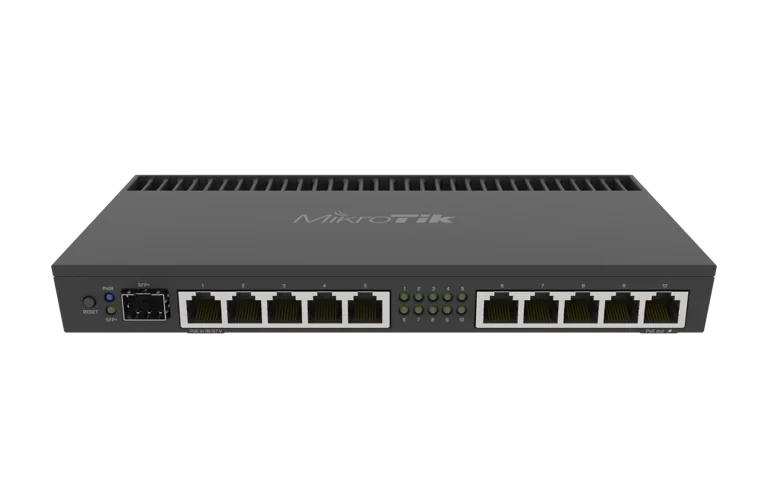
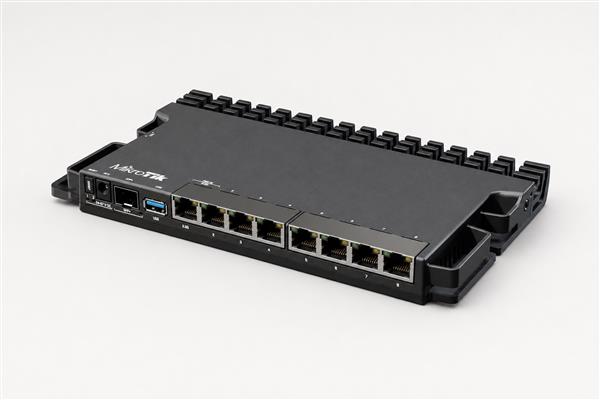
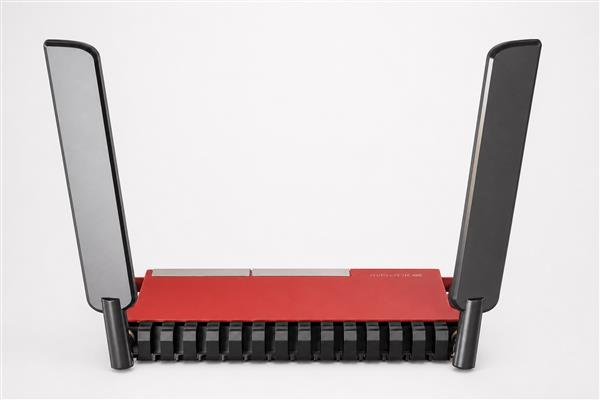
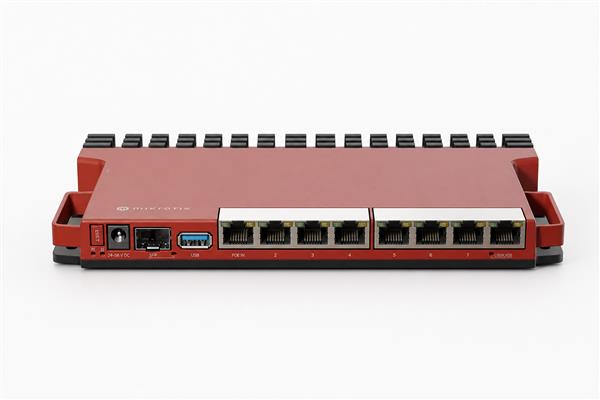
MikroTik router prices in Kenya vary by model, interface speed, wireless capability, processing capacity, stock position and the accessories required for a working deployment. A useful price comparison therefore goes beyond the figure on a product card. It identifies the exact model code, confirms genuine stock and warranty support, and checks whether the router can handle the intended internet speed, security rules, VPNs, users and future growth.
Orbitlink Solutions supplies genuine MikroTik equipment and helps homes, businesses, schools, hotels, enterprises and internet service providers select, configure and support complete networks. Browse the current MikroTik router catalogue or request a dated quotation for a model, installation or full bill of materials.
Quick answer: Current listed examples on 5 August 2026 range from about KES 8,500 for an RB951Ui-2HnD to KES 27,000 for an RB5009UG+S+IN. Prices and availability can change, so confirm the exact model, included accessories, warranty and validity period before ordering.
MikroTik Router Prices in Kenya: Current Examples
The following examples were observed in Orbitlink Solutions’ live catalogue on 5 August 2026. They are a practical snapshot, not a permanent price promise. Currency movement, freight, stock age, hardware revisions and supplier availability can affect a later quotation.
| Example model | Listed price | Typical buying context |
|---|---|---|
| RB951Ui-2HnD | KES 8,500 | Entry wireless routing for modest home or office requirements |
| hEX Refresh E50UG | KES 9,000 | Compact wired routing where separate WiFi is preferred |
| RB951Ui-2nD | KES 12,000 | Small indoor wireless networks with basic requirements |
| hEX PoE lite RB750UPr2 | KES 12,000 | Compact routing with compatible PoE considerations |
| hEX S RB760iGS | KES 13,000–15,000 | Wired routing with an SFP option; verify the exact listing |
| RB951G-2HnD | KES 15,000 | Gigabit-capable legacy wireless deployment scenarios |
| L009UiGS-RM | KES 16,000 | Rack-oriented business routing and network expansion |
| RB960PGS hEX PoE | KES 16,000 | Routing and compatible PoE-powered edge designs |
| L009UiGS-2HaxD-IN | KES 17,000 | Business or advanced home routing with integrated wireless |
| RB5009UG+S+IN | KES 27,000 | Higher-capacity business, lab and demanding edge deployments |
Two listings can show different prices for what appears to be the same family. Confirm the full product code, revision, package contents and stock status. Ask whether VAT, delivery, configuration, optics, injectors or mounting accessories are included. The most dependable answer is a written, time-limited quotation.
What Determines MikroTik Router Price in Kenya?
Processing capacity and workload
Router performance is not one universal number. Firewall filtering, queues, VPN encryption, subscriber management, inter-VLAN routing and large connection tables consume resources differently. A device used for straightforward internet access may support a higher raw speed than the same device running several demanding services together. Pay for capacity that matches the real configuration, with reasonable headroom.
Ethernet and fibre interfaces
Fast Ethernet, Gigabit, 2.5 Gigabit, SFP and SFP+ interfaces belong to different price tiers. Count internet, LAN, switch, access-point, server and management connections before choosing. Fibre interfaces may require separate transceivers, DAC cables and patch leads. See Orbitlink’s MikroTik fibre router guide when the design includes optical uplinks.
Wireless generation and coverage
Integrated WiFi can simplify a small site, but radio generation, supported bands, antenna design and local interference affect value. One router should not be expected to cover every multi-room or multi-floor building. A wired router plus properly placed access points may deliver a better result. Review MikroTik WiFi solutions in Kenya for business coverage planning.
PoE, power and installation accessories
PoE input and output capabilities can reduce separate power wiring, but voltage compatibility and total power budget must be checked. Confirm whether the power supply, injector, rack ears and mounts are included. Add surge protection and backup power where outages or electrical disturbances could interrupt service.
Availability, exchange rates and warranty
Networking equipment is commonly imported, so exchange rates, shipment costs and replenishment timing affect local prices. Genuine supply, a clear warranty route and access to technical support may be worth more than a small saving from an uncertain source. Orbitlink’s genuine MikroTik buying guide explains authenticity checks.
How to Compare MikroTik Price Quotations
- Match the exact model code. Similar family names may hide different processors, radios, ports or power arrangements.
- Confirm package contents. List supplies, injectors, antennas, mounts, rack hardware and cables.
- Check quotation terms. Note VAT, validity period, delivery, payment terms and lead time.
- Confirm warranty support. Understand the seller’s testing, return and replacement process.
- Add the deployment cost. Include cabling, configuration, installation, documentation and training.
- Test capacity assumptions. Compare expected internet speed and services, not marketing labels alone.
- Plan an acceptance test. Define how routing, VPN, failover, security and performance will be verified.
A cheap quotation can become expensive when essential accessories are missing or the hardware is undersized. Conversely, the most expensive router is not automatically the right one. A transparent bill of materials lets decision-makers see what each item contributes and where future expansion has been allowed.
Price Tiers and Suitable Buyer Profiles
| Buyer profile | Priority | Price decision |
|---|---|---|
| Home or micro business | Secure internet and practical WiFi | Balance connection speed, coverage and simplicity |
| Small or medium business | VLANs, VPN, failover and monitoring | Allow processing and port headroom |
| School, hotel or campus | Many users and managed coverage | Budget for switching, PoE and multiple access points |
| Enterprise or branch network | Security, resilience and documentation | Compare lifecycle cost and support response |
| Internet service provider | Subscribers, routing, fibre and redundancy | Size for peak workload and growth |
For an office, start with the expected number of simultaneous users, internet links, VLANs, tunnels and security policies. For ISP requirements, assess subscriber sessions, queue design, routing protocols and redundancy. Read the ISP router selection guide and enterprise router guide for workload-specific considerations.
Total Cost Beyond the Router
The router is one component of a network. A complete budget can include managed switches, access points, fibre modules, structured cabling, cabinets, power protection, configuration and monitoring. A site survey may reveal that coverage, cabling or electrical conditions—not routing capacity—are the main constraint.
Configuration should include secure administrator access, current stable software, firewall policy, backups and documented addressing. Business deployments may also require guest isolation, bandwidth priorities, VPN access and automatic failover. Orbitlink provides MikroTik configuration services and router installation services in Kenya so customers can buy equipment and implementation from one accountable provider.
Ongoing cost also matters. Budget for configuration backups, software maintenance, monitoring, replacement planning and support. Good documentation reduces troubleshooting time and protects the organisation when staff or service providers change.
Common Price-Comparison Mistakes
- Comparing different model revisions as though they were identical.
- Choosing Fast Ethernet hardware for a faster internet service.
- Ignoring VPN, firewall or queue processing requirements.
- Assuming one wireless router will cover a large building.
- Forgetting SFP modules, PoE injectors, rack mounts or power protection.
- Buying without a genuine-stock and warranty check.
- Using an undated online figure as a guaranteed current price.
- Omitting installation, testing and documentation from the budget.
False economy appears when an undersized device is replaced early or when downtime costs more than the original saving. Overbuying is also wasteful. The goal is a correctly sized design backed by clear assumptions.
How Orbitlink Solutions Helps Buyers
Orbitlink Solutions positions MikroTik supply inside a complete networking service. The team can assess requirements, recommend genuine equipment, prepare a bill of materials, configure RouterOS, install cabling and devices, test the result and provide support. This one-stop approach is valuable when routing interacts with WiFi, switching, fibre, power and security.
For a useful quotation, provide your location, current and target internet speed, user count, floor plan or coverage area, required services, existing equipment and expected growth. ISP and enterprise buyers should also provide routing, subscriber, redundancy and uplink requirements. If information is incomplete, Orbitlink can arrange discovery before final equipment selection.
Explore Orbitlink’s networking shop, compare the broader 2026 MikroTik buying guide, or contact Orbitlink Solutions for a dated price and deployment proposal.
Authoritative MikroTik Resources
Product availability and local quotations should be confirmed with Orbitlink Solutions. For manufacturer documentation and feature references, consult the official MikroTik product catalogue and RouterOS documentation. Kenyan communications-sector information is available from the Communications Authority of Kenya.
Budget Planning Examples
Home and remote-work budget
A home buyer should begin with the internet package, wired device count and the rooms that need wireless coverage. Video meetings, cloud backup, streaming and gaming can occur at the same time, so peak use matters more than the total number of registered devices. If the provider supplies an optical network terminal, confirm that the MikroTik router will receive an Ethernet handoff and that its WAN port supports the subscribed speed. Include patch leads, surge protection and a small backup-power solution where continuity is important.
For a compact apartment, an integrated wireless router may be economical. Larger homes often perform better with separate access points positioned around the building. That design can cost more initially but avoids repeatedly replacing the main router in an attempt to solve a coverage problem. Ask for a plan showing where routing ends and wireless coverage begins.
Small-business budget
A small business should list staff, guest, voice, camera and management networks. It may need two internet providers, secure remote access, application priorities and logs. These requirements add configuration work and can influence processor and port selection. Budget for a managed switch when the router does not have enough ports, and include compatible PoE capacity for access points or cameras. Where business operations depend on connectivity, compare the cost of redundancy with the likely cost of downtime.
Request a quotation that separates hardware, configuration, installation and optional support. This makes competing proposals easier to compare and gives the business a reusable record for later expansion. An acceptance checklist should confirm internet access, VLAN isolation, guest restrictions, VPN access, failover and backup restoration.
ISP and enterprise budget
ISP and enterprise pricing should be based on a design rather than a retail shortlist. Document peak throughput, packets per second where relevant, subscriber or branch count, routing protocols, tunnels, queues, firewall policies and expected growth. Include redundant power, spare optics, rack space, cooling, monitoring and replacement strategy. A lower-priced router that becomes a single point of failure may carry a much higher operational cost.
For staged growth, identify which upgrade triggers can be measured: subscriber count, sustained CPU use, port utilisation, route-table size or peak encrypted traffic. A clear trigger lets the organisation buy enough capacity today without guessing at a distant maximum. It also creates time to procure the next platform before service quality declines.
Stock, Warranty and Delivery Questions to Ask
Before ordering, ask whether the quoted unit is physically available, reserved for the order or subject to supplier confirmation. Confirm the model code, quantity, hardware revision where relevant and whether multiple units come from consistent stock. For urgent projects, agree on the expected dispatch date and what happens if the preferred model sells out before payment is complete.
Warranty questions should identify who receives a fault report, what diagnostic information is required, whether the item must be returned to Nairobi, and how long assessment normally takes. Clarify whether damage from incorrect power, lightning, water or unauthorised modification is excluded. Businesses that cannot wait for a warranty process should budget for a cold spare or a temporary replacement arrangement.
Delivery planning matters for county and remote sites. Provide the exact destination, contact person, access hours and any insurance requirement. Inspect packages promptly and record visible transit damage before deployment. For several branches, label each unit and its intended site so preconfigured devices are not mixed during distribution.
Configuration and Acceptance Checklist
A router should be delivered as part of a controlled configuration process. Record the approved software channel and version, restrict administrative access, use strong unique credentials and disable unnecessary services. Build firewall rules from an agreed policy, separate guest and trusted traffic, protect management interfaces and save an encrypted backup in a location controlled by the customer.
Testing should reproduce important business scenarios. Measure internet performance over a suitable wired connection, verify internal routing, confirm DNS and time synchronisation, and test every VLAN. Where two providers are installed, disconnect the primary link and record failover and recovery behaviour. Test remote-access VPNs from outside the premises, confirm that guest users cannot reach private resources, and ensure monitoring alerts reach the responsible team.
The handover pack should contain a network diagram, addressing plan, port schedule, device inventory, configuration backup, warranty records and escalation contacts. Credentials should be transferred securely and ownership made explicit. Staff should know how to report a fault and which basic indicators they may check without changing the configuration. These steps turn the purchase price into a supportable business asset.
Frequently Asked Questions
How much is a MikroTik router in Kenya?
Prices depend on the exact model and stock date. Orbitlink examples observed on 5 August 2026 ranged from about KES 8,500 to KES 27,000 for several home and business models, while advanced equipment may cost more.
Why do MikroTik router prices change?
Exchange rates, freight, supplier availability, stock age, hardware revision and included accessories can change the delivered price. Request a dated quotation with a validity period.
What is the cheapest suitable MikroTik router?
The cheapest suitable model is the lowest-cost genuine device that meets the actual connection speed, ports, security services, user load and growth requirement. It cannot be chosen from price alone.
Does the displayed price include VAT and delivery?
Terms differ by listing and quotation. Confirm VAT, delivery, installation and accessories in writing before comparing totals.
Does a MikroTik router include WiFi?
Some models include wireless radios and others are wired routers. Check the exact model specification and plan separate access points when the site needs broader coverage.
Are SFP modules included with fibre-capable routers?
Often they are separate. Confirm the required fibre type, speed, connector, distance and compatible module in the bill of materials.
Should I buy a router with extra capacity?
Reasonable headroom supports growth and added security services, but excessive capacity wastes budget. Base the margin on a documented forecast.
Can Orbitlink configure the router before delivery?
Yes. Orbitlink Solutions can provide configuration, installation, testing and documentation based on agreed requirements.
How can I confirm that a MikroTik router is genuine?
Buy through a traceable supplier, check the exact model and serial information, inspect packaging and confirm warranty and support arrangements.
Which MikroTik router is best for an ISP?
The answer depends on subscriber count, throughput, queues, routing protocols, uplinks and redundancy. An ISP design should be sized from measured peak workload.
Do I need a site survey?
A survey is valuable for multi-room WiFi, fibre routes, outdoor links, cabinet placement and power planning. It helps prevent equipment choices based on incomplete assumptions.
How do I get the current MikroTik router price?
Send Orbitlink Solutions the exact model or your network requirements and location. Ask for a dated quotation showing stock, terms, accessories, warranty and delivery.
Request a Current MikroTik Router Price in Kenya
MikroTik router prices in Kenya make sense only when they are connected to the right model, a dated stock position and a complete deployment requirement. Orbitlink Solutions can help you compare genuine equipment, avoid hidden omissions and build a network that is secure, supportable and ready for growth. Request a current quotation and expert recommendation for your home, business, enterprise or ISP network.