RouterOS Load Balancing
RouterOS Load Balancing: practical RouterOS guidance, secure networking support and genuine MikroTik equipment from Orbitlink Solutions Kenya.

MikroTik Products in Kenya
No products found in this category yet.
RouterOS Load Balancing: Practical Guidance for Kenyan Networks
RouterOS Load Balancing helps organisations turn MikroTik hardware into a network that is secure, understandable and ready for growth. Orbitlink Solutions supports multi-WAN planning, failover testing and practical connection management. The objective is not merely to activate a feature: it is to plan a dependable service that suits people, applications, internet links and future expansion.
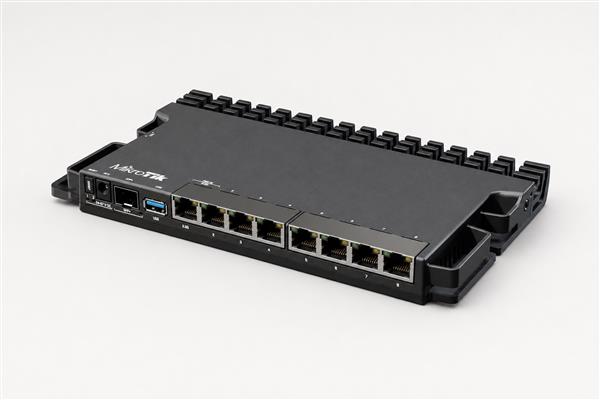
Whether a site is a small office, hotel, retail outlet, school, branch or home, a good RouterOS design begins with clear requirements. You can compare MikroTik routers, review managed switches, browse the Orbitlink Solutions shop or request technical guidance before choosing equipment.
What does RouterOS Load Balancing involve?
RouterOS Load Balancing is a practical process of translating a network plan into controlled RouterOS settings. This can include interface roles, IP addressing, DHCP, DNS, NAT, routing, VLANs, firewall filters, wireless parameters, monitoring and backups. The right mix varies by site. A branch with one connection has different priorities from a business running several providers, guest WiFi, CCTV, cloud services and remote staff access.
Orbitlink Solutions approaches RouterOS Load Balancing with a one-stop mindset. The router, switch, access points, power, cabling, fibre modules and rack layout should reinforce each other. That avoids common problems such as a fast router connected through an unsuitable uplink, a guest network that is not properly separated, or a configuration that cannot be recovered when a technician changes.
Start with a clear network plan
Before applying RouterOS Load Balancing, document the internet services, existing addressing, critical applications, device count, wireless areas, security boundaries and administration responsibilities. Decide which users need internet only, which systems need priority, and which devices must never reach one another. This makes every later rule easier to explain and test.
Good planning also creates an upgrade path. Leave room for another access point, a faster fibre uplink, a second WAN link, more users or a new office segment. A small amount of preparation reduces rework and helps organisations buy the appropriate MikroTik model rather than relying on a configuration to solve a hardware capacity issue.
Core RouterOS practices
Secure administrator access
RouterOS Load Balancing should always include strong unique credentials, restricted management services, trusted administrator IP ranges and regular review of exposed access. Disable services that are not needed, keep records of approved administrators and use encrypted remote access rather than leaving management open to the internet. These fundamentals matter more than a long list of advanced features.
Addressing, DNS and routing
Use an address plan that distinguishes staff, guest, management, cameras, voice and servers where appropriate. Confirm DHCP scopes do not overlap, DNS settings are deliberate and routes follow the intended path. Test from real client devices rather than assuming a successful ping proves that every application will work.
Monitoring and recovery
Configuration exports, protected backups, device naming, interface labels and a simple topology diagram make RouterOS Load Balancing easier to support. Monitor link state, resource usage, WAN health and critical services. When a fault occurs, a documented baseline helps teams isolate the cause instead of making risky changes under pressure.
Security and operational discipline
A firewall is a policy, not just a collection of copied rules. For RouterOS Load Balancing, define what must be allowed, what must be denied and which traffic needs logging. Place rules in a logical order, comment them, test changes during a suitable window and retain a working rollback path. Avoid exposing management services or relying on default credentials.
Software currency is also important. Review RouterOS releases and hardware compatibility before upgrades, back up the configuration and schedule changes carefully. The official MikroTik Documentation and MikroTik software page are useful authoritative references for current guidance.
Common Kenyan use cases
| Environment | Typical requirement | RouterOS focus |
|---|---|---|
| Home or small office | Secure internet, WiFi and devices | Basic firewalling, DHCP and backup |
| Growing business | VLANs, guest WiFi, CCTV and remote work | Segmentation, policy control and monitoring |
| Multi-site organisation | Branch connectivity and resilient access | VPN design, routing and documented failover |
| Hospitality or public WiFi | Controlled guest access and bandwidth | Hotspot policy, isolation and user management |
Testing RouterOS Load Balancing before handover
Test each expected outcome: internet access, DNS resolution, VLAN isolation, guest access, remote connectivity, failover and administration restrictions. Confirm that authorised users can reach what they need and unauthorised paths are blocked. Then record the final settings, credential handover process and support contacts.
This testing step turns RouterOS Load Balancing from a theoretical setup into an operational network. It also identifies weak coverage, unsuitable cabling, overlooked power requirements or capacity concerns before they become business interruptions.
Why work with Orbitlink Solutions?
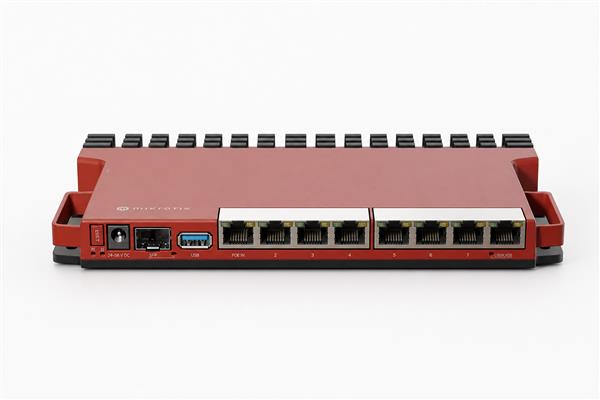
- Genuine equipment: MikroTik routers, switches, wireless devices and accessories for complete deployments.
- Practical guidance: recommendations based on topology, users, applications and budget.
- One-stop supply: networking equipment, PoE, fibre, cabinets, cabling and related accessories.
- Support-minded planning: configurations designed for secure management, monitoring and recovery.
- Nationwide service: procurement support from Nairobi to customers across Kenya.
Frequently Asked Questions
Can RouterOS Load Balancing be applied to an existing network?
Yes. Begin with a review of the existing topology, services and risk areas. A staged approach with backups and planned testing is safer than making broad changes during normal business hours.
Do I need a powerful router?
Choose hardware based on real throughput, firewall rules, VPN encryption, queues, user count, interfaces and future growth. Port count alone is not a complete performance measure.
Can Orbitlink Solutions supply the equipment?
Yes. We can help match compatible MikroTik hardware, switches, access points, power options and accessories to the deployment.
RouterOS Load Balancing becomes more dependable when each change is reviewed against a clear security and operational objective.
Consistent documentation, verification and backups turn RouterOS Load Balancing into a repeatable support process.
For RouterOS Load Balancing, practical capacity headroom and orderly cabling are as important as the configuration itself.
Teams using RouterOS Load Balancing should periodically review access, logs, backups and business requirements.
RouterOS Load Balancing becomes more dependable when each change is reviewed against a clear security and operational objective.
Consistent documentation, verification and backups turn RouterOS Load Balancing into a repeatable support process.
For RouterOS Load Balancing, practical capacity headroom and orderly cabling are as important as the configuration itself.
Teams using RouterOS Load Balancing should periodically review access, logs, backups and business requirements.
RouterOS Load Balancing becomes more dependable when each change is reviewed against a clear security and operational objective.
Consistent documentation, verification and backups turn RouterOS Load Balancing into a repeatable support process.
For RouterOS Load Balancing, practical capacity headroom and orderly cabling are as important as the configuration itself.
Teams using RouterOS Load Balancing should periodically review access, logs, backups and business requirements.
RouterOS Load Balancing becomes more dependable when each change is reviewed against a clear security and operational objective.
Consistent documentation, verification and backups turn RouterOS Load Balancing into a repeatable support process.
For RouterOS Load Balancing, practical capacity headroom and orderly cabling are as important as the configuration itself.
Teams using RouterOS Load Balancing should periodically review access, logs, backups and business requirements.
RouterOS Load Balancing becomes more dependable when each change is reviewed against a clear security and operational objective.
Consistent documentation, verification and backups turn RouterOS Load Balancing into a repeatable support process.
For RouterOS Load Balancing, practical capacity headroom and orderly cabling are as important as the configuration itself.
Teams using RouterOS Load Balancing should periodically review access, logs, backups and business requirements.
RouterOS Load Balancing becomes more dependable when each change is reviewed against a clear security and operational objective.
Consistent documentation, verification and backups turn RouterOS Load Balancing into a repeatable support process.
For RouterOS Load Balancing, practical capacity headroom and orderly cabling are as important as the configuration itself.
Teams using RouterOS Load Balancing should periodically review access, logs, backups and business requirements.
RouterOS Load Balancing becomes more dependable when each change is reviewed against a clear security and operational objective.
Consistent documentation, verification and backups turn RouterOS Load Balancing into a repeatable support process.
For RouterOS Load Balancing, practical capacity headroom and orderly cabling are as important as the configuration itself.
Teams using RouterOS Load Balancing should periodically review access, logs, backups and business requirements.
RouterOS Load Balancing becomes more dependable when each change is reviewed against a clear security and operational objective.
Consistent documentation, verification and backups turn RouterOS Load Balancing into a repeatable support process.
For RouterOS Load Balancing, practical capacity headroom and orderly cabling are as important as the configuration itself.
Teams using RouterOS Load Balancing should periodically review access, logs, backups and business requirements.
Final Thoughts
RouterOS Load Balancing delivers the best result when configuration, security, hardware selection and documentation are treated as one connected task. Orbitlink Solutions helps Kenyan customers build reliable networks that can be operated, supported and expanded with confidence.
Contact Orbitlink Solutions for equipment, configuration support and a practical plan for your RouterOS network.