TP-Link ER605
Buy TP-Link ER605 in Kenya from Orbitlink Solutions. Get 5 Gigabit ports, up to 3 Ethernet WANs, USB LTE backup, VPN, load balancing and Omada SDN.
TP-Link ER605 Omada Gigabit VPN Gateway in Kenya

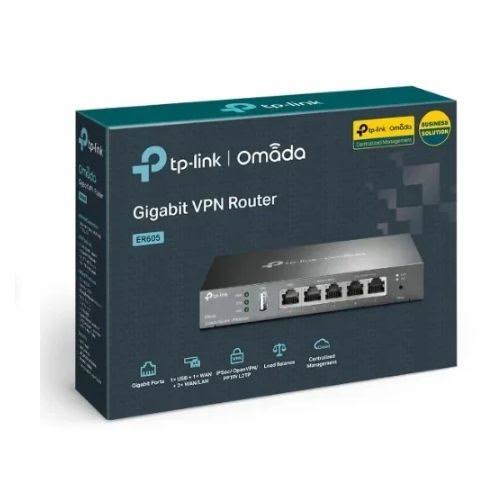
The TP-Link ER605 Omada Gigabit VPN Gateway is a compact business router designed for offices, SMEs, schools, hotels, shops, branch networks and other installations that require multiple internet connections, VPN connectivity, load balancing, WAN failover and centralized network management. The current ER605 V2.20 platform provides five Gigabit Ethernet ports and can use up to three of them as Ethernet WAN interfaces.
Unlike a normal home wireless router, the ER605 is primarily a wired gateway and does not include built-in Wi-Fi. It is normally installed at the edge of a network and paired with switches and wireless access points, making it particularly suitable for professional TP-Link Omada SDN deployments.
The ER605 is also especially useful in Kenya where businesses may want to combine fibre, Starlink and mobile broadband. Its multi-WAN architecture supports load balancing and link backup, while its USB 2.0 port can use a compatible USB LTE modem as an additional WAN backup connection.
TP-Link ER605 Key Features
| Feature | Specification |
|---|---|
| Model | TP-Link ER605 |
| Product Type | Omada Gigabit VPN Gateway |
| Ethernet Ports | 5 × Gigabit RJ45 |
| Dedicated WAN | 1 × Gigabit |
| WAN/LAN Ports | 2 × Gigabit configurable |
| Dedicated LAN | 2 × Gigabit |
| Maximum Ethernet WANs | Up to 3 |
| USB | 1 × USB 2.0 |
| USB WAN | Compatible LTE/3G modem backup |
| Load Balancing | Supported |
| Link Backup / Failover | Supported |
| VPN | IPSec, OpenVPN, WireGuard, PPTP, L2TP and others depending on mode/firmware |
| Omada SDN | Supported |
| Cloud Management | Supported |
| VLAN | IEEE 802.1Q |
| Firewall | Supported |
| DPI | Supported on current firmware/platform |
| Concurrent Sessions | Up to 150,000 on current referenced V2.20 |
| Power | External 12V / 1A |
| Mounting | Desktop or wall |
| Cooling | Fanless |
| Enclosure | Steel |
TP-Link’s current ER605 V2.20 specifications list one dedicated Gigabit WAN port, two configurable Gigabit WAN/LAN ports, two dedicated Gigabit LAN ports and one USB 2.0 interface for compatible mobile broadband devices.
Five Gigabit Ethernet Ports
The ER605 includes five Gigabit Ethernet ports, giving businesses more flexibility than a basic single-WAN router.
Its port arrangement is:
| Port Type | Quantity |
|---|---|
| Dedicated Gigabit WAN | 1 |
| Gigabit WAN/LAN | 2 |
| Dedicated Gigabit LAN | 2 |
| Total Gigabit RJ45 Ports | 5 |
This means the ER605 can be configured with up to three wired internet connections simultaneously, depending on how the WAN/LAN ports are assigned.
For example, a business could configure:
WAN 1: Fibre
WAN 2: Starlink
WAN 3: Second fibre ISP
The remaining LAN ports can then connect to a managed switch or other network equipment.
Multi-WAN Load Balancing
One of the strongest reasons to buy the TP-Link ER605 is its multi-WAN capability.
TP-Link supports load balancing across up to three Ethernet WAN interfaces. The gateway can distribute traffic according to configured bandwidth ratios so several internet connections can be used more effectively.
A typical business setup may look like:
Fibre + Starlink → ER605 → Managed Switch → Access Points, Computers, CCTV and Servers
Instead of relying entirely on one ISP, the business can use multiple links to improve availability and distribute traffic.
WAN Failover and Link Backup
The ER605 also supports Link Backup, including failover functions. TP-Link’s current datasheet lists link backup based on timing and failover conditions.
This can be particularly useful for:
| Primary Internet | Backup |
|---|---|
| Fibre | Starlink |
| Starlink | Fibre |
| Fibre | LTE |
| Business ISP | Secondary ISP |
| Main office fibre | Mobile broadband |
If the primary WAN fails, the gateway can be configured to move traffic to a backup connection.
This makes the ER605 useful for businesses where internet downtime affects POS systems, cloud applications, VoIP, online meetings, ERP platforms or remote access.
TP-Link ER605 for Starlink
The TP-Link ER605 works well with Starlink when businesses need more routing control than the standard Starlink router provides.
A typical deployment can be:
Starlink → ER605 → Managed Switch → Wi-Fi Access Points
For redundancy:
Starlink + Fibre → ER605 → Omada Network
This allows Starlink to operate either as the primary internet connection or as a backup service.
Because the ER605 uses Gigabit Ethernet ports, it is far better suited to modern Starlink speeds than older routers limited to Fast Ethernet.
Starlink and Fibre Failover
One of the most practical ER605 deployments in Kenya is:
Fibre Internet + Starlink Backup
If fibre experiences an outage, Starlink can provide an alternative path to the internet.
Alternatively, Starlink can be the primary service while fibre operates as the backup.
For businesses that depend heavily on cloud systems, email, payment services and online communication, using two independent technologies can significantly improve network resilience.
USB LTE WAN Backup
The current ER605 V2.20 includes a USB 2.0 port capable of supporting compatible USB LTE/3G dongles for WAN backup.
This creates another possible architecture:
Fibre + Starlink + LTE Backup → ER605
The USB modem must be compatible with TP-Link’s supported-device list, so compatibility should be confirmed before purchase.
TP-Link Omada SDN Integration
The ER605 is part of the TP-Link Omada Software Defined Networking ecosystem.
When used with an Omada controller, compatible devices including:
ER605 Gateway → Omada Switches → Omada Access Points
can be managed through a centralized interface.
TP-Link supports centralized management through hardware controllers, software controllers and cloud-based controller options.
This is particularly useful for businesses operating several switches and wireless access points.
Centralized Cloud Management
With an appropriate Omada controller architecture, administrators can centrally monitor and configure compatible gateways, switches and access points.
The ER605 supports:
| Management Feature | Support |
|---|---|
| Omada SDN | Yes |
| Cloud Access | Yes |
| Omada App | Yes |
| Centralized Management | Yes |
| Zero-Touch Provisioning | Available in supported Omada deployments |
| Intelligent Monitoring | Supported |
TP-Link specifically positions centralized cloud management and zero-touch provisioning among the ER605’s major business features.
TP-Link ER605 VPN Support
VPN capability is another major ER605 feature.
The current platform supports multiple technologies including IPSec, OpenVPN, WireGuard, PPTP, L2TP, GRE and SSL-related VPN capabilities, although some protocols or functions depend on operating mode and firmware.
The current V2.20 specification includes:
| VPN Type | Current Referenced Capability |
|---|---|
| IPSec | Up to 20 tunnels |
| WireGuard | Up to 20 tunnels |
| OpenVPN | Up to 16 tunnels |
| L2TP | Up to 16 tunnels |
| PPTP | Up to 16 tunnels |
| GRE | Supported in Standalone Mode |
TP-Link also notes that the ER605 can operate as a VPN client and connect with up to ten VPN servers for supported client modes.
Site-to-Site VPN

Businesses with two or more offices can use the ER605 to establish secure site-to-site VPN connections.
Example:
Nairobi Office ER605 ⇄ Secure VPN ⇄ Mombasa Office ER605
This can allow users at both sites to securely access selected internal resources over the internet.
Typical applications include:
Head Office ⇄ Branch Office
Main School ⇄ Remote Campus
Hotel Head Office ⇄ Branch Property
Warehouse ⇄ Administration Office
The ER605 supports both LAN-to-LAN and client-to-LAN IPSec configurations.
Remote Access VPN
Remote employees can also use supported VPN technologies to access business resources from outside the office.
For example:
Remote Laptop → Internet → VPN → ER605 → Office LAN
This can be useful for authorized access to:
Business applications, servers, file systems, CCTV management interfaces and internal administration platforms.
VPN throughput depends heavily on the selected protocol and encryption method.
ER605 VPN Performance
TP-Link publishes tested VPN throughput figures for the current referenced ER605 V2.20 platform.
| VPN Type | TP-Link Test Result |
|---|---|
| IPSec AES256 / SHA1 | 259.78Mbps |
| IPSec AES256 / SHA256 | 260.81Mbps |
| WireGuard | 130.96Mbps |
| OpenVPN | 21.70Mbps |
| GRE Unencrypted | 359.74Mbps |
| GRE Encrypted | 78.11Mbps |
| L2TP Unencrypted | 640.99Mbps |
| L2TP Encrypted | 77.31Mbps |
| PPTP Unencrypted | 759.55Mbps |
| PPTP Encrypted | 75.80Mbps |
These are controlled TP-Link benchmark results rather than guaranteed real-world speeds. Actual VPN performance depends on packet size, protocol, encryption, WAN speed, firmware and network conditions.
This is particularly important for buyers expecting full Gigabit throughput through an encrypted VPN tunnel.
Gigabit NAT Performance
For normal internet routing without heavy VPN encryption, the ER605 can operate close to Gigabit-class throughput under TP-Link’s test conditions.
TP-Link’s V2.20 datasheet lists approximately:
| Routing Test | Result |
|---|---|
| Static IP NAT Upload | 945.77Mbps |
| Static IP NAT Download | 938.79Mbps |
| DHCP NAT Upload | 945.54Mbps |
| DHCP NAT Download | 945.66Mbps |
| PPPoE NAT Upload | 939.71Mbps |
| PPPoE NAT Download | 939.43Mbps |
| DPI TCP Throughput | 905Mbps |
| DPI UDP Throughput | 788Mbps |
These are laboratory measurements and should not be interpreted as guaranteed internet speeds.
For internet connections above 1Gbps, a multi-Gigabit Omada gateway such as the ER707-M2 or a higher-performance model should be considered.
150,000 Concurrent Sessions
TP-Link lists support for up to 150,000 concurrent sessions on the current referenced ER605 V2.20 platform, with up to approximately 2,600 new sessions per second in the manufacturer’s test specification.
This makes the ER605 suitable for many small and medium business environments involving multiple users and applications.
However, maximum session count alone should not be used to size a network. VPN workload, bandwidth, DPI, user activity and routing policies also affect performance.
DPI – Deep Packet Inspection
Current ER605 firmware/platform information lists Deep Packet Inspection, allowing network administrators to apply more detailed internet access policies and traffic strategies.
TP-Link lists tested DPI throughput of approximately:
905Mbps TCP
788Mbps UDP
on the referenced V2.20 benchmark.
This can be useful for organizations that want greater visibility and policy control over network traffic.
Firewall and Network Security
The ER605 includes business security features such as firewall policies, access control and attack-defense functions.
| Security Feature | Support |
|---|---|
| Firewall Policies | Yes |
| DoS Defense | Yes |
| Source/Destination IP Access Control | Yes |
| URL Filtering | Yes |
| IP-MAC Binding | Yes |
| ARP Inspection | Supported |
| WAN Ping Blocking | Supported |
| TCP Scan Defense | Supported |
| VLAN | Supported |
| ACL | Supported |
TP-Link also lists protection against TCP, UDP and ICMP flood attacks as part of its security feature set.
VLAN Support
The ER605 supports IEEE 802.1Q VLANs, allowing a network administrator to divide the physical network into separate logical networks.
For example:
| VLAN | Purpose |
|---|---|
| VLAN 10 | Staff |
| VLAN 20 | Guest Wi-Fi |
| VLAN 30 | CCTV |
| VLAN 40 | VoIP |
| VLAN 50 | Management |
When paired with managed switches and VLAN-aware access points, the ER605 can form part of a much more structured business network.
ER605 for Hotels and Guest Wi-Fi
Hotels can use the ER605 as the gateway controlling internet access before traffic reaches Omada switches and wireless access points.
A typical deployment can be:
Starlink + Fibre → ER605 → PoE Switch → Omada Access Points
VLANs can then separate hotel operations from guest Wi-Fi, CCTV, VoIP and management traffic.
Multi-WAN also allows the hotel to maintain internet availability when one ISP fails.
ER605 for Schools
Schools can deploy the ER605 to manage:
Administration traffic, student Wi-Fi, computer labs, CCTV, teachers’ networks and internet redundancy.
With Omada switches and access points, different areas can be segmented using VLANs and centrally managed.
A school with both fibre and Starlink can also use the ER605 to reduce the effect of internet outages.
ER605 for Offices
For SMEs, the ER605 is particularly useful when the network has moved beyond what a basic all-in-one Wi-Fi router can comfortably manage.
A professional office architecture could be:
Fibre + Starlink → ER605 → Omada PoE Switch → EAP Access Points
This allows routing, switching and Wi-Fi to be handled by separate devices while remaining part of the Omada ecosystem.
ER605 for CCTV Networks
The ER605 can form part of a segmented CCTV installation where cameras are separated from staff and guest traffic.
Example:
Internet → ER605 → Managed PoE Switch → CCTV Cameras + NVR
VLANs and firewall policies can then be used to restrict which devices can communicate with the camera network.
Remote viewing can also be integrated through suitable VPN configurations instead of exposing internal equipment directly to the internet.
Does the TP-Link ER605 Have Wi-Fi?
No.
The ER605 is a wired gateway.
It does not broadcast a Wi-Fi network by itself.
For wireless coverage, use compatible access points such as TP-Link Omada EAP models.
Typical setup:
ER605 → PoE Switch → EAP Access Points
This separation is one of the reasons the ER605 works well in scalable business networks.
Does the TP-Link ER605 Provide PoE?
No.
The ER605 does not provide a PoE budget for powering access points or cameras. TP-Link explicitly lists no PoE budget for the current ER605 hardware.
If PoE is required, connect the gateway to:
ER605 → PoE Switch → Access Points / CCTV Cameras
This gives greater flexibility in choosing the correct switch for the number and power requirements of connected devices.
Fanless Metal Design
The current ER605 V2.20 uses a fanless steel enclosure and supports desktop or wall mounting.
TP-Link specifies dimensions of approximately:
158 × 101 × 25mm
with maximum power consumption of approximately 7.94W on the referenced hardware.
Its fanless design helps keep operation quiet, making it suitable for offices and small network cabinets.
TP-Link ER605 vs Normal Wi-Fi Router
| Feature | Typical Home Wi-Fi Router | TP-Link ER605 |
|---|---|---|
| Built-in Wi-Fi | Yes | No |
| Gigabit Routing | Common | Yes |
| Multi-WAN | Limited | Up to 3 Ethernet WANs |
| USB WAN Backup | Rare | Yes, compatible LTE modem |
| Load Balancing | Limited | Yes |
| WAN Failover | Model dependent | Yes |
| Business VPN | Basic/model dependent | Strong |
| VLAN | Basic/model dependent | Business-focused |
| Omada SDN | No | Yes |
| Best Use | Home | SME/business networks |
The ER605 is therefore better described as a business network gateway rather than a conventional Wi-Fi router.
TP-Link ER605 vs ER7206
| Feature | ER605 | ER7206 |
|---|---|---|
| Gigabit RJ45 Ports | 5 | 5 |
| SFP | No | Yes |
| USB | USB 2.0 | USB 3.0 on current revisions |
| Ethernet WAN Capability | Up to 3 | Up to 5 WAN options depending on configuration |
| Omada SDN | Yes | Yes |
| VPN | Yes | Yes |
| Best For | Small/medium office | Larger or more demanding networks |
The ER605 is usually the more economical entry point, while the ER7206 provides greater interface flexibility for growing business networks.
TP-Link ER605 vs ER707-M2
| Feature | ER605 | ER707-M2 |
|---|---|---|
| Maximum Port Class | Gigabit | 2.5GbE available |
| Multi-WAN | Yes | Yes |
| VPN | Yes | Yes |
| Omada | Yes | Yes |
| Best Internet Speed | Up to Gigabit-class | Multi-Gigabit connections |
| Best For | SMEs | Faster business networks |
If your fibre or LAN exceeds 1Gbps, the ER707-M2 or another multi-Gigabit gateway is a better long-term choice.
TP-Link ER605 Advantages and Limitations
| Advantages | Limitations |
|---|---|
| Five Gigabit ports | No built-in Wi-Fi |
| Up to three Ethernet WANs | No 2.5GbE |
| USB LTE WAN backup | No PoE output |
| Multi-WAN load balancing | OpenVPN performance is much lower than Gigabit |
| WAN failover | External power adapter |
| Omada SDN integration | Separate AP required for wireless |
| VLAN support | Some functions vary by operating mode |
| WireGuard and IPSec VPN | Hardware revisions should be checked |
| Firewall and DPI | USB LTE compatibility must be verified |
| Fanless steel enclosure | Not ideal for >1Gbps internet |
Who Should Buy the TP-Link ER605?
The TP-Link ER605 is particularly suitable for businesses that need a reliable Gigabit gateway with multi-WAN, VPN and centralized management without moving into higher-priced enterprise routing hardware.
It works especially well for offices, schools, shops, hotels, restaurants, clinics, warehouses, small campuses, branch offices and businesses combining Starlink with fibre or LTE backup.
Users with internet speeds above 1Gbps, very high VPN requirements or substantial enterprise routing workloads should consider a more powerful multi-Gigabit Omada gateway.
What Is Included with the TP-Link ER605?
TP-Link’s current datasheet lists:
| Package Item | Included |
|---|---|
| TP-Link ER605 Gateway | Yes |
| Power Adapter | Yes |
| RJ45 Ethernet Cable | Yes |
| Quick Installation Guide | Yes |
Detailed TP-Link ER605 Specifications
| Specification | Details |
|---|---|
| Model | TP-Link ER605 V2.20 |
| Product Type | Omada Gigabit VPN Gateway |
| Ethernet Standards | IEEE 802.3 / 802.3u / 802.3ab |
| VLAN | IEEE 802.1Q |
| WAN | 1 × Gigabit |
| WAN/LAN | 2 × Gigabit |
| LAN | 2 × Gigabit |
| USB | 1 × USB 2.0 |
| USB WAN | Compatible LTE dongle |
| Maximum Ethernet WAN Ports | 3 |
| Flash | 128MB NAND |
| DRAM | 256MB DDR |
| Concurrent Sessions | 150,000 |
| New Sessions/Second | 2,600 |
| DPI TCP | 905Mbps test result |
| DPI UDP | 788Mbps test result |
| WireGuard VPN | 130.96Mbps test result |
| OpenVPN | 21.70Mbps test result |
| IPSec VPN | Up to ~260Mbps in selected AES256 tests |
| Power Supply | 12V / 1A DC |
| Max Power Consumption | 7.94W |
| Cooling | Fanless |
| Enclosure | Steel |
| Mounting | Desktop / Wall |
| Dimensions | 158 × 101 × 25mm |
| Surge Protection | 4kV on current referenced version |
| Omada SDN | Supported |
| Cloud Management | Supported |
Specifications above refer mainly to the current referenced ER605 V2.20 platform. Hardware revisions and firmware can affect available features, so always confirm the exact version before firmware updates or project deployment.
TP-Link ER605 Price in Kenya
Recent Nairobi market listings show the ER605 at approximately KES 6,399–8,800, depending on seller, VAT treatment and promotion. Current indexed examples include KES 6,399, KES 6,999, KES 7,950 and KES 8,800 excluding VAT.
| Recent Kenya Market Reference | Approximate Price |
|---|---|
| Jiji listing | KES 6,399 |
| Jiji listing | KES 6,999 |
| Digital Store | KES 7,950 |
| Techdaily Kenya | KES 8,800 ex VAT |
These are market-reference prices rather than Orbitlink Solutions’ fixed selling price.
For the Orbitlink website, use:
Price: Contact Orbitlink Solutions for the current TP-Link ER605 price in Kenya and availability.
Why Buy TP-Link ER605 from Orbitlink Solutions?
Orbitlink Solutions supplies TP-Link networking equipment for homes, SMEs and enterprise projects in Kenya. Customers can get guidance on choosing the correct gateway according to internet speed, number of WAN connections, VPN requirements, VLAN design, user count and network expansion plans.
Orbitlink can also help build complete networks combining the ER605, Omada managed switches, PoE switches, indoor and outdoor access points, Starlink, fibre internet, CCTV and structured cabling.
For multi-site businesses and larger installations, Orbitlink Solutions can assist with BOQ preparation, equipment selection, project pricing, Nairobi pickup, nationwide delivery and technical support.
Watch: TP-Link ER605 Omada Gigabit VPN Gateway
The TP-Link ER605 is designed for businesses that need more control and reliability than a conventional single-WAN home router can provide. Its five Gigabit Ethernet ports allow up to three Ethernet WAN connections, while USB mobile broadband can provide another backup option when a compatible LTE modem is used.
For Kenyan businesses, one of the most useful configurations is fibre plus Starlink, allowing the ER605 to use load balancing or failover to maintain connectivity when one service becomes unavailable. When paired with Omada switches and access points, it also becomes part of a centrally managed SDN architecture rather than functioning as an isolated router.
The ER605 is particularly strong for Gigabit-class small and medium business networks, but it is important to understand its limits. It does not have Wi-Fi, does not supply PoE, and VPN throughput varies substantially by protocol. Organizations requiring internet connections beyond 1Gbps or much heavier VPN workloads should consider higher-performance Omada gateways.
Frequently Asked Questions About TP-Link ER605
What is the TP-Link ER605?
The ER605 is a TP-Link Omada Gigabit VPN Gateway designed for multi-WAN routing, load balancing, VPN, firewall, VLAN and centralized business-network management.
How many ports does the ER605 have?
It has five Gigabit Ethernet ports: one WAN, two configurable WAN/LAN ports and two dedicated LAN ports.
How many internet connections can the ER605 use?
It supports up to three wired WAN connections simultaneously, plus compatible USB mobile broadband for backup.
Does the ER605 support load balancing?
Yes. TP-Link supports load balancing across configured WAN connections.
Does the ER605 support failover?
Yes. Current TP-Link specifications include Link Backup with failover capability.
Can I use Starlink with the ER605?
Yes. The ER605 can be used downstream of Starlink and is particularly useful when combining Starlink and fibre for redundancy.
Can I use Starlink and fibre simultaneously?
Yes. Both can be connected as WAN services and configured for load balancing or backup according to network requirements.
Does the ER605 have Wi-Fi?
No. It is a wired gateway. Use a separate wireless access point for Wi-Fi.
Does the ER605 provide PoE?
No. A separate PoE switch or PoE injector is required to power access points or PoE devices.
Does ER605 support WireGuard?
Yes. The current ER605 V2.20 supports WireGuard VPN, with up to 20 tunnels listed by TP-Link.
Does ER605 support OpenVPN?
Yes. TP-Link lists OpenVPN server/client capabilities and up to 16 OpenVPN tunnels on the current referenced platform.
How fast is the ER605?
For normal NAT routing, TP-Link benchmark figures are close to Gigabit speeds on the current V2.20 platform. VPN speeds are lower and depend on protocol and encryption.
What is the WireGuard speed of ER605?
TP-Link’s current V2.20 datasheet lists approximately 130.96Mbps in its WireGuard benchmark.
What is the OpenVPN speed of ER605?
TP-Link lists approximately 21.70Mbps in its referenced OpenVPN benchmark.
Does the ER605 support VLANs?
Yes. It supports 802.1Q VLANs and can be used with managed switches and access points for network segmentation.
Can ER605 manage Omada access points?
The ER605 forms part of Omada SDN. With a suitable Omada controller, compatible gateways, switches and access points can be centrally managed.
Can the ER605 use a 4G modem?
Yes, the current V2.20 supports compatible USB LTE/3G dongles through its USB 2.0 interface. Compatibility should be checked before purchase.
Is the ER605 suitable for hotels?
Yes. Its multi-WAN capability, VLANs, VPN, Omada integration and failover support make it useful for hotel and hospitality networks.
Is the ER605 suitable for a small office?
Yes. It is particularly well suited to SMEs that need Gigabit routing, multiple ISPs, VLANs and VPN connectivity.
What is the TP-Link ER605 price in Kenya?
Recent Nairobi listings are approximately KES 6,399–8,800, although actual pricing varies with seller, VAT and stock.
Buy TP-Link ER605 in Kenya
The TP-Link ER605 Omada Gigabit VPN Gateway is an excellent entry point for businesses that need Gigabit routing, multi-WAN load balancing, fibre and Starlink failover, VPN connectivity, VLAN segmentation and Omada centralized management. It is particularly suitable for SMEs, schools, hotels, shops, clinics, branch offices and other organizations that need reliable internet and better network control.
For more demanding networks, the ER605 can be paired with Omada managed switches, PoE switches and EAP access points, allowing the network to scale without replacing the entire architecture. Businesses requiring multi-Gigabit internet or substantially higher VPN performance should compare it with higher Omada gateway models before purchase.
Contact Orbitlink Solutions
Orbitlink Solutions
Address: Lyric House, Kimathi Street, Nairobi
Phone: +254 743 720 551
Email: info@orbitlinksolutions.co.ke
Opening Hours: Monday–Saturday, 9:00 AM–6:00 PM
Availability: Nairobi pickup and nationwide delivery
Contact Orbitlink Solutions for the current TP-Link ER605 price in Kenya, Omada gateways, managed switches, PoE switches, access points, Starlink and fibre failover configuration, VPN networking and complete business network solutions.
Need Help Choosing? Ask a Technician
Get guidance on setup, compatibility, stock, and delivery before buying for your project.