Starlink Standard Kit
Enjoy high-speed, uninterrupted internet with the Starlink Standard Kit in Kenya. Perfect for remote areas, travelers, and businesses. Order now...
Products Available

Table of Contents
Starlink Standard Kit: Setup, Pricing & Availability in Kenya
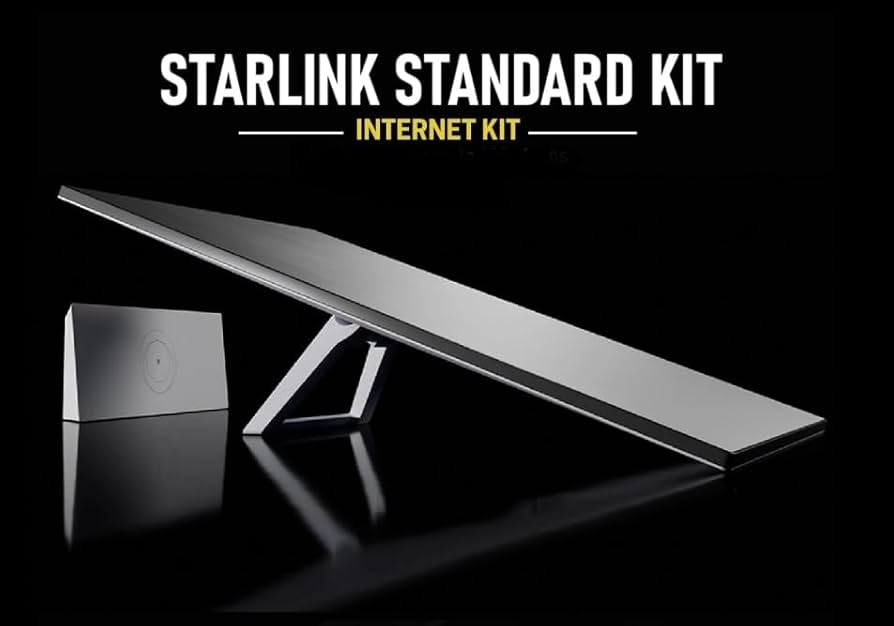
The Starlink Standard Kit is a satellite-based internet solution designed to provide high-speed, low-latency connectivity to users in remote and underserved areas. It includes a satellite dish, Wi-Fi router, power supply, and mounting stand, making it a complete package for seamless internet access. By connecting to SpaceX’s network of low-Earth orbit (LEO) satellites, the kit ensures a reliable and fast internet experience, even in areas where traditional fiber or mobile networks are unreliable.
Ideal for homes and small businesses, the Starlink Standard Kit is perfect for those who need stable internet for streaming, remote work, online learning, or running a business. Its ability to deliver high-speed internet in rural and urban settings alike makes it a game-changer for users seeking an alternative to conventional ISPs. Additionally, features like Starlink Roaming make it a flexible solution for travelers and mobile businesses.
This guide will walk you through everything you need to know about the Starlink Standard Kit in Kenya, from setup and pricing to performance expectations and troubleshooting tips. Whether you're considering purchasing a kit or looking for installation assistance, Orbitlink Solutions—a trusted Starlink reseller in Kenya—can help you get started with expert support and reliable service.
1. Understanding the Starlink Standard Kit

The Starlink Standard Kit is an advanced satellite-based internet solution that provides high-speed, low-latency connectivity by connecting to SpaceX’s Low-Earth Orbit (LEO) satellites. It is designed to be user-friendly, making it an excellent choice for individuals, families, and businesses that need a reliable internet connection, especially in areas with limited access to fiber or mobile networks.
1.1 What Comes in the Starlink Standard Kit?
When you purchase the Starlink Standard Kit, you receive all the essential components required for quick and hassle-free installation. The kit includes:
- Dish (Antenna) – The motorized phased-array antenna, also known as the Starlink dish, is responsible for receiving signals from LEO satellites and ensuring a stable connection. The dish automatically aligns itself to optimize performance.
- Wi-Fi Router – A high-performance Wi-Fi 6 router designed to distribute the internet connection wirelessly throughout your home or office. It eliminates the need for third-party routers, though users can still connect their own if desired.
- Power Supply & Cables – The kit comes with a power adapter and durable cables for connecting the dish to the router and ensuring smooth power distribution. The cables are weather-resistant, making them ideal for outdoor setups.
- Mounting Stand – A standard tripod mount that provides stability and allows for easy positioning of the dish on flat surfaces such as rooftops, yards, or open ground. Additional pole or roof mounts can be purchased separately for permanent installations.
1.2 How the Starlink Standard Kit Works
The Starlink Standard Kit operates by communicating with a vast constellation of SpaceX's low-Earth orbit satellites, ensuring global coverage and consistent performance. The working mechanism involves:
- Connecting to LEO Satellites – Unlike traditional satellite internet services that rely on geostationary satellites (located 35,000 km above Earth), Starlink uses LEO satellites positioned at about 550 km altitude. This significantly reduces latency, making real-time applications like video calls and online gaming smoother.
- Providing High-Speed, Low-Latency Internet – The system transmits data between your dish and multiple Starlink satellites, which then relay the data to ground stations connected to the global fiber-optic network. This process allows download speeds of 50-250 Mbps, upload speeds of 10-40 Mbps, and latency as low as 20-40 ms, making it comparable to fiber internet in many cases.
1.3 Who Should Use the Starlink Standard Kit?
The Starlink Standard Kit is ideal for a wide range of users, particularly those in areas where traditional broadband options are either unavailable or unreliable. The main beneficiaries include:
- Home Users in Rural or Remote Areas – People living in villages, farms, islands, or underserved towns can now access fast internet without relying on expensive mobile data or unstable fixed broadband connections. Starlink helps bridge the digital divide, making streaming, remote work, and online education more accessible.
- Small Businesses Needing Reliable Internet – From startups to retail shops, lodges, and small offices, businesses that rely on a stable connection for transactions, virtual meetings, and customer interactions can benefit greatly from Starlink. The service ensures minimal downtime, even in locations where traditional ISPs struggle.
- Travelers Using the Starlink Roaming Option – Digital nomads, RV owners, and adventure travelers can stay connected no matter where they go. Starlink offers a Roaming Mode, which allows users to move their dish between locations, making it a great option for those on the move, including campers, expedition teams, and remote workers.
The Starlink Standard Kit is a game-changer for those who need high-speed, dependable internet in Kenya and beyond. Whether for personal or business use, it provides an effective alternative to fiber, DSL, or mobile internet, ensuring connectivity wherever it's needed.
2. How to Set Up the Starlink Standard Kit in Kenya
Setting up the Starlink Standard Kit in Kenya is a straightforward process that requires minimal technical expertise. With the right placement and configuration, you can enjoy high-speed, low-latency internet in just a few steps. This section covers unboxing, installation, and activation, ensuring you get the best performance from your kit.
2.1 Unboxing and Assembling the Kit
What to Expect in the Package
When you receive your Starlink Standard Kit, it comes neatly packed with all the essential components needed for setup. Inside the box, you will find:
- Starlink Dish (Antenna) – The main satellite receiver that connects to SpaceX’s network of low-Earth orbit (LEO) satellites.
- Wi-Fi Router – A high-speed, Wi-Fi 6 router that provides a stable wireless connection for your devices.
- Power Supply & Cables – Weather-resistant cables for connecting the dish to the router and power source.
- Mounting Stand – A tripod-style stand for placing the dish on the ground, rooftop, or balcony.
Connecting the Components
- Place the Dish on the Mounting Stand – Secure the dish onto the provided tripod stand to ensure stability during installation.
- Connect the Dish to the Router – Use the provided cable to link the dish to the Starlink router. The cable is pre-attached for a hassle-free connection.
- Plug the Router into the Power Supply – Connect the router to a power outlet using the included adapter. Once powered, the dish will automatically orient itself to find the best satellite signal.
Once assembled, the system is almost ready to use, but choosing the right location is crucial for optimal performance.
2.2 Choosing the Best Location for Installation
Ensuring a Clear View of the Sky
For uninterrupted connectivity, the Starlink dish must have a clear view of the sky without trees, buildings, or other obstructions blocking its line of sight. The dish automatically adjusts its angle to maintain a strong connection, but proper placement significantly enhances speed and reliability.
The best locations include:
- Rooftops – Provides an elevated position with minimal obstructions.
- Open Yards – A spacious area away from tall structures or dense vegetation.
- Balconies – Suitable for urban users, provided there’s an open sky view.
Using the Starlink App to Check for Obstructions
To ensure an optimal installation site, download and use the Starlink App (available on Android and iOS). The app offers an “Obstruction Checker” tool that:
- Scans your surroundings to detect potential obstructions.
- Recommends the best placement for the dish.
- Provides real-time updates on satellite visibility.
If the app detects obstructions, consider relocating the dish to a more open area or using an elevated mount for better reception.
2.3 Activating Starlink Internet
Connecting to Power and Router Setup
- Plug in the Dish and Router – Ensure all cables are properly connected and power up the system.
- Wait for Automatic Calibration – The dish will take a few minutes to orient itself and establish a connection with Starlink satellites.
Using the Starlink App for Activation
- Open the Starlink App and create an account or log in.
- Connect to the Starlink Wi-Fi network, which appears in your available networks.
- Follow the in-app instructions to configure the Wi-Fi network name and password.
- Confirm the Connection – Once the setup is complete, the app will display your internet status and signal strength.
After activation, your Starlink Standard Kit is fully operational, providing high-speed internet in Kenya. You can now start browsing, streaming, and working online without interruptions!
3. Performance & Internet Speeds
The Starlink Standard Kit delivers high-speed, low-latency internet by connecting to a network of low-Earth orbit (LEO) satellites. Performance can vary depending on location, network congestion, and environmental factors, but Starlink remains one of the best solutions for remote and underserved areas in Kenya.
3.1 Typical Download and Upload Speeds
Expected Speeds in Kenya
Users in Kenya can expect the following average speeds with the Starlink Standard Kit:
- Download speeds: 50 Mbps to 250 Mbps
- Upload speeds: 10 Mbps to 40 Mbps
- Latency: 20 ms to 60 ms
These speeds are sufficient for streaming, gaming, video conferencing, and heavy browsing. Compared to traditional satellite internet, Starlink offers significantly lower latency and faster speeds.
Factors Affecting Performance
Several factors can impact your internet speeds:
- Obstructions – Trees, buildings, or mountains can block signals, reducing performance.
- Weather Conditions – Heavy rain or thick cloud cover may temporarily affect speeds.
- Network Congestion – At peak hours, when many users are online, speeds may slightly fluctuate.
- Router Placement – Keeping the Starlink Wi-Fi router in an open area improves signal distribution.
- Software Updates – Starlink regularly updates its system, improving speed and stability.
For optimal performance, ensure the dish has a clear view of the sky and regularly check for Starlink firmware updates.
3.2 Latency and Reliability
Comparing Starlink to Fiber and Mobile Networks
Latency, measured in milliseconds (ms), determines how fast data travels between your device and the internet. Starlink offers latency of 20-60 ms, which is:
- Lower than traditional satellite internet (300-600 ms).
- Comparable to 4G mobile networks (30-100 ms).
- Higher than fiber internet (5-20 ms).
For most users, Starlink’s latency is excellent for gaming, video calls, and live streaming. However, fiber-optic internet remains the best option where available.
Downtime Considerations
Starlink is highly reliable, but users may experience brief interruptions as the dish switches between satellites. Downtime is usually a few seconds and is minimized with ongoing satellite launches and software updates.
Key factors influencing reliability:
- Clear sky view reduces disconnections.
- Newer satellites continue improving global coverage.
- Regular app updates enhance network stability.
3.3 Weather Impact on Starlink Performance
How Rain, Storms, and Clouds Affect Connectivity
While Starlink is designed to withstand harsh weather, extreme conditions can temporarily impact performance:
- Light Rain or Cloudy Skies – Minimal to no impact on speeds.
- Heavy Rainstorms – May cause temporary slowdowns but rarely lead to complete disconnection.
- Snow and Ice – The Starlink dish has a built-in heating feature to melt snow and prevent signal loss.
- Strong Winds – The dish is aerodynamic and automatically adjusts for stability.
To minimize weather-related disruptions:
Secure the dish properly to prevent movement in strong winds.
Elevate the dish if in an area prone to heavy flooding.
Use the Starlink app to monitor signal quality during extreme weather.
Despite occasional weather-related slowdowns, Starlink remains one of the most reliable internet solutions for rural and remote users in Kenya.
5. Comparing the Standard Kit to Other Starlink Packages
Starlink offers multiple packages tailored to different types of users, ranging from home users to businesses and travelers. While the Standard Kit is the most commonly used package in Kenya, other options provide additional features such as higher speeds, better performance in extreme conditions, and enterprise-level connectivity. Understanding the differences between these kits helps users choose the best option for their needs.
5.1 Standard Kit vs. High-Performance Kit
The Starlink High-Performance Kit is designed for users who need faster speeds, stronger signals, and better performance in harsh weather conditions. Below is a detailed comparison between the Standard Kit and the High-Performance Kit:
| Feature | Standard Kit | High-Performance Kit |
|---|---|---|
| Dish Size | Smaller, lightweight | Larger, more powerful |
| Internet Speeds | Up to 250 Mbps | Up to 500 Mbps |
| Latency | ~25-50 ms | ~20-40 ms (more stable) |
| Weather Resistance | Good, but may experience signal issues in heavy rain | Better performance in extreme weather (rain, snow, dust storms) |
| Use Case | Homes, small businesses, travelers | Businesses, demanding users, areas with extreme weather |
| Price | KES 45,500 (USD 300) | Higher, varies by region (often over KES 100,000) |
Which One Should You Choose?
- If you need affordable, high-speed internet for a home or small business, the Standard Kit is sufficient.
- If you require higher speeds, stronger reliability, and better performance in bad weather, the High-Performance Kit is a better choice despite its higher price.
5.2 Standard Kit vs. Standard Actuated Kit
The Standard Actuated Kit is similar to the Standard Kit, but it features an automatic motorized dish that adjusts itself for the best possible signal. This feature is especially useful for users who move frequently or require a portable, easy-to-set-up system.
| Feature | Standard Kit | Standard Actuated Kit |
|---|---|---|
| Dish Type | Fixed position | Motorized, auto-adjusting |
| Portability | Suitable for fixed locations but can be moved manually | Ideal for frequent travelers and RV users |
| Ease of Setup | Manual positioning required | Automatically finds the best angle |
| Price | KES 45,500 (USD 300) | Slightly more expensive due to motorized features |
Which One Should You Choose?
- If you plan to use Starlink in one location (home or office), the Standard Kit is sufficient.
- If you travel often or need quick setup with minimal manual adjustment, the Standard Actuated Kit is a better choice.
5.3 Standard Kit vs. Enterprise Kit
The Enterprise Kit is designed for large businesses, government agencies, and users who need highly stable, high-speed connections with priority access to Starlink’s network. Compared to the Standard Kit, the Enterprise Kit provides stronger security features, a higher bandwidth capacity, and better network prioritization during congestion.
| Feature | Standard Kit | Enterprise Kit |
|---|---|---|
| Internet Speeds | Up to 250 Mbps | Up to 500 Mbps (or more with priority access) |
| Data Priority | Standard | Higher priority for business users |
| Multiple Users | Best for homes & small businesses | Designed for multiple users in offices, hotels, remote sites |
| Reliability | High, but may slow down during peak hours | More stable with less congestion |
| Security Features | Basic encryption | Enhanced security for corporate use |
| Price | KES 45,500 (USD 300) | Significantly more expensive (over KES 200,000) |
Which One Should You Choose?
- If you need fast and affordable internet for home or small business, the Standard Kit is perfect.
- If you run a large business, require network priority, or need higher security features, the Enterprise Kit is the best option.
Which Starlink Kit is Right for You?
Choosing the right Starlink package depends on your budget, internet speed needs, and specific use case.
The Standard Kit is perfect for most home users and small businesses who want a reliable and cost-effective satellite internet connection.
The High-Performance Kit is ideal for users who need faster speeds, stronger signal stability, and better performance in bad weather.
The Standard Actuated Kit is great for travelers and those who need an easy, portable Starlink setup.
The Enterprise Kit is best for large businesses, government organizations, and corporate offices that require high-priority data, security, and network stability.
By understanding these differences, you can make an informed decision and choose the Starlink package that best fits your internet needs in Kenya.
6. Troubleshooting Common Issues
While the Starlink Standard Kit is designed to provide reliable internet with minimal disruptions, users may occasionally experience connectivity issues. These problems can range from weak signals and slow speeds to complete disconnections from the satellite network. Below is a detailed guide on how to troubleshoot and resolve these common issues effectively.
6.1 Weak Signal or No Connection
A weak signal or complete loss of connection usually results from poor dish placement, physical obstructions, or interference from nearby objects. To resolve this:
- Adjust the Dish Placement: The Starlink dish should be positioned in an open area with a clear, unobstructed view of the sky. Even minor obstructions like trees, buildings, or tall structures can interfere with the satellite connection.
- Use the Starlink App to Check for Obstructions: The Starlink app has a built-in tool that helps users scan the sky for potential obstructions before installation. If your internet frequently drops, use the app to identify and remove blockages.
- Reposition the Dish if Necessary: If obstructions are unavoidable, try elevating the dish on a higher mount, pole, or rooftop to improve visibility and signal strength.
6.2 Slow Internet Speeds
Starlink typically provides high-speed internet, but speeds may fluctuate due to network congestion, poor router placement, or interference. If you experience slow speeds, follow these steps:
- Optimize Router Location: The Wi-Fi router should be placed centrally in the house, away from walls, electronic devices, and thick barriers that can weaken the signal. If your connection is weak in certain rooms, consider using a Wi-Fi extender.
- Check for Network Congestion: Starlink users share bandwidth with others in the same region. During peak hours, speeds may temporarily slow down due to network congestion. To improve performance, try using the internet during off-peak hours for bandwidth-heavy tasks like streaming or gaming.
- Limit Unnecessary Device Connections: If multiple devices are downloading large files or streaming HD content simultaneously, it may slow down your connection. Disconnect any unused devices or limit bandwidth usage on secondary devices.
- Restart the Router: If speeds are still low, perform a router reboot by unplugging it for 30 seconds before reconnecting. This can help refresh the connection.
6.3 Dish Not Connecting to Satellites
If your Starlink dish fails to connect to satellites or experiences frequent disconnections, consider these troubleshooting steps:
- Restart the System: A simple power cycle can resolve many connectivity problems. Unplug the dish, router, and power supply, wait one minute, and plug everything back in.
- Check for Software Updates: Starlink regularly releases firmware updates to improve performance. Open the Starlink app and check if updates are available. If so, install the latest version.
- Ensure Proper Weather Conditions: Bad weather, such as heavy rain, storms, or thick cloud cover, can temporarily disrupt the signal. If your dish loses connection during storms, wait for the weather to clear and monitor if the signal stabilizes.
- Inspect for Hardware Issues: If your dish is physically damaged or cables are loose or broken, it may fail to connect. Inspect all hardware and replace any damaged components.
Most Starlink connectivity problems can be resolved by ensuring proper dish placement, optimizing the router location, and performing routine system restarts. If issues persist, the Starlink app provides real-time diagnostics to help identify the cause. In extreme cases, contacting Starlink support or a local authorized reseller like Orbitlink Solutions may be necessary for professional troubleshooting.
By following these steps, you can maintain a stable and fast Starlink connection in Kenya, ensuring seamless internet access for your home or business.
7. Frequently Asked Questions (FAQs) About the Starlink Standard Kit
1. What is the Starlink Standard Kit, and what does it include?
The Starlink Standard Kit is a satellite internet package designed for homes and small businesses. It includes:
- A Starlink dish (antenna) to connect to SpaceX's Low-Earth Orbit (LEO) satellites
- A Wi-Fi router for distributing the internet signal
- A power supply and cables for proper connectivity
- A mounting stand to position the dish in an optimal location
2. How does the Starlink Standard Kit provide internet access?
The Starlink Standard Kit connects to a network of LEO satellites operated by SpaceX. The dish automatically aligns itself to the best satellite, ensuring high-speed, low-latency internet. The signal is then transmitted to the Wi-Fi router, which distributes the connection to your devices.
3. What internet speeds can I expect from the Starlink Standard Kit in Kenya?
In Kenya, the Starlink Standard Kit offers download speeds ranging between 50 Mbps to 250 Mbps and upload speeds between 10 Mbps to 20 Mbps. Speeds may vary depending on network congestion, weather conditions, and obstructions.
4. How much does the Starlink Standard Kit cost in Kenya?
The Starlink Standard Kit in Kenya is priced at KES 45,500 (approximately $310) for the hardware. The monthly subscription fee is KES 14,000 (about $95). Additional installation costs may apply if professional setup is required.
5. Where can I buy the Starlink Standard Kit in Kenya?
The Starlink Standard Kit is available through Orbitlink Solutions, an authorized Starlink reseller in Kenya. You can order directly from them for authentic products, reliable customer support, and assistance with installation.
6. Can I install the Starlink Standard Kit myself?
Yes, the Starlink Standard Kit is designed for easy self-installation. Simply:
- Unbox the kit and connect the dish, power supply, and router.
- Use the Starlink app to find the best location with a clear sky view.
- Mount the dish and plug in all components.
- Activate the service through the Starlink app and connect your devices.
If you need professional help, Orbitlink Solutions offers installation services.
7. Does bad weather affect the Starlink Standard Kit’s performance?
Yes, rain, storms, and thick cloud cover can temporarily weaken the signal. However, the Starlink Standard Kit is designed to automatically adjust and maintain connectivity during most weather conditions. Performance may be slightly reduced, but the connection is rarely lost completely.
8. Can I use the Starlink Standard Kit for travel or on the go?
Yes, with Starlink Roaming, you can use the Starlink Standard Kit while traveling. However, if you frequently move locations, you might want to consider the Standard Actuated Kit, which is better suited for portability.
9. What should I do if my Starlink Standard Kit is not working?
If you experience connection issues, try these troubleshooting steps:
- Check for obstructions using the Starlink app
- Restart your router and dish by unplugging for 30 seconds
- Ensure cables are properly connected
- Look for software updates in the Starlink app
- If the issue persists, contact Orbitlink Solutions or Starlink support
10. Is the Starlink Standard Kit better than fiber internet?
The Starlink Standard Kit is an excellent alternative in rural and remote areas where fiber is unavailable. While fiber generally offers more stable speeds, Starlink provides high-speed internet with greater coverage, making it ideal for homes, small businesses, and travelers in Kenya.
Conclusion
The Starlink Standard Kit is a revolutionary solution for those seeking fast, reliable internet in Kenya, especially in areas where traditional broadband options are limited. With download speeds of up to 250 Mbps, low latency, and easy installation, it is the perfect choice for home users, small businesses, and travelers who need uninterrupted connectivity. Its satellite-based technology ensures access even in the most remote locations, making it an excellent alternative to fiber and mobile networks.
For seamless setup and expert support, Orbitlink Solutions is your trusted Starlink reseller in Kenya. As an authorized provider, they offer genuine Starlink kits, professional installation services, and ongoing technical support to ensure you get the best performance from your Starlink connection. Their team is dedicated to helping you maximize your internet experience, whether for work, streaming, or online gaming.
Don’t let slow or unreliable internet hold you back—order your Starlink Standard Kit today and enjoy high-speed satellite connectivity from anywhere in Kenya. Visit Orbitlink Solutions to place your order and take the first step toward unmatched internet performance!