Starlink Standard Actuated Kit
Enjoy high-speed internet with the Starlink Standard Actuated Kit. Automatic alignment ensures top performance for homes, businesses, travellers...
Products Available
Table of Contents
Starlink Standard Actuated Kit: Features, Pricing & Installation in Kenya
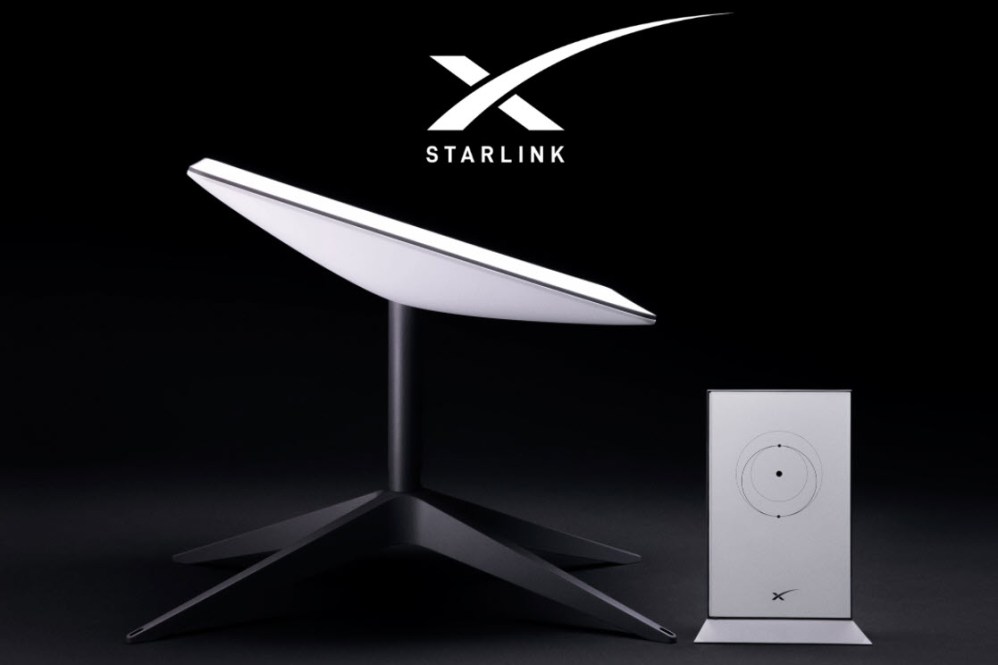
The Starlink Standard Actuated Kit is an advanced satellite internet system designed to provide seamless connectivity with minimal manual intervention. Unlike the standard Starlink kit, this version features a motorized actuated dish that automatically aligns itself for the best possible signal, eliminating the need for frequent manual adjustments. It includes a Wi-Fi router, power supply, mounting stand, and all necessary cables, ensuring a hassle-free setup.
What sets the actuated kit apart is its self-adjusting capability, which enhances performance by continuously optimizing signal reception. This makes it ideal for homeowners, businesses, and remote users who need reliable high-speed internet without worrying about dish positioning. Whether you’re in a rural area or a location prone to signal disruptions, the actuated kit ensures better stability and faster speeds compared to the standard Starlink kit.
For those looking to purchase the Starlink Standard Actuated Kit in Kenya, Orbitlink Solutions is the best place to buy from. As a trusted Starlink reseller, they offer genuine hardware, expert installation services, and local customer support to ensure a smooth experience. With Orbitlink Solutions, you can be assured of a quick and hassle-free setup, making it easier than ever to enjoy uninterrupted Starlink internet.
1. Understanding the Starlink Standard Actuated Kit

The Starlink Standard Actuated Kit is an upgraded version of the traditional Starlink setup, designed to provide a hassle-free installation process and optimized internet performance. Unlike the standard kit, which requires manual dish adjustments, the actuated kit features an automatic self-aligning dish that continuously optimizes its position for the best possible signal. This ensures faster speeds, improved reliability, and less downtime, making it an ideal choice for both home and business users in Kenya.
1.1 What Comes in the Starlink Standard Actuated Kit?
The Starlink Standard Actuated Kit includes all the essential components needed for a smooth and efficient satellite internet connection:
- Motorized Actuated Dish – The key feature of this kit, the actuated dish automatically aligns itself to find the strongest Starlink satellite signal, eliminating the need for manual positioning.
- Wi-Fi Router – A high-performance router that ensures stable wireless connectivity across multiple devices, making it ideal for homes and offices.
- Power Supply & Cables – The kit includes a power adapter and cables designed for efficient power distribution and easy setup, ensuring uninterrupted internet access.
- Mounting Stand – A sturdy stand that provides secure positioning for the dish, whether installed on a rooftop, ground level, or any elevated surface.
1.2 How the Actuated Dish Works
The motorized actuated dish is the standout feature of this kit, designed to automatically adjust and align itself for optimal signal reception. Here’s how it works:
-
Automatic Self-Alignment for Optimal Connectivity
The actuated dish continuously scans and adjusts its angle to maintain the best possible connection with Starlink’s satellite network. This means users no longer need to manually reposition the dish when facing signal disruptions. -
Reduced Manual Setup for Better Efficiency
Unlike the standard Starlink kit, which requires careful placement and occasional realignment, the actuated dish automates this entire process, making setup easier and ensuring stable internet even in locations prone to obstructions.
This feature is particularly beneficial in areas with trees, buildings, or unpredictable weather conditions, as the dish can reposition itself to find a clearer signal path.
1.3 Who Should Use the Starlink Standard Actuated Kit?
The Starlink Standard Actuated Kit is designed for users who need consistent, high-speed internet without the hassle of manual adjustments. It is particularly beneficial for:
-
Homeowners Seeking Seamless Connectivity
Whether streaming, gaming, or working remotely, this kit ensures uninterrupted internet access with minimal lag. The self-aligning dish removes the need for manual intervention, making it perfect for home users who prefer a plug-and-play experience. -
Businesses Requiring Enhanced Reliability
For businesses that rely on a stable internet connection for daily operations, video conferencing, cloud computing, or remote work, the actuated kit enhances uptime and efficiency. Its automated realignment ensures consistent speeds, reducing downtime caused by signal fluctuations. -
Travelers and Mobile Users Needing Easy Setup
While not as compact as the Starlink Mini, the actuated dish provides a portable solution for users who frequently move locations. Its automatic signal adjustment makes it an excellent choice for rural users, field workers, and off-grid travelers needing quick and reliable connectivity.
The Starlink Standard Actuated Kit is an excellent investment for anyone looking for a hassle-free, high-performance satellite internet solution.
2. How to Set Up the Starlink Standard Actuated Kit
Setting up the Starlink Standard Actuated Kit is a straightforward process, thanks to its automated alignment and user-friendly design. Unlike traditional satellite dishes that require careful manual positioning, this kit features a motorized actuated dish that adjusts itself for the best possible connection. By following a few simple steps, users can quickly unbox, assemble, and activate their Starlink internet with minimal effort.
2.1 Unboxing and Assembling the Kit
Upon receiving the Starlink Standard Actuated Kit, users can expect a well-packaged set of components designed for easy installation. The package includes:
- Motorized Actuated Dish – The key component responsible for automatic signal alignment.
- Wi-Fi Router – Provides a strong and stable wireless connection to multiple devices.
- Power Supply & Cables – Ensures proper power distribution and connectivity.
- Mounting Stand – Offers a secure base for positioning the dish.
Connecting the Dish and Router
- Unpack all components and place them on a flat surface for easy assembly.
- Attach the dish to the mounting stand, ensuring it is secure and stable.
- Connect the dish to the power supply using the provided cables.
- Plug the Wi-Fi router into a power source and connect it to the dish.
- Power on the system, allowing the actuated dish to begin its automatic alignment.
2.2 Automatic Alignment and Activation
One of the biggest advantages of the Starlink Standard Actuated Kit is its self-aligning dish, which eliminates the need for manual adjustments.
-
How the Actuated Dish Adjusts for the Best Signal
Once powered on, the actuated dish will automatically rotate and tilt to find the strongest Starlink satellite signal. This process typically takes a few minutes, depending on location and environmental factors. The dish continuously fine-tunes its position to maintain optimal connectivity. -
Using the Starlink App for Activation
To complete the setup, users need to:- Download the Starlink app from the App Store or Google Play.
- Follow the on-screen instructions to connect the Wi-Fi router.
- Monitor the dish alignment progress as it fine-tunes its position.
- Once connected, the system will indicate successful activation, and the internet will be ready to use.
The app also provides real-time diagnostics, helping users track signal strength, network performance, and any potential obstructions.
2.3 Ensuring Optimal Placement
For optimal performance, the Starlink Standard Actuated Kit should be placed in a clear, open space with minimal obstructions.
-
Finding an Obstruction-Free View of the Sky
The dish should have a clear line of sight to the sky, free from trees, buildings, or other structures that might interfere with the signal. The higher the placement, the better the connectivity. Rooftops, open fields, or elevated surfaces are ideal locations. -
Using Starlink's Built-In Obstruction Detection
The Starlink app includes a built-in obstruction detection tool that helps users identify potential signal disruptions. By scanning the area before installation, the app can recommend the best placement for the dish to ensure uninterrupted connectivity.
Once the Starlink Standard Actuated Kit is properly placed and activated, users can enjoy high-speed, low-latency satellite internet with minimal maintenance.
3. Performance & Internet Speeds
The Starlink Standard Actuated Kit is designed to deliver high-speed, low-latency internet, making it an excellent choice for homes, businesses, and mobile users in Kenya. With its motorized self-aligning dish, the system continuously adjusts to maintain optimal signal strength, reducing interruptions caused by environmental factors or satellite movement. Whether used in urban areas or remote locations, this kit provides a reliable and fast internet experience.
3.1 Download and Upload Speeds
Kenyan users can expect download speeds ranging from 50 Mbps to 250 Mbps and upload speeds between 10 Mbps and 30 Mbps, depending on network traffic and environmental conditions. These speeds make the Starlink Standard Actuated Kit ideal for:
- Streaming high-definition videos without buffering
- Smooth online gaming with low latency
- Video conferencing and remote work
- Downloading and uploading large files efficiently
Factors That Impact Performance
While Starlink offers consistent internet speeds, several factors can affect performance:
- Location and Obstructions – Trees, buildings, or other obstacles can interfere with signal reception.
- Network Congestion – Peak usage times may lead to slower speeds.
- Weather Conditions – Heavy rain and storms can cause temporary disruptions.
- Router Placement – Positioning the Wi-Fi router in a central, open space improves indoor connectivity.
3.2 Automatic Realignment for Optimal Signal
Unlike standard satellite dishes that require manual adjustments, the Starlink Standard Actuated Kit uses a motorized dish that realigns itself for the best signal reception.
-
How the Actuated Kit Improves Reliability
- The dish automatically adjusts its position based on satellite movement.
- Continuous monitoring ensures strong, stable internet connectivity.
- No manual repositioning is needed, making setup easier for users.
-
Differences from Manual Adjustment Kits
- Standard Starlink kits require users to manually find the best position, which may need periodic adjustments.
- The actuated dish eliminates guesswork, providing hands-free, real-time optimization.
- This results in higher uptime and fewer service interruptions.
3.3 Weather and Environmental Impact
Since Starlink relies on satellite connectivity, environmental conditions can influence performance. However, the Starlink Standard Actuated Kit is designed to withstand various weather conditions, ensuring uninterrupted service in most situations.
-
How Rain, Storms, and Extreme Weather Affect Performance
- Light to moderate rain has minimal impact on signal quality.
- Heavy storms or thick cloud cover may cause temporary speed reductions.
- Snow and ice buildup on the dish can affect performance, though the dish has a built-in heating function to melt snow.
-
Durability of the Actuated Dish in Different Conditions
- The dish is built with weather-resistant materials, making it suitable for harsh environments.
- Wind-resistant design ensures stability in strong gusts.
- Automatic alignment helps recover the signal faster after weather-related disruptions.
With its adaptive technology and robust construction, the Starlink Standard Actuated Kit ensures consistent, high-performance internet regardless of environmental challenges.
4. Pricing & Availability in Kenya
The Starlink Standard Actuated Kit is now available in Kenya, offering cutting-edge satellite internet with automatic alignment for optimal connectivity. Whether for home use, business operations, or mobile applications, this advanced kit provides a seamless online experience. However, users should consider both the initial investment and the ongoing subscription fees to ensure uninterrupted service.
4.1 Cost of the Starlink Standard Actuated Kit
The total cost of acquiring and using the Starlink Standard Actuated Kit includes:
-
Initial Hardware Cost
- KES 45,000 (USD 350) for the dish, Wi-Fi router, power supply, and accessories.
-
Monthly Subscription Fees
- KES 4,000 (USD 30) for unlimited satellite internet access.
Additional Costs to Consider
- Shipping & Delivery Fees – Varies depending on location in Kenya.
- Professional Installation (if needed) – Can be arranged for an extra charge.
4.2 One-Time vs. Recurring Costs
Understanding the financial aspects of owning a Starlink Standard Actuated Kit helps users plan better:
-
One-Time Costs
- Purchasing the hardware kit (dish, router, cables, and mounting stand).
- Installation fees (if professional setup is required).
-
Recurring Costs
- Monthly subscription for unlimited high-speed internet.
- Firmware updates and maintenance, though most updates are automatic and free.
This pricing structure makes the Starlink Actuated Kit a valuable long-term investment, offering superior performance without hidden fees.
4.3 Where to Buy the Starlink Standard Actuated Kit in Kenya
For those looking to purchase the Starlink Standard Actuated Kit in Kenya, Orbitlink Solutions is the go-to authorized reseller, providing:
- Genuine Starlink kits with full warranty.
- Fast and reliable delivery across Kenya.
- Professional installation services for optimal setup.
- Customer support to assist with activation and troubleshooting.
By choosing Orbitlink Solutions, users can ensure a smooth purchasing process with expert guidance and after-sales support. Order your Starlink Standard Actuated Kit today and experience high-speed internet like never before!
5. Comparing the Actuated Kit to Other Starlink Kits
The Starlink Standard Actuated Kit stands out for its motorized auto-alignment feature, making it an excellent choice for users who need seamless connectivity with minimal manual setup. However, it's essential to compare it with other Starlink kits to determine the best fit based on automation, speed, portability, and intended use.
5.1 Actuated Kit vs. Standard Kit
The primary difference between the Actuated Kit and the Standard Kit is the automation of the dish alignment:
- The Actuated Kit features a motorized dish that automatically aligns itself for the best signal, reducing manual adjustments and improving reliability.
- The Standard Kit requires manual setup, meaning users need to adjust the dish manually for optimal performance.
- The Actuated Kit is ideal for users who need a "plug-and-play" experience, while the Standard Kit is better suited for those comfortable with manual setup.
If ease of use and minimal maintenance are priorities, the Actuated Kit is the superior choice.
5.2 Actuated Kit vs. High-Performance Kit
For users demanding higher speeds and greater reliability, the High-Performance Kit is another option. Key differences include:
- The High-Performance Kit has a larger dish, offering stronger connectivity in challenging weather conditions.
- The Actuated Kit, while automated, has a smaller dish, which may slightly impact performance in extreme weather.
- The High-Performance Kit is better for businesses and high-bandwidth users, while the Actuated Kit is a balanced option for home users, travelers, and mobile applications.
If maximum speed and low latency are required, the High-Performance Kit may be the best choice, but for general and mobile users, the Actuated Kit offers more flexibility.
5.3 Actuated Kit vs. Starlink Mini
For those prioritizing portability and space efficiency, the Starlink Mini is another alternative. The main distinctions are:
- The Starlink Mini is smaller and more portable, making it a great choice for travelers and campers.
- The Actuated Kit, while portable, is larger and heavier, making it better suited for home or business use.
- The Actuated Kit offers stronger performance and more stable speeds, while the Mini is ideal for low-bandwidth needs.
For compact travel-friendly internet, the Starlink Mini is preferable, but for more robust performance with automated alignment, the Actuated Kit remains the best option.
The Starlink Standard Actuated Kit bridges the gap between automation, performance, and ease of use. It outperforms the Standard Kit in convenience, competes with the High-Performance Kit in stability, and offers better connectivity than the Mini. For users looking for a balance between automation and reliability, the Actuated Kit is the ideal Starlink solution.
6. Troubleshooting & Maintenance
While the Starlink Standard Actuated Kit is designed for effortless setup and automated performance, occasional issues may arise. Understanding common problems, software updates, and best maintenance practices ensures optimal performance and longevity of the system.
6.1 Common Setup Issues & How to Fix Them
-
Dish Not Aligning Properly
If the actuated dish fails to auto-align, check for:
- Obstructions: Use the Starlink app to detect obstacles that may interfere with the signal.
- Power Issues: Ensure the dish is properly connected to the power supply.
- Rebooting the System: Restart the router and dish to reset alignment settings.
-
Internet Connectivity Problems
- Slow or intermittent speeds may be due to weather conditions, network congestion, or improper placement.
- Ensure the dish has a clear view of the sky and relocate if necessary.
- Check for firmware updates in the Starlink app, as outdated software can impact connectivity.
6.2 Software & Firmware Updates
Keeping the Starlink Standard Actuated Kit updated ensures optimal performance and security.
- Starlink automatically pushes software updates, but users should regularly check the Starlink app for any pending firmware installations.
- Updates may include improvements to auto-alignment, stability fixes, and enhanced connectivity optimizations.
- If an update fails, reboot the system and try again.
Regular software maintenance ensures the dish remains efficient, responsive, and capable of delivering the best possible speeds.
6.3 Best Practices for Longevity
To prolong the life of the Starlink Standard Actuated Kit, follow these maintenance tips:
- Keep the dish clean: Remove dust, debris, or snow that may block signals and impact performance.
- Secure cables and connections: Ensure power and data cables are intact and not exposed to harsh weather conditions.
- Monitor performance using the Starlink app: Track signal strength and address issues before they escalate.
- Avoid physical damage: Install the dish in a stable, secure location to prevent accidental falls or misalignment.
By following these troubleshooting and maintenance guidelines, users can maximize uptime, ensure reliable connectivity, and get the most out of their Starlink Standard Actuated Kit.
7. Frequently Asked Questions (FAQs) About the Starlink Standard Actuated Kit
1 What makes the Starlink Standard Actuated Kit different from the Standard Starlink Kit?
The Starlink Standard Actuated Kit features a motorized dish with automatic self-alignment, making it more efficient and user-friendly than the Standard Starlink Kit, which requires manual adjustments. The actuated version enhances signal reliability, ease of installation, and performance.
2 How long does it take to set up and activate the Starlink Standard Actuated Kit?
Setting up the Starlink Standard Actuated Kit takes approximately 15-30 minutes. The motorized dish automatically aligns itself, reducing manual effort. Activation is done via the Starlink app, where users can register the device, check signal strength, and complete the setup process.
3 Can the Starlink Standard Actuated Kit be used for mobile or RV applications?
Yes, the Starlink Standard Actuated Kit is suitable for RV and mobile use, but users must subscribe to Starlink’s Mobile/Roam plan for on-the-go connectivity. The motorized dish ensures quick auto-alignment, making it ideal for travelers who frequently change locations.
4 Does the Starlink Standard Actuated Kit require professional installation?
No, the Starlink Standard Actuated Kit is designed for DIY installation. It comes with a plug-and-play setup, and the motorized dish aligns itself automatically. However, users who prefer professional installation can seek services from authorized Starlink resellers like Orbitlink Solutions.
5 What happens if the auto-alignment feature of the Starlink Standard Actuated Kit fails?
If the automatic alignment feature malfunctions, users can try:
- Rebooting the system to reset alignment settings.
- Checking for obstructions that may block the signal.
- Updating the firmware via the Starlink app.
If issues persist, contact Starlink support or a local authorized reseller for assistance.
6 What are the expected download and upload speeds of the Starlink Standard Actuated Kit in Kenya?
The Starlink Standard Actuated Kit typically delivers download speeds of 50-250 Mbps and upload speeds of 10-20 Mbps in Kenya. However, speeds may vary depending on network congestion, weather conditions, and signal obstructions.
7 How much does the Starlink Standard Actuated Kit cost in Kenya?
The Starlink Standard Actuated Kit costs approximately KES 45,500 ($310) for the hardware, with a monthly subscription fee of KES 14,000 ($95). Prices may vary depending on the reseller and service plan.
8 Where can I buy the Starlink Standard Actuated Kit in Kenya?
The best place to buy the Starlink Standard Actuated Kit in Kenya is Orbitlink Solutions, an authorized Starlink reseller. They offer genuine kits, reliable customer support, and installation services.
9 Does the Starlink Standard Actuated Kit work in extreme weather conditions?
Yes, the Starlink Standard Actuated Kit is designed to withstand harsh weather conditions, including heavy rain, strong winds, and extreme temperatures. However, severe storms may temporarily reduce signal strength.
10 How often does the Starlink Standard Actuated Kit receive updates?
The Starlink Standard Actuated Kit receives automatic firmware and software updates directly from Starlink’s network. These updates improve performance, security, and auto-alignment efficiency. Users can check for updates via the Starlink app.
11 Can multiple devices connect to the Wi-Fi router in the Starlink Standard Actuated Kit?
Yes, the Wi-Fi router included in the Starlink Standard Actuated Kit supports multiple devices simultaneously, including smartphones, laptops, smart TVs, and gaming consoles. The exact number depends on network traffic and bandwidth usage.
12 What maintenance is required for the Starlink Standard Actuated Kit?
To maintain optimal performance, users should:
- Keep the dish clean and free from dust, dirt, and snow.
- Ensure cables and power connections remain secure.
- Use the Starlink app to monitor signal strength and detect obstructions.
- Check for software updates regularly.
By following these guidelines, users can maximize the efficiency and lifespan of the Starlink Standard Actuated Kit.
Conclusion
The Starlink Standard Actuated Kit is a game changer in satellite internet connectivity, offering automatic self-alignment, improved reliability, and seamless high-speed performance. Unlike traditional kits that require manual setup, this actuated version automatically optimizes signal reception, making it perfect for homes, businesses, and mobile users who demand uninterrupted connectivity.
For those in Kenya, Orbitlink Solutions is the trusted Starlink reseller, providing genuine kits, expert support, and professional installation services. With a commitment to quality and customer satisfaction, Orbitlink Solutions ensures that users experience the full potential of Starlink’s cutting-edge technology.
Don't miss out on the next-level internet experience—order your Starlink Standard Actuated Kit today from Orbitlink Solutions .