Compare the best MikroTik routers in Kenya for 2026, current price examples, home, business and ISP use cases, genuine stock and expert buying advice.
Last updated: 4 August 2026 · Reviewed by Orbitlink Solutions networking specialists
Best MikroTik Routers in Kenya (2026 Buying Guide) is a practical guide for buyers budgeting for a MikroTik deployment. The right MikroTik platform should match real traffic, security, coverage and growth requirements—not simply the highest specification on a price list. Orbitlink Solutions supplies genuine networking equipment in Kenya and brings the router, switching, wireless, fibre, rack, power and installation pieces together as one accountable solution.
Talk to Orbitlink Solutions for a needs assessment, current availability and a deployment plan, or browse MikroTik router prices in Kenya.
The central consideration is comparing total value, capability and lifecycle cost rather than price alone. Start with the internet handoff speed, expected concurrent users, wired port requirements, VPN load, wireless coverage, PoE needs and the number of VLANs or sites. Allow reasonable headroom so encryption, firewall rules, queues and monitoring do not consume all available resources at peak time.
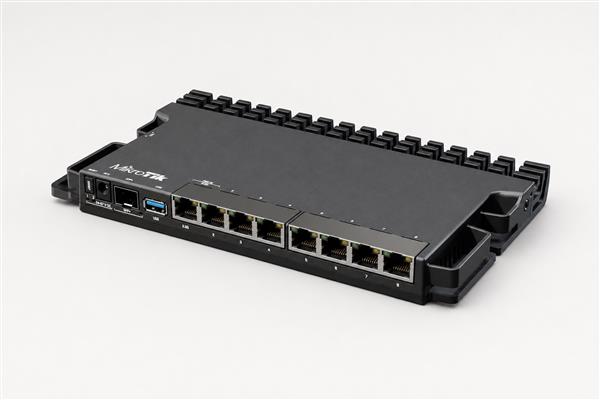
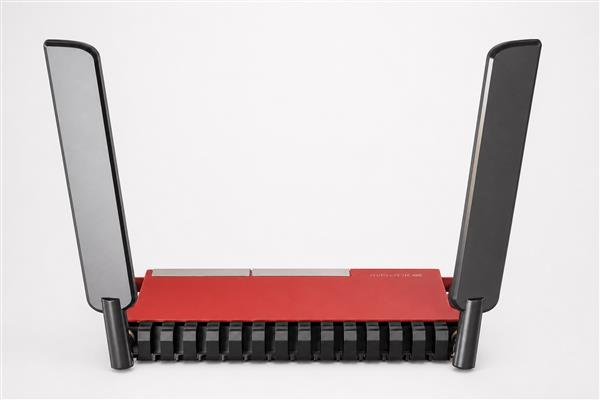
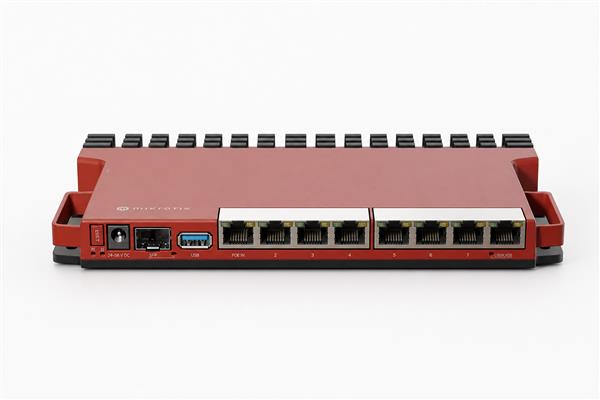
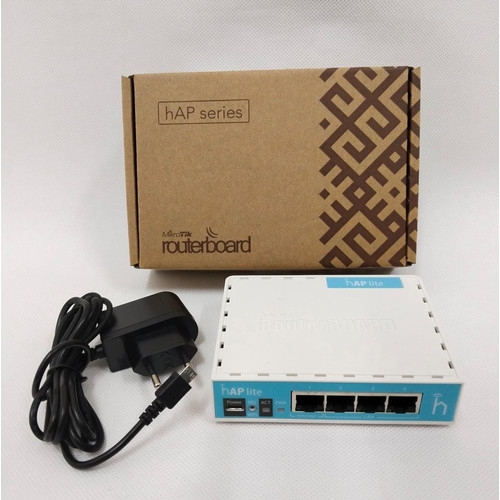
Commonly suitable choices include hEX Refresh, hEX S, L009UiGS-RM, L009UiGS-2HaxD-IN and RB5009UG+S+IN. Final selection should follow a short assessment because bandwidth alone does not describe packet rate, firewall complexity, VPN encryption or future expansion.
See the full MikroTik catalogue for current models and pricing. Stock and prices can change, so request a quote for a confirmed bill of materials.
A dependable network is more than a router. Orbitlink Solutions can plan addressing and VLANs, configure firewall policy, establish primary and backup WAN links, create bandwidth queues, deploy secure VPN access, integrate switches and access points, label connections and hand over configuration documentation. For wireless projects, a coverage plan helps avoid dead zones, co-channel interference and unnecessary access-point overlap.
Before go-live, test DNS, DHCP, internet failover, wired and wireless throughput, guest isolation, VPN access and recovery from a power interruption. Keep an exported configuration and a RouterOS backup in a controlled location. Schedule periodic reviews as staff, applications and threats change.
Orbitlink Solutions is positioned as a one-stop networking equipment partner: customers can source routers, switches, wireless devices, fibre components, racks, structured cabling, power protection and technical services from one team. This reduces compatibility gaps and makes support simpler when the network crosses several product categories. Shop networking equipment or request expert assistance.
For technical feature and configuration references, consult the official MikroTik RouterOS documentation. Kenyan organisations should also review applicable licensing and cybersecurity guidance from the Communications Authority of Kenya.
Quick answer: in the Orbitlink Solutions catalogue checked on 5 August 2026, representative MikroTik router prices ranged from about KES 8,500 for an RB951Ui-2HnD to KES 27,000 for an RB5009UG+S+IN. Prices and stock change, so use these figures for budgeting and confirm the live product page or quotation before ordering.
Confirm service speed, Ethernet or fibre presentation, public addressing and whether a second ISP will be added. A fibre service does not automatically require an SFP router: many providers terminate fibre at an ONT and present Ethernet. Buy the interface that matches the real handoff.
Count concurrent users, cameras, phones, access points and servers. Identify cloud applications, video meetings, backups and guest traffic. Peak usage matters more than total registered devices. Leave capacity headroom for growth and unexpected bursts.
NAT, firewall rules, queues, VPN encryption, hotspot, PPPoE, logging and dynamic routing consume resources. Advertised port speed is not a promise that every feature combination will forward at line rate. Select hardware for the configured workload and test before handover.
A router with wireless is convenient for a compact space. Larger offices, hotels and homes with thick walls usually perform better with a wired router and correctly placed access points. This also allows routing capacity and wireless coverage to be upgraded independently.
List required copper ports, managed-switch connections, SFP or SFP+ uplinks and devices needing PoE. Check voltage, power budget and standards instead of assuming any PoE-labelled port can power any device. Include modules, patch leads, cabinet space and UPS capacity in the bill of materials.
Buy genuine equipment from a supplier that can confirm compatibility, warranty, configuration and recovery options. Keep backups and documentation. The cheapest purchase becomes expensive if an undocumented setup fails during business hours.
The router price is only one part of a dependable deployment. Budget for access points, switches, SFP modules, PoE, rack or cabinet, structured cabling, UPS, installation and configuration. A higher-capacity router may be economical when it avoids early replacement, but overspending on unused features is not future-proofing.
Orbitlink Solutions helps match the bill of materials to the site. Compare MikroTik Wi-Fi solutions, fibre switches, enterprise routers, installation services, configuration services, network monitoring and support and maintenance.
A good buying decision starts with realistic traffic, not only the number of people in the building. A ten-person design studio that moves large files to cloud storage can place more sustained demand on a router than a thirty-person office whose users mainly send email. Estimate simultaneous users, internet speed, wired devices, wireless access points, VPN users, cameras, voice handsets and any public hotspot traffic. Then allow headroom for growth, security rules and software updates.
For a home with a fibre connection, several phones, smart televisions and one remote worker, a compact router may be enough when the wireless coverage area is small. If the home has thick walls or several floors, treat routing and WiFi coverage as separate decisions. A capable wired router paired with correctly positioned access points usually performs more consistently than one powerful all-in-one unit placed in a corner. Buyers should also check whether their provider terminates service through Ethernet, an optical network terminal or another handoff before ordering.
A growing office may need staff and guest networks, secure remote access, bandwidth priorities for calls, and reliable failover to a second provider. In that case, choose a router with spare Ethernet capacity, appropriate processing headroom and manageable power options. Map every port before purchase: internet connections, switches, access points, servers, cameras and administration devices. If the design already consumes every port on day one, include a suitable managed switch rather than buying around an artificial constraint.
An ISP, hotel, school or organisation with several branches should test the complete design under expected peak load. Routing tables, queues, tunnels, subscriber sessions, firewall rules and monitoring can all change capacity requirements. A model that is comfortable in a simple speed test may behave differently when these services run together. Orbitlink Solutions can translate subscriber counts, service tiers and redundancy targets into an equipment shortlist and an implementation plan, helping the buyer avoid both under-sizing and unnecessary spending.
Before payment, compare the exact model code on the quotation with the required specification. Similar-looking products may have different wireless radios, port speeds, power methods or rack-mounting options. Check included accessories and confirm whether transceivers, injectors, brackets or licences are separate. For the broad manufacturer portfolio, consult the official MikroTik product catalogue, then confirm locally available stock and support with Orbitlink Solutions.
The value of a router depends on how well it is configured. A professional deployment should begin with a backup and rollback plan, current stable software, strong administrator access controls and a documented addressing scheme. Internet links, DHCP, DNS, time synchronisation and routing should be established before optional services are layered on. Firewall rules should follow least-privilege principles, management access should be restricted, and unused services should be disabled.
Acceptance testing should reflect the purpose of the network. Test wired throughput, WiFi roaming where applicable, guest isolation, VPN access, application priorities and failover. Confirm that monitoring produces useful alerts and that the configuration can be restored. Record device names, ports, VLANs, IP ranges, credentials ownership, warranty details and escalation contacts in the handover pack. This documentation reduces downtime and prevents the organisation from depending on one person’s memory.
Orbitlink Solutions supports the complete lifecycle: needs assessment, genuine equipment supply, configuration, installation, testing, documentation and ongoing maintenance. That one-stop approach is particularly useful when a project combines routing, switching, WiFi, fibre, power and security. Instead of treating each product as an isolated purchase, the design is checked as one working system with clear responsibilities and measurable results.
There is no single best model. hEX Refresh suits compact wired networks, hEX S adds fibre flexibility, L009 models suit growing offices, and RB5009 targets heavier routing. Match interfaces, workload and growth to the site.
Representative Orbitlink catalogue prices checked on 5 August 2026 ranged from KES 8,500 to KES 27,000 for the models compared here. Stock, exchange rates and promotions change, so confirm the live price before purchase.
For a wired Gigabit home, hEX Refresh is a practical starting point with a separate access point. An RB951-class wireless router may suit lighter budgets where its port and wireless limits are acceptable.
L009 or RB5009-class routers are useful candidates for businesses, but the answer depends on internet speed, VPNs, VLANs, firewall complexity and user count. A short assessment is more reliable than choosing by model popularity.
Some do and some are wired-only. Check the exact model suffix and product page. Wired hEX models normally need a separate access point, while models such as L009UiGS-2HaxD-IN include wireless capability.
Yes. A router can connect through Ethernet from an ISP ONT or through a compatible SFP module when the provider supports that handoff. Confirm fibre and module details before ordering.
Yes. MikroTik can provide VLANs, VPNs, queues, hotspot services and failover behind a compatible Starlink connection. The physical connection and network mode depend on the Starlink hardware generation and design.
hEX S is preferable when an SFP interface is genuinely needed. hEX Refresh can be the better-value wired choice when the provider presents Ethernet. Compare the complete network, not one port.
Consider RB5009 when a busy business or advanced edge needs more processing headroom, flexible interfaces and room to grow. It should still be sized against actual firewall, queue, VPN and routing workload.
Basic internet access may be straightforward, but VLANs, firewall rules, VPNs, failover, hotspot and ISP services benefit from professional design and testing. Configuration should include backups and documented handover.
PoE is useful when switches, access points or cameras should receive power over Ethernet. Confirm standards, voltage, per-port output and total power budget across the whole installation.
Orbitlink Solutions supplies genuine MikroTik networking equipment with local selection, configuration and after-sales guidance. Use the live catalogue or request a quotation to confirm model, warranty, stock and delivery.
The Best MikroTik Routers in Kenya (2026 Buying Guide) is a decision framework, not a ranking based only on price. Define the handoff, users, applications, RouterOS workload, interfaces, power and support needs first. Then choose the least-cost model that meets those requirements with sensible growth headroom.
Contact Orbitlink Solutions for a current stock check, model comparison, genuine equipment quotation and complete installation plan.